

SK hynix
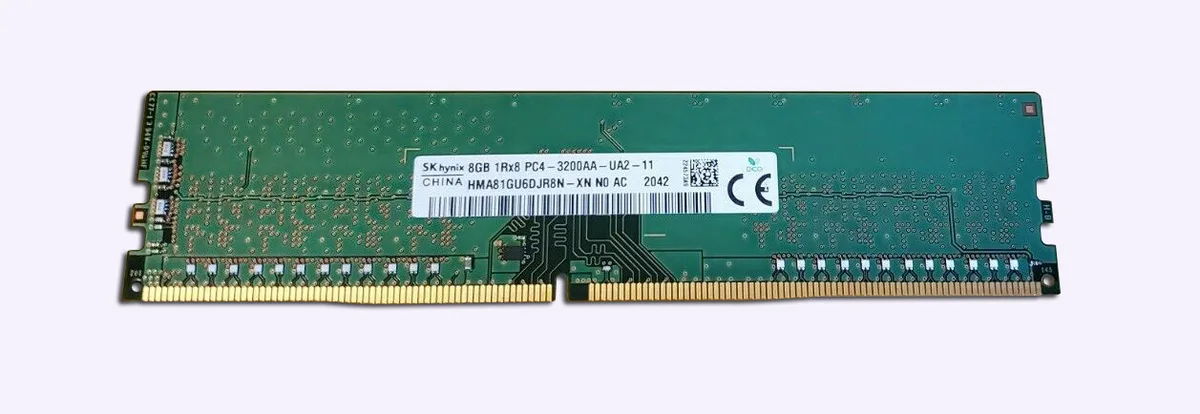
SK hynix HMA81GU6DJR8N-XN 8GB DDR4 3200 desktop RAM
8 GB DDR4 UDIMM at 3200 MHz with CL22 latency, non-ECC unbuffered design and 1.2 V operation
- Capacity8GB
- SpeedDDR4 3200 (PC4 25600)
- CAS LatencyCL22
- Voltage1.20V
- ECCNo
- Buffered/RegisteredUnbuffered
- 8 GB capacity for smooth multitasking
- DDR4 3200 speed for responsive performance
- CL22 latency for efficient data access
- 2 V operation reduces power draw
- 288-pin UDIMM fits standard desktop slots
8 GB DDR4 3200 Desktop Memory
This is an 8 GB DDR4 3200 UDIMM for desktop PCs. It runs at PC4 25600 speed with CL22 latency at 1.20 V. The module is unbuffered, non-ECC and uses a standard 288 pin layout. It is suited for general desktop upgrades or new builds.
Suitable for Standard Desktop Builds
This module suits users who need a single 8 GB DDR4 stick at 3200 MT/s for everyday computing. It is not for systems that require ECC error correction. It is not for platforms that only accept registered or buffered memory. It is not for buyers who need more than 8 GB per slot.
Key Spec: DDR4 3200 CL22 1.20 V
The deciding specification is the DDR4 3200 speed with CL22 timing at 1.20 V. This combination determines compatibility with the motherboard memory controller. Verify that your board supports DDR4 3200 unbuffered non-ECC UDIMMs before purchasing.
Βασικά χαρακτηριστικά
- 8 GB capacity for smooth multitasking
- DDR4 3200 speed for responsive performance
- CL22 latency for efficient data access
- 2 V operation reduces power draw
- 288-pin UDIMM fits standard desktop slots
Προδιαγραφές
| Brand | Hynix |
|---|---|
| Series | Desktop Memory |
| Model | HMA81GU6DJR8N-XN |
| Capacity | 8GB |
| Speed | DDR4 3200 (PC4 25600) |
| CAS Latency | CL22 |
| Voltage | 1.20V |
| ECC | No |
| Buffered/Registered | Unbuffered |
Ερωτήσεις για αυτό το προϊόν
Will this 288-pin UDIMM fit a motherboard that only has DDR4 slots?
Yes, the module is a 288-pin DDR4 UDIMM and requires a DDR4 DIMM slot on the motherboard.
Can I add this 3200 MT/s stick alongside slower DDR4 modules already installed?
The system will run all modules at the speed of the slowest installed stick, so this 3200 MT/s module will downclock to match.
How do I confirm the module is running at its rated 3200 MT/s and CL22 timings after installation?
Check the memory speed and CAS latency reported in the BIOS or a tool such as CPU-Z to verify 3200 MT/s and CL22.
Επίσης σε αυτό το ράφι
Οι πελάτες σύγκριναν και αυτά
Ίδιο ράφι, ίδιο ταμείο — οκτώ νομίσματα και κλείδωμα ισοτιμίας 30 λεπτών.


Mushkin Enhanced
Mushkin Enhanced 4GB DDR2-800 CL6 SoDIMM Apple 971741A memory upgrade
104,99 $
0.00133444BTC
Διαθέσιμο

SK hynix
SK hynix HYMD232M646C6-J 256MB DDR 333MHz PC2700 CL2.5 SODIMM laptop RAM
- 4GB (2 x 2GB)
7,99 $
0.00010155BTC
Διαθέσιμο