

SanDisk
SanDisk Cruzer Blade 8 GB USB 2.0 USB flash drive Black SDCZ50-008G-B35
391,99 USD
0.0050133BTC
Yra sandėlyjePriimame kriptovaliutą — taip monetos, kurias turite, gali nupirkti tikrą techniką.Mokėkite kriptovaliuta, išleiskite ją tikrai technikai. Nemokamas apdraustas pristatymas visame pasaulyje virš 399 $. Paprastos, be žymų siuntos dėžės, siunčiamos iš Vokietijos.Nemokamas apdraustas pristatymas virš 399 $. Jūsų kursas fiksuojamas 30 minučių, kai tik prasideda atsiskaitymas.Kursas fiksuojamas 30 minučių. Kiekvienas gaminys užplombuotas, jo serijos numeris patikrintas, ir jam taikoma 24 mėnesių garantija.Užplombuota, 24 mėnesių garantija.


ASUS
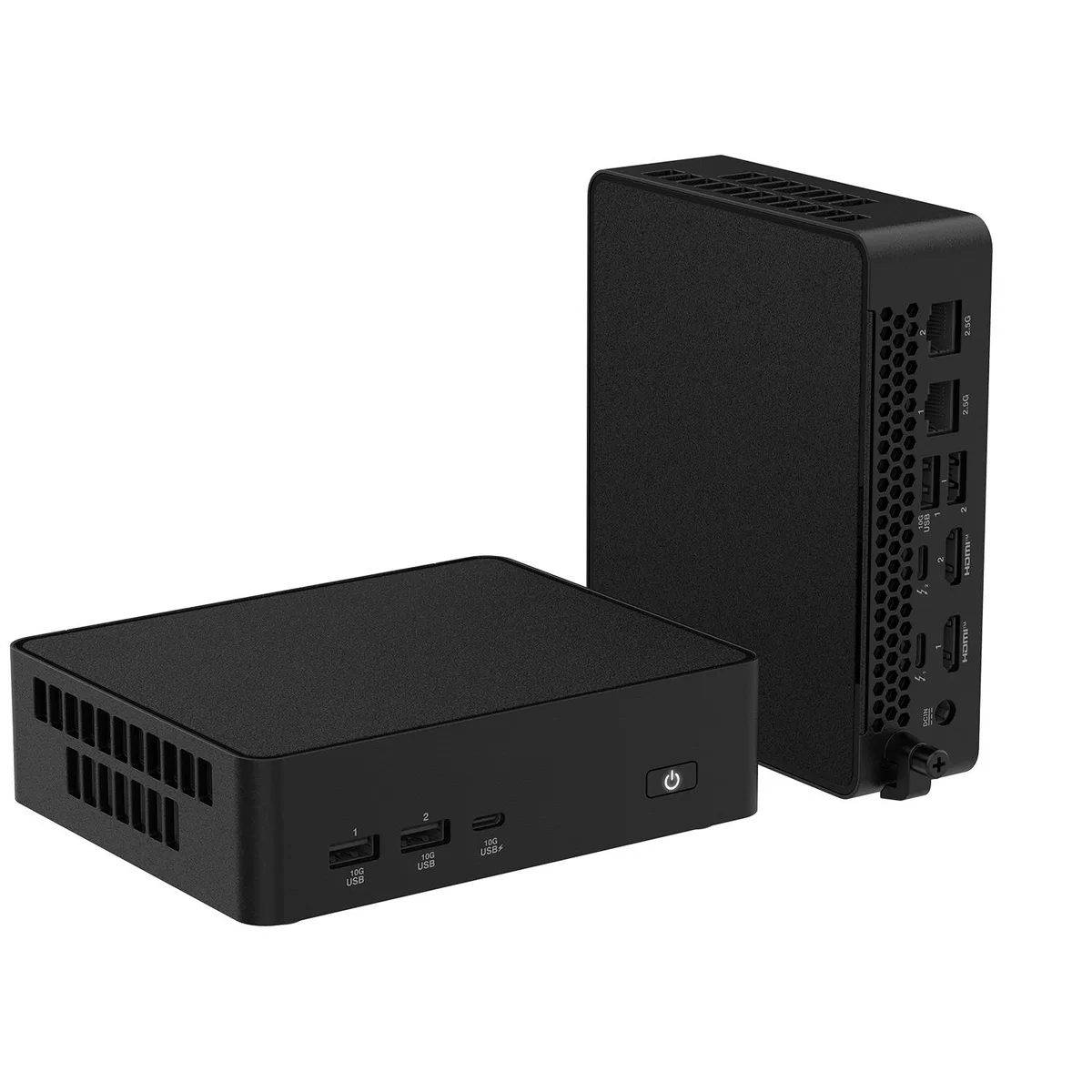
Compact barebone mini PC with Intel Core Ultra 7 356H, 32 GB DDR5-5600, 1 TB Nvme, dual 2.5 Gb Ethernet, Wi-Fi 7, Bluetooth 6.0 and two Thunderbolt 4 ports
The ASUS NUC16GDKU7 is a barebone mini PC powered by an Intel Core Ultra 7 356H processor with integrated Intel Graphics. It arrives with 32GB of DDR5 5600 memory installed across two 262-pin SO-DIMM slots and a 1TB NVMe SSD in the M.2 2280 slot. Dual 2.5Gbps Ethernet, Wi-Fi 7, Bluetooth 6.0, two HDMI 2.1 ports and two Thunderbolt 4 ports provide extensive connectivity for professional or home use.
This compact system suits users who need a ready-to-run desktop with high-speed wired and wireless networking, multiple 4K display outputs and Thunderbolt 4 expansion in a VESA-mountable chassis. Buyers who require discrete graphics performance, additional internal 2.5-inch drive bays or legacy COM and parallel ports should consider alternative form factors.
The board provides one M.2 2280 slot with PCIe Gen5 x4 wiring and one M.2 2242 slot with PCIe Gen4 x4 wiring, each accepting NVMe SSDs from 128GB up to 8TB. This slot layout and lane allocation determine which drives can be added and the maximum throughput available for storage upgrades.
| Brand | ASUS |
|---|---|
| Series | NUC 16 PRO |
| Model | NUC16GDKU7 |
| CPU Type | Intel Core Ultra 7 356H |
| Memory installed | 32GB |
| Memory slot | 2 x 262Pin SO-DIMM |
| Memory Type Supported | DDR5 5600 |
| Storage Installed | 1TB |
| M.2 Slot | 1 x M.2 2280 PCIe Gen5x4 Support 128G~8TB Nvme SSD 1 x M.2 2242 PCIe Gen4x4 Support 128G~8TB Nvme SSD |
| Integrated Graphics | Intel Graphics |
| LAN | Intel® Ethernet Controller I226-V, 2.5G |
| Max LAN Speed | 2.5Gbps |
| Wireless LAN | 802.11be |
| WiFi Generation | Wi-Fi 7 |
| Bluetooth | 6.0 |
| Front USB | 1 x USB 3.2 Gen2x1 Type-C 2 x USB 3.2 Gen2 Type-A |
| HDMI | 2 x HDMI 2.1 (up to 4K@60Hz) |
| Thunderbolt | 2 x Thunderbolt 4 (include DisplayPort 2.1 and USB4) |
| Rear USB | 2 x USB 3.2 Gen2 Type-A |
| RJ45 | 2x RJ45 (2.5Gb Ethernet) |
| Input | 19.5VDC, 7.7A |
| Power Supply | 150W Power Adapter |
| Dimensions | 144mm x 117mm x 42mm |
| Weight | 720g |
| Packaging | AC Power Adapter + Power Cord 2 Mounting Brackets and Screws Cable Management Clip Safety / Precautions / Compliance Information Sheet Warranty Card |
Remove the chassis cover, insert the 2280 drive at an angle into the Gen5x4 slot, secure it with the standoff screw, then reinstall the cover and enable the new drive in the BIOS so the OS recognises it.
The two SO-DIMM slots support up to 128GB DDR5-7200 total; you can add or replace modules later, but no routine maintenance is required for the existing memory.
Thermal throttling of the 356H processor typically occurs before the 2.5Gb Ethernet or Thunderbolt 4 interfaces saturate during prolonged high-load tasks.
Taip pat šiame skyriuje
Ta pati lentyna, tas pats atsiskaitymas — aštuonios monetos ir 30 minučių fiksuotas kursas.
Tai, kuo mokate, ir valiuta, kuria matote kainas.
Išsiunčiama iš Jūsų piniginės atsiskaitant
Tik rodoma — katalogo kainos nurodytos doleriais
Tokios valiutos nerasta.
Pasirinkite kalbą, kuria Jums kalbės svetainė.
Tokios kalbos nerasta.
Pirmą kartą čia?
Jau turite paskyrą?
Automatinio atstatymo nėra: ši parduotuvė nesiunčia jokių el. laiškų, todėl nėra jokios vienkartinės nuorodos, kurios būtų galima paprašyti. Palikite adresą paskyroje, ir juo bus pasirūpinta rankiniu būdu.
Prašymas užfiksuotas
Į Jūsų pašto dėžutę niekas nekeliauja — ši parduotuvė apskritai nesiunčia jokių el. laiškų. Šiuos prašymus kažkas peržiūri rankiniu būdu.
Prisiminėte?



