

HP
HP EliteBook 1040 G9 i7-1255U 32GB 512GB 14in business laptop
- Silver
- Windows 11 Pro
418,99 USD
0.00531491BTC
Yra sandėlyjePriimame kriptovaliutą — taip monetos, kurias turite, gali nupirkti tikrą techniką.Mokėkite kriptovaliuta, išleiskite ją tikrai technikai. Nemokamas apdraustas pristatymas visame pasaulyje virš 399 $. Paprastos, be žymų siuntos dėžės, siunčiamos iš Vokietijos.Nemokamas apdraustas pristatymas virš 399 $. Jūsų kursas fiksuojamas 30 minučių, kai tik prasideda atsiskaitymas.Kursas fiksuojamas 30 minučių. Kiekvienas gaminys užplombuotas, jo serijos numeris patikrintas, ir jam taikoma 24 mėnesių garantija.Užplombuota, 24 mėnesių garantija.


ASUS
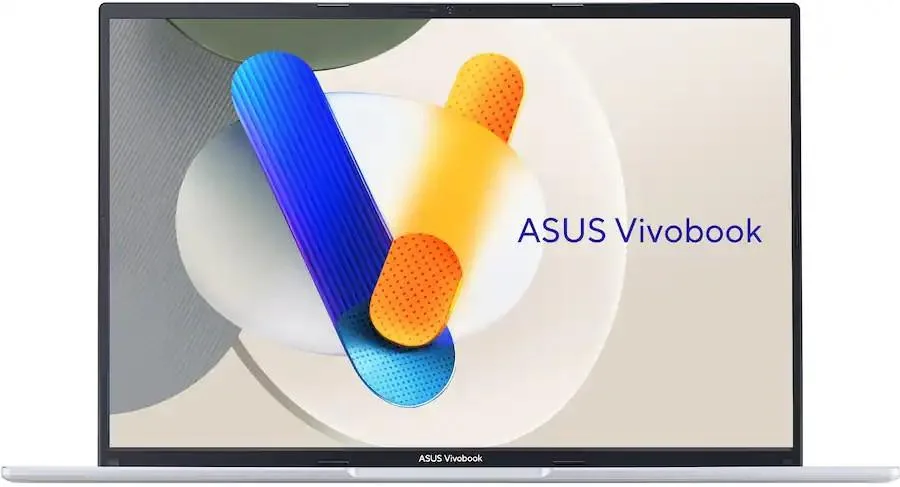
A 16-inch WUXGA laptop with an Intel Core i9-13900H processor, 16GB memory and a 1TB NVMe drive
The ASUS Vivobook is a 16.0 inch laptop built around an Intel Core i9-13900H processor with 16GB of memory and a 1TB NVMe drive. It runs Windows 11 Home and includes a fingerprint reader for secure sign-in. The WUXGA display shows 1920 x 1200 pixels at 60 Hz. This configuration suits professionals and students who need a large screen and strong single-thread speed for heavy multitasking.
The i9-13900H is a high-performance mobile chip that will throttle under prolonged full load because the thin chassis limits cooling capacity. Clock speeds drop once thermal limits are reached so long renders or compiles run slower than short bursts. Integrated graphics share system memory and have no dedicated VRAM so they cannot sustain high frame rates in 3D workloads. Buyers who need consistent multi-hour turbo speeds or discrete GPU power should consider a thicker workstation class machine.
The single M.2 2242 slot caps storage expansion at one drive so total capacity cannot exceed the installed 1TB without replacing the module. Wi-Fi 6E and Bluetooth 5.3 provide modern wireless connectivity but throughput depends on router compatibility and spectrum congestion. The 60 Hz panel cannot display motion smoother than 60 frames per second regardless of GPU output. Users who require multiple internal drives or higher refresh rates will find the platform restrictive.
| Brand | ASUS |
|---|---|
| Color | Cool Silver |
| Other Features | Fingerprint reader |
| Operating System | Windows 11 Home |
| CPU Type | Intel Core i9 13th Gen |
| Processor Name | Intel Core i9-13900H |
| Screen Size | 16.0" |
| Display Type | WUXGA |
| Resolution | 1920 x 1200 |
| Refresh Rate | 60 Hz |
| GPU/VPU | Integrated Graphics |
| Graphic Type | Integrated Card |
| SSD | 1TB NVMe |
| HDD | No |
| Storage Spec | One drive, up to 1TB M.2 2242 SSD |
| Memory | 16GB |
| Memory Spec | 16 GB x 1 |
| WLAN | 802.11ax Wireless LAN |
| WiFi Generation | Wi-Fi 6E |
| Bluetooth | Bluetooth 5.3 |
| USB | 2 x USB 3.2 Gen 1 Type-A |
| Video Port | 1 x HDMI |
| HDMI | 1 x HDMI 1.4 |
| Other port | 1x Headphone/Microphone combo jack (3.5mm) |
| Audio Ports | 1x Headphone/Microphone combo jack (3.5mm) |
| Speaker | Internal Speakers |
| Backlit Keyboard | Backlit |
| Other Input Devices | Yes |
| Webcam | 720p HD |
| Battery Life | Up to 8 Hours |
The laptop uses integrated Intel graphics and a 60 Hz 1920 x 1200 panel, so the cooling system handles typical office and multitasking loads without extreme fan noise or surface temperatures.
Only a Microsoft account for the initial Windows 11 Home setup and your usual USB accessories; the 802.11ax Wi-Fi 6E and Bluetooth 5.3 connect to existing networks and devices.
The chassis includes standard USB-A ports and an HDMI output, so legacy flash drives and external displays work directly without adapters.
Taip pat šiame skyriuje
Ta pati lentyna, tas pats atsiskaitymas — aštuonios monetos ir 30 minučių fiksuotas kursas.
Tai, kuo mokate, ir valiuta, kuria matote kainas.
Išsiunčiama iš Jūsų piniginės atsiskaitant
Tik rodoma — katalogo kainos nurodytos doleriais
Tokios valiutos nerasta.
Pasirinkite kalbą, kuria Jums kalbės svetainė.
Tokios kalbos nerasta.
Pirmą kartą čia?
Jau turite paskyrą?
Automatinio atstatymo nėra: ši parduotuvė nesiunčia jokių el. laiškų, todėl nėra jokios vienkartinės nuorodos, kurios būtų galima paprašyti. Palikite adresą paskyroje, ir juo bus pasirūpinta rankiniu būdu.
Prašymas užfiksuotas
Į Jūsų pašto dėžutę niekas nekeliauja — ši parduotuvė apskritai nesiunčia jokių el. laiškų. Šiuos prašymus kažkas peržiūri rankiniu būdu.
Prisiminėte?


