

ASUS
ASUS PRIME-RTX5070-12G GeForce RTX 5070 12GB GDDR7 graphics card
- PCI Express 5.0 x16
- NVIDIA
669,99 $
0.00862867BTC
KrājumāMēs pieņemam kriptovalūtu — lai tā, kas Jums pieder, varētu nopirkt īstu aparatūru.Maksājiet kriptovalūtā, iztērējiet to īstai aparatūrai. Bezmaksas apdrošināta piegāde visā pasaulē virs 399 $. Vienkāršas, nemarķētas kastes, sūtītas no Vācijas.Bezmaksas apdrošināta piegāde virs 399 $. Jūsu kurss tiek fiksēts uz 30 minūtēm, tiklīdz atveras kase.Kurss fiksēts uz 30 minūtēm. Katra prece ir aizzīmogota, tās sērijas numurs ir pārbaudīts, un uz to attiecas 24 mēnešu garantija.Aizzīmogots, 24 mēnešu garantija.
ASUS
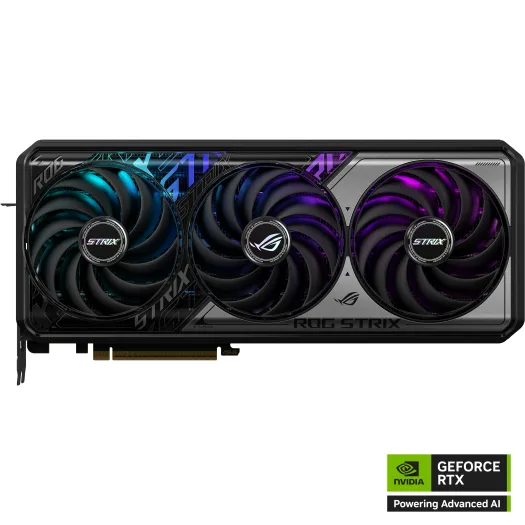
GeForce RTX 5070 graphics card with 12 GB GDDR7 memory, 6144 CUDA cores and triple-fan cooling for 4K gaming
Edition ROG STRIX OC
Pārsvītrotās versijas pastāv, taču šeit nav pieejamas.
The ASUS ROG Strix GeForce RTX 5070 is a graphics card built on the Blackwell architecture with 6144 CUDA cores. It carries 12GB of GDDR7 memory on a 192-bit bus clocked at 28 Gbps. The card connects through a PCI Express 5.0 x16 interface and occupies 3.2 slots. A triple-fan cooler handles thermals for the factory-overclocked GPU.
This model suits players targeting high-refresh 1440p or 4K gaming where DLSS 4 frame generation and ray tracing matter. The 12GB frame buffer and 192-bit bus can limit texture-heavy 4K workloads or professional render tasks needing more VRAM. Creators running large scenes or users planning multi-GPU via SLI should look elsewhere, as SLI is not supported.
The single specification that determines suitability is the 12GB GDDR7 memory on a 192-bit interface. It delivers high bandwidth at 28 Gbps, yet the capacity and bus width set a hard ceiling for 4K ultra textures and compute datasets. If your workload exceeds 12GB VRAM, a card with a wider bus or larger buffer is required.
| Brand | ASUS |
|---|---|
| Series | ROG |
| Model | ROG-STRIX-RTX5070-O12G-GAMING |
| Interface | PCI Express 5.0 x16 |
| Chipset Manufacturer | NVIDIA |
| GPU Series | NVIDIA GeForce RTX 50 Series |
| GPU | GeForce RTX 5070 |
| Architecture | Blackwell |
| CUDA Cores | 6144 |
| Effective Memory Clock | 28 Gbps |
| Memory Size | 12GB |
| Memory Interface | 192-Bit |
| Memory Type | GDDR7 |
| DirectX | DirectX 12 Ultimate |
| OpenGL | OpenGL 4.6 |
| Multi-Monitor Support | 4 |
| HDMI | 2 x HDMI 2.1b |
| DisplayPort | 3 x DisplayPort 2.1b |
| Color | Silver |
| Max Resolution | 7680 x 4320 |
| CrossFireX Support | No |
| SLI Support | No |
| Virtual Reality Ready | Yes |
| Cooler | Triple Fans |
| Recommended PSU Wattage | 750W |
| Power Connector | 1 x 16-Pin |
| Form Factor | ATX |
| Max GPU Length | 332 mm |
| Slot Width | 3.2 Slots |
| Sūtījuma svars | 2.54 kg |
| Sūtījuma izmēri | 419 × 226 × 127 mm |
Citas šī modeļa versijas
Viena saime, taču atšķirīga atmiņa, dzesētājs vai frekvence — salīdziniet, pirms izlemjat.
The card measures 332 mm long and occupies 3.2 slots, so verify your case clearance and motherboard spacing before purchase.
Use a native 12V-2x6 or 12VHPWR cable from a 750W PSU; do not daisy-chain adapters, and seat the connector fully until the latch clicks.
Blow dust from the heatsink fins and fan blades every 6–12 months, or sooner if GPU temperatures rise under load.
Arī šajā sadaļā
Tas pats plaukts, tā pati kase — astoņas kriptovalūtas un kursa fiksēšana uz 30 minūtēm.
Kriptovalūta, kurā maksājat, un valūta, kurā redzat cenas.
Nosūtīts no Jūsu maciņa, noformējot pasūtījumu
Tikai informatīvi — katalogā cenas norādītas ASV dolāros
Neviena valūta neatbilst.
Izvēlieties valodu, kurā vietne sarunājas ar Jums.
Pirmo reizi šeit?
Jau ir konts?
Automātiskas atiestatīšanas nav: šis veikals nesūta e-pastus, tāpēc nav arī vienreizējas saites, ko pieprasīt. Atstājiet adresi kontā, un tā tiks apstrādāta manuāli.
Pieprasījums saņemts
Uz Jūsu e-pastu nekas neatnāks — šis veikals vispār nesūta e-pastus. Kāds šos pieprasījumus apstrādā manuāli.
Atcerējāties?




