


Lenovo
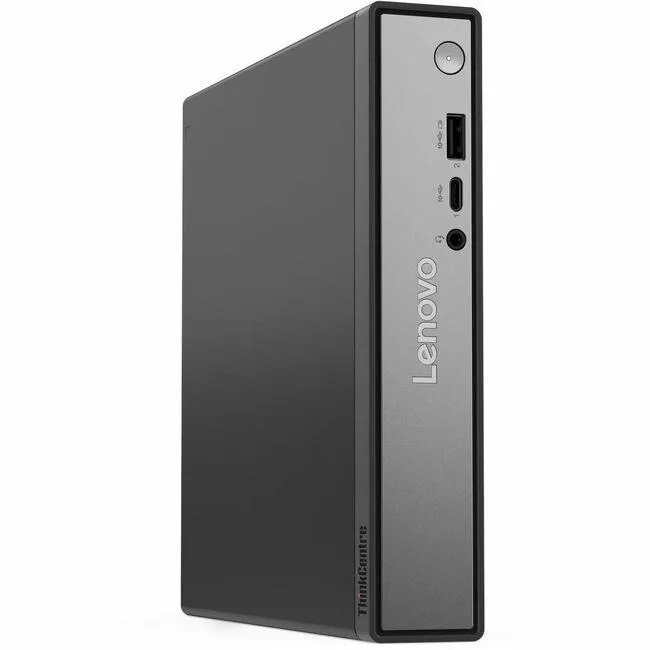
Lenovo ThinkCentre neo 50q QC 13C8000YUS desktop PC Snapdragon X X1-26-100 16 GB 256 GB SSD Tiny Eclipse Black
Tiny desktop PC with Snapdragon X X1-26-100 processor, 16 GB LPDDR5X memory, 256 GB SSD and Windows 11 Pro
- TypeStudent / Home Office
- UsageBusiness / Mainstream / Work / Business
- MonitorMonitor not included
- Screen SizeNo Screen
- Snapdragon X X1-26-100 processor drives responsive everyday computing
- 16 GB LPDDR5X memory keeps multiple business apps running smoothly
- 256 GB SSD provides fast boot and file access
- Tiny chassis fits on a desk shelf or behind a monitor
- Windows 11 Pro delivers built-in business security and management features
Compact Snapdragon Desktop for Light Workloads
The Lenovo ThinkCentre neo 50q QC 13C8000YUS is a tiny desktop computer built around the Snapdragon X X1-26-100 processor. It ships with 16 GB of LPDDR5X memory and a 256 GB solid-state drive. Windows 11 Pro comes pre-installed and the Qualcomm Adreno GPU handles integrated graphics. The Eclipse Black chassis is designed for space-constrained desks.
Suits Home Offices and Student Tasks
This system suits users who need a quiet, small-form-factor PC for web browsing, document editing and video conferencing. Buyers who require discrete graphics performance, large local storage capacity or extensive internal expansion should look at larger workstation-class machines instead. The integrated graphics and fixed memory limit heavy creative or engineering workloads.
Simple Setup With Limited Upgrade Path
Initial setup is straightforward: connect power, a display and peripherals then follow the Windows 11 Pro out-of-box experience. Because the memory is soldered LPDDR5X and the chassis is tiny, adding more RAM or a second drive is not practical. Most issues arise from expecting desktop-class upgrade flexibility in this sealed form factor.
Priekšrocības
- Snapdragon X X1-26-100 processor drives responsive everyday computing
- 16 GB LPDDR5X memory keeps multiple business apps running smoothly
- 256 GB SSD provides fast boot and file access
- Tiny chassis fits on a desk shelf or behind a monitor
- Windows 11 Pro delivers built-in business security and management features
Specifikācijas
| Brand | Lenovo |
|---|---|
| Type | Student / Home Office |
| Usage | Business / Mainstream / Work / Business |
| Monitor | Monitor not included |
| Screen Size | No Screen |
| Sūtījuma svars | 2.90 kg |
| Sūtījuma izmēri | 488 × 269 × 142 mm |
Jautājumi par šo preci
What display and input devices do I need to use this Tiny desktop since no monitor is included?
You must supply your own monitor, keyboard and mouse; the system ships without a screen or peripherals.
Can I keep using my existing USB-A accessories with the ThinkCentre neo 50q QC?
The desktop provides standard USB-A ports, so legacy keyboards, mice and storage drives will connect directly.
How can I verify the Snapdragon X X1-26-100 and 16 GB LPDDR5X memory are recognised after first boot?
Open Windows Settings → System → About to confirm the processor name and 16 GB installed RAM appear correctly.
Arī šajā sadaļā
Klienti arī salīdzināja
Tas pats plaukts, tā pati kase — astoņas kriptovalūtas un kursa fiksēšana uz 30 minūtēm.



DELL
DELL J1-7490AA01 All-in-One PC Core i7-10700 2.9GHz 16GB 512GB SSD 23.8" FHD
- All-in-One PC
- All-in-One
691,99 $768,99 $−10%
0.00883158BTC
Krājumā
HP
HP J1-800G6AA01 All-in-One PC Core i5-10500 16GB DDR4 512GB NVMe 23.8
- All-in-One PC
- All-in-One
810,99 $999,99 $−19%
0.01035033BTC
Krājumā
HP
HP OmniStudio X 27-CS1000T all-in-one PC, Intel Core Ultra 7 256V, 16 GB, 512 GB, 27" FHD IPS, Meteor Silver
696,99 $
0.0088954BTC
Krājumā