

SanDisk
SanDisk Cruzer Blade 8 GB USB 2.0 USB flash drive Black SDCZ50-008G-B35
391,99 $
0.00501972BTC
KrājumāMēs pieņemam kriptovalūtu — lai tā, kas Jums pieder, varētu nopirkt īstu aparatūru.Maksājiet kriptovalūtā, iztērējiet to īstai aparatūrai. Bezmaksas apdrošināta piegāde visā pasaulē virs 399 $. Vienkāršas, nemarķētas kastes, sūtītas no Vācijas.Bezmaksas apdrošināta piegāde virs 399 $. Jūsu kurss tiek fiksēts uz 30 minūtēm, tiklīdz atveras kase.Kurss fiksēts uz 30 minūtēm. Katra prece ir aizzīmogota, tās sērijas numurs ir pārbaudīts, un uz to attiecas 24 mēnešu garantija.Aizzīmogots, 24 mēnešu garantija.
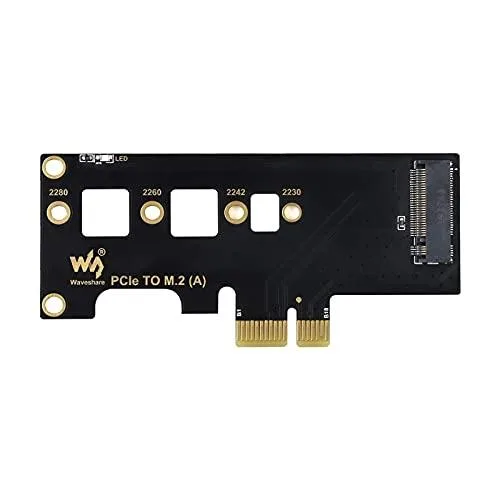


LORDWORLD
Adds NVMe SSD storage to Compute Module 4 carrier boards via PCIe slot
The LORDWORLD adapter adds an M.2 NVMe slot to Raspberry Pi Compute Module 4 carriers that expose a PCIe lane. Makers and embedded engineers can attach fast solid-state storage instead of relying on slower SD cards or eMMC. The board fits any PCIe ×1, ×4, ×8 or ×16 socket on a compatible base board.
Replacing the default boot media with an NVMe drive cuts boot time and raises sustained read and write throughput for data-logging, media serving or container workloads. The jump is worth it when the application demands lower latency or higher endurance than flash cards provide.
The adapter draws power and signal from the carrier board PCIe slot and requires no extra cables. An onboard LED shows power and blink-codes drive activity so you can verify operation at a glance. The slot accepts common M.2 lengths so you can choose capacity without changing the carrier. Builders who need more than one NVMe drive or a different form factor cannot use this single-slot design.
| Brand | LORDWORLD |
|---|
The adapter fits base boards with PCIe x1, x4, x8 or x16 sockets.
Seat the Compute Module 4 first, then insert the NVMe M.2 SSD and secure it with the mounting screw.
The onboard LED stays lit when powered and blinks continuously during read or write activity.
Arī šajā sadaļā
Tas pats plaukts, tā pati kase — astoņas kriptovalūtas un kursa fiksēšana uz 30 minūtēm.
Kriptovalūta, kurā maksājat, un valūta, kurā redzat cenas.
Nosūtīts no Jūsu maciņa, noformējot pasūtījumu
Tikai informatīvi — katalogā cenas norādītas ASV dolāros
Neviena valūta neatbilst.
Izvēlieties valodu, kurā vietne sarunājas ar Jums.
Neviena valoda neatbilst.
Pirmo reizi šeit?
Jau ir konts?
Automātiskas atiestatīšanas nav: šis veikals nesūta e-pastus, tāpēc nav arī vienreizējas saites, ko pieprasīt. Atstājiet adresi kontā, un tā tiks apstrādāta manuāli.
Pieprasījums saņemts
Uz Jūsu e-pastu nekas neatnāks — šis veikals vispār nesūta e-pastus. Kāds šos pieprasījumus apstrādā manuāli.
Atcerējāties?



