

SanDisk
SanDisk Cruzer Blade 8 GB USB 2.0 USB flash drive Black SDCZ50-008G-B35
391,99 $
0.0049743BTC
KrājumāMēs pieņemam kriptovalūtu — lai tā, kas Jums pieder, varētu nopirkt īstu aparatūru.Maksājiet kriptovalūtā, iztērējiet to īstai aparatūrai. Bezmaksas apdrošināta piegāde visā pasaulē virs 399 $. Vienkāršas, nemarķētas kastes, sūtītas no Vācijas.Bezmaksas apdrošināta piegāde virs 399 $. Jūsu kurss tiek fiksēts uz 30 minūtēm, tiklīdz atveras kase.Kurss fiksēts uz 30 minūtēm. Katra prece ir aizzīmogota, tās sērijas numurs ir pārbaudīts, un uz to attiecas 24 mēnešu garantija.Aizzīmogots, 24 mēnešu garantija.
Simmtec, Inc
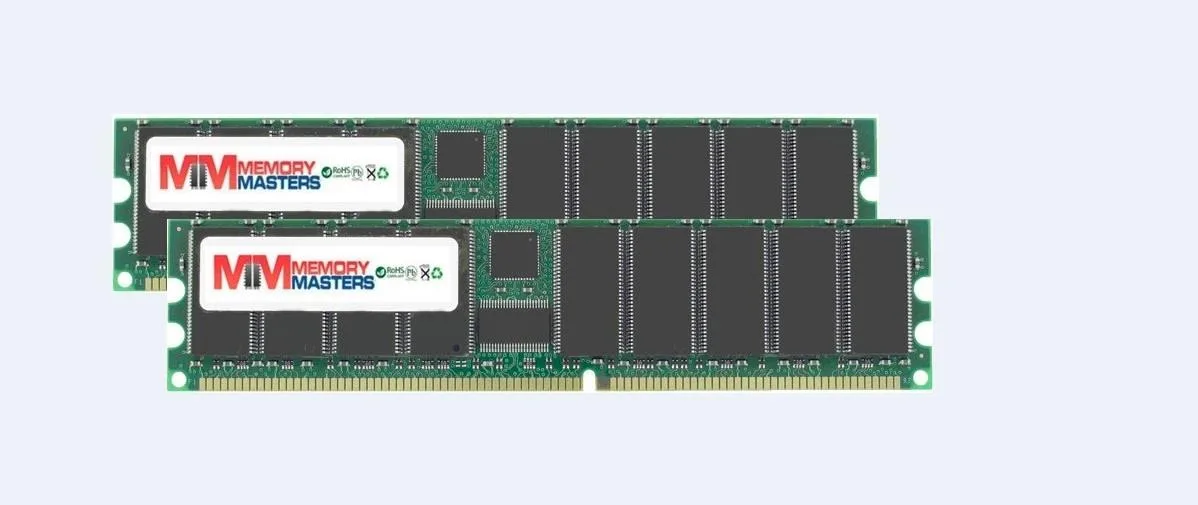
Two matched 1 GB DDR400 desktop DIMMs deliver 2 GB total at 400 MHz with CL 3.0 latency
This kit supplies two 1GB DDR400 modules for a total of 2GB. It targets owners of legacy desktop systems that accept 184-pin unbuffered DIMMs and need a matched pair for stable dual-channel operation. Non-ECC, non-parity design suits standard consumer motherboards of the era. Builders restoring or upgrading period-correct hardware will find the specification a direct fit.
DDR400 modules of this type run at modest voltage and generate little heat under normal desktop workloads. No active cooling is required and the sticks operate silently inside a typical case airflow. Power draw remains low enough that a standard ATX supply handles the kit without extra headroom. The CL 3.0 latency setting is conservative, reducing electrical stress during sustained use.
Each stick uses Samsung chips mounted on a green 184-pin PCB with gold-edge contacts. The unbuffered layout means the modules plug straight into the motherboard slots without registration circuitry. A single notch keys the DIMM to prevent backward insertion, so alignment is straightforward. Once seated, the retaining clips lock automatically, securing the kit for transport or long-term service.
| Capacity | 2GB (2 x 1GB) |
|---|
Align the notch on each 184-pin DIMM with the slot key, press straight down until both side clips click, then verify the BIOS reports 400 MHz operation.
No routine maintenance is required; the unbuffered non-ECC modules either run reliably for the system's life or are replaced if a fault appears.
The CAS latency 3.0 cycle at 400 MHz sets the minimum access delay; bandwidth and stability are bounded by that timing window.
Arī šajā sadaļā
Tas pats plaukts, tā pati kase — astoņas kriptovalūtas un kursa fiksēšana uz 30 minūtēm.
Kriptovalūta, kurā maksājat, un valūta, kurā redzat cenas.
Nosūtīts no Jūsu maciņa, noformējot pasūtījumu
Tikai informatīvi — katalogā cenas norādītas ASV dolāros
Neviena valūta neatbilst.
Izvēlieties valodu, kurā vietne sarunājas ar Jums.
Neviena valoda neatbilst.
Pirmo reizi šeit?
Jau ir konts?
Automātiskas atiestatīšanas nav: šis veikals nesūta e-pastus, tāpēc nav arī vienreizējas saites, ko pieprasīt. Atstājiet adresi kontā, un tā tiks apstrādāta manuāli.
Pieprasījums saņemts
Uz Jūsu e-pastu nekas neatnāks — šis veikals vispār nesūta e-pastus. Kāds šos pieprasījumus apstrādā manuāli.
Atcerējāties?



