

AVID Products
AVID Products R-Go Wireless Vertical Ergonomic Mouse Large Right Hand Black
71,99 $
0.00088856BTC
ΔιαθέσιμοΔεχόμαστε κρυπτονομίσματα — έτσι ώστε αυτά που κατέχετε να μπορούν να αγοράσουν πραγματικό εξοπλισμό.Πληρώστε σε κρυπτονομίσματα, ξοδέψτε τα σε πραγματικό εξοπλισμό. Δωρεάν ασφαλισμένη αποστολή παγκοσμίως άνω των 399 $. Ουδέτερες κούτες αποστολής, χωρίς σήμανση, από τη Γερμανία.Δωρεάν ασφαλισμένη αποστολή άνω των 399 $. Η ισοτιμία σας κλειδώνει για 30 λεπτά μόλις ανοίξει το ταμείο.Κλείδωμα ισοτιμίας 30 λεπτών. Κάθε προϊόν είναι σφραγισμένο, ελεγμένο ως προς τον σειριακό αριθμό του, και καλύπτεται από εγγύηση 24 μηνών.Σφραγισμένο, με εγγύηση 24 μηνών.


MSI
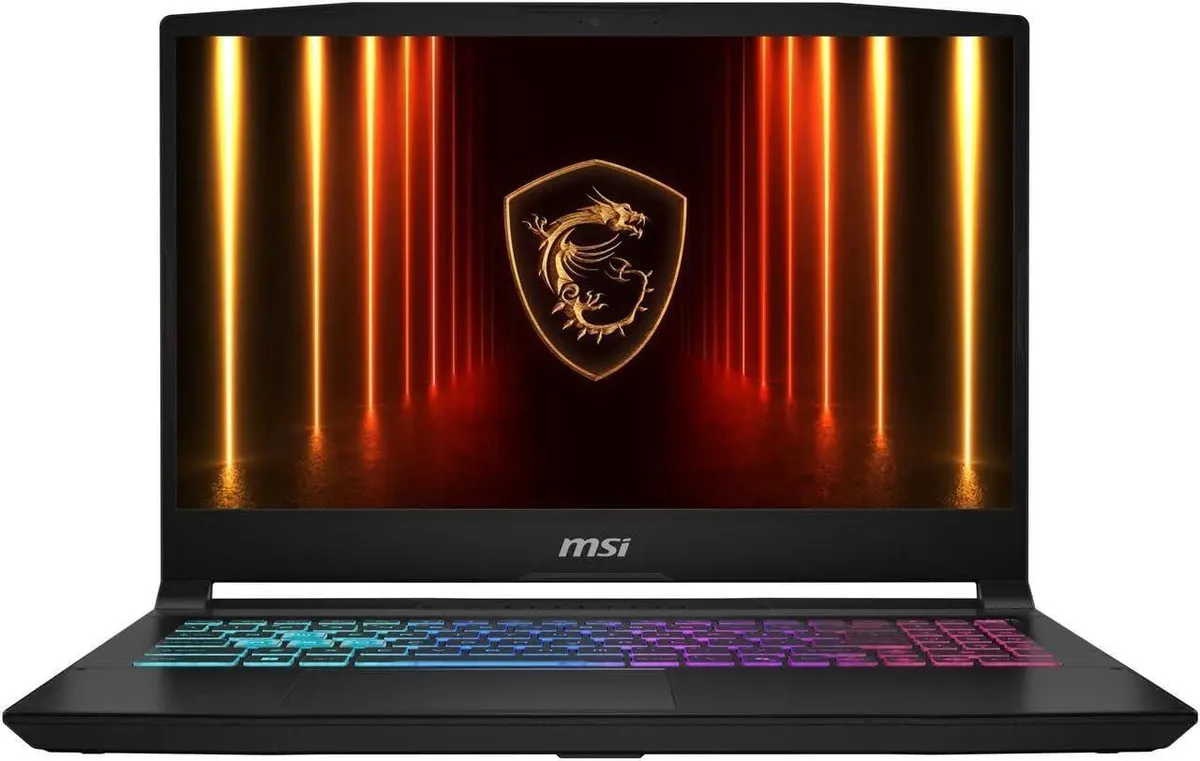
A 15.6-inch QHD 165Hz gaming laptop with an Intel Core i7 16-core processor, RTX 5070 8GB GDDR7 graphics, 16GB DDR5 memory and a 2TB PCIe SSD
The Katana 15 pairs a 15.6 inch QHD panel running at 165 Hz with an Intel Core i7 14650HX processor and an RTX 5070 graphics card carrying 8 GB of GDDR7 memory. Sixteen gigabytes of DDR5 4800 system memory and a 2 TB PCIe SSD complete a configuration aimed at high-refresh competitive play and content creation on Windows 11 Home.
This machine fits gamers who want a 15.6 inch QHD 165 Hz display driven by a 16 core 24 thread CPU and RTX 5070 graphics. It also suits creators needing 16 GB DDR5 and a 2 TB PCIe SSD in a 5.29 pound chassis. Buyers needing a touchscreen, an SD card reader, a fingerprint reader or a lighter ultraportable form factor should consider other models.
Verify that your external monitors can accept a 2560 x 1440 signal over the HDMI port and that your peripherals work with three USB Type-A and two USB Type-C ports. Confirm your network infrastructure supports 802.11ac Wi-Fi or wired RJ45 Ethernet. Ensure you have space for a 14.13 by 10.31 by 0.99 inch footprint and a power outlet for the supplied adapter.
| Brand | MSI |
|---|---|
| Series | Katana 15 |
| Model | MSI 15.6 |
| Color | Black |
| CPU Type | Intel Core i7 14th Gen |
| Processor Name | 2.20GHz |
| Number of Cores | 16-core Processor |
| Screen Size | 15.6" |
| Touchscreen | Non-Touch Screen |
| Display Type | QHD |
| Resolution | 2560 x 1440 |
| Operating System | Windows 11 Home |
| GPU/VPU | GeForce RTX 5070 Laptop GPU |
| Video Memory | 8GB |
| Graphic Type | Integrated Card |
| SSD | 2TB PCIe SSD |
| Memory | 16GB |
| Memory Speed | DDR5 4800 |
| Optical Drive Type | No |
| WLAN | 802.11ac Wireless LAN |
| WiFi Generation | Wi-Fi 6E |
| Bluetooth | Yes |
| USB | 1 |
| HDMI | 1 x HDMI |
| Ethernet | 1 x RJ-45 (100Mbps) |
| Audio | Integrated Sound card |
| Speaker | Internal Speakers |
| Backlit Keyboard | Backlit |
| Style | Standard |
| Type | Gaming |
| Battery Life | Up to 7 Hours |
The laptop includes the 2560 x 1440 panel and GeForce RTX 5070 8GB GDDR7 built in, so no external monitor or GPU is required for them to work.
Yes, the chassis provides 3 x USB Type-A ports in addition to the 2 x USB Type-C ports, so older mice, keyboards and drives plug straight in.
Open Settings > System > Display > Advanced display and verify the refresh rate dropdown shows 165 Hz for the internal 15.6 QHD panel.
Επίσης σε αυτό το ράφι
Ίδιο ράφι, ίδιο ταμείο — οκτώ νομίσματα και κλείδωμα ισοτιμίας 30 λεπτών.
Το νόμισμα στο οποίο πληρώνετε, και αυτό στο οποίο βλέπετε τις τιμές.
Αποστέλλεται από το πορτοφόλι σας στο ταμείο
Μόνο για προβολή — ο κατάλογος αναγράφεται σε δολάρια
Κανένα νόμισμα δεν αντιστοιχεί.
Επιλέξτε τη γλώσσα στην οποία σας μιλάει ο ιστότοπος.
Καμία γλώσσα δεν ταιριάζει.
Πρώτη επίσκεψη;
Έχετε ήδη λογαριασμό;
Δεν υπάρχει αυτόματη επαναφορά κωδικού: αυτό το κατάστημα δεν στέλνει e-mail, άρα δεν υπάρχει σύνδεσμος μίας χρήσης να ζητήσετε. Αφήστε τη διεύθυνση στον λογαριασμό σας και κάποιος θα την επεξεργαστεί με το χέρι.
Το αίτημα καταχωρίστηκε
Δεν θα λάβετε τίποτα στα εισερχόμενά σας — το κατάστημα δεν στέλνει κανένα e-mail. Κάποιος το διαχειρίζεται με το χέρι.
Τον θυμηθήκατε;



