
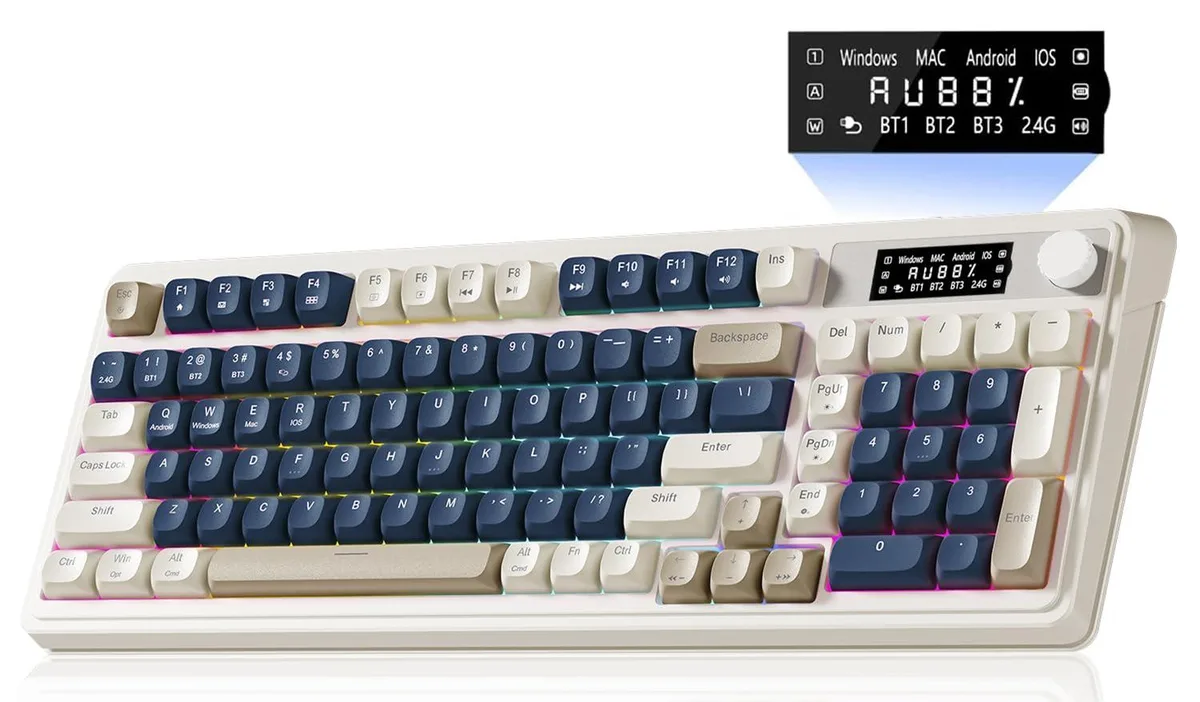


AULA S99Pro 99-key membrane gaming keyboard blue white
A 99-key membrane gaming keyboard with Bluetooth 5.0, 2.4 GHz wireless and USB-C connectivity, dedicated media knob and RGB backlighting in blue and white
- NameS99Pro
- Keyboard InterfaceBluetooth
- Palm RestRetro
- Function Keys9
- Mechanical KeyboardUSB Cable / Linear
- Key SwitchLinear
- Dedicated knob and LED screen for real-time battery and connection status
- Three connectivity modes: Bluetooth 5.0, 2.4 GHz wireless, and USB wired
- Connects up to five devices simultaneously with FN key switching
- All 99 keys support macro customisation for complex in-game actions
- Membrane switches with RGB backlighting in a blue and white colourway
AULA S99Pro 99-key membrane gaming keyboard
The AULA S99Pro is a 99-key membrane gaming keyboard in a blue and white colourway. It is built for Windows or Mac users who want a compact layout with a dedicated media knob and an integrated LED status screen. The keyboard connects via Bluetooth 5.0, 2.4 GHz wireless or USB wired modes. It supports simultaneous pairing with up to five devices for multi-tasking workflows.
Installation and common issues
Connecting the keyboard is straightforward: plug the 2.4 GHz receiver into a USB port, pair via Bluetooth 5.0 or use the USB cable for wired operation. The FN key combination switches between the five paired devices instantly. A frequent issue is accidental mode changes when the FN layer is active during intense gaming sessions. The uncustomizable LED screen shows battery and connection status but cannot display user-defined information.
Deciding specification
The keyboard uses linear membrane switches rather than mechanical switches, which determines the typing feel and sound profile. This makes it suitable for users who prefer a quieter, softer keystroke with consistent actuation. Buyers seeking the distinct tactile feedback or audible click of mechanical switches should look elsewhere. All 99 keys support macro programming for complex command sequences.
Privalumai
- Dedicated knob and LED screen for real-time battery and connection status
- Three connectivity modes: Bluetooth 5.0, 2.4 GHz wireless, and USB wired
- Connects up to five devices simultaneously with FN key switching
- All 99 keys support macro customisation for complex in-game actions
- Membrane switches with RGB backlighting in a blue and white colourway
Specifikacijos
| Brand | AULA |
|---|---|
| Series | S99Pro |
| Name | S99Pro |
| Model | S99Pro |
| Part Number | aula s99 pro keyboard |
| Keyboard Interface | Bluetooth |
| Palm Rest | Retro |
| Function Keys | 9 |
| Mechanical Keyboard | USB Cable / Linear |
| Key Switch | Linear |
| Key Switch Type | Linear |
| Keycaps | Acrylonitrile Butadiene Styrene |
| Keyboard Color | Blue / White |
| Backlit | RGB |
| Dimensions | 72" |
| Type | 2.4 GHz / Bluetooth |
| Mouse Included | Retro |
| Mouse Interface | Wi-Fi |
| Mouse DPI | Membrane |
| Hand Orientation | Ambidextrous |
| Tracking Method | Ergonomic |
| Buttons | 9 |
| Scrolling Capability | Volume Roller |
| Mouse Color | Blue |
| Power Source | Battery Powered, Bluetooth |
| Operating Time | Battery Powered, true |
| Distance | 16.23 L x 7.28 W x 2.03 H inches |
| System Requirement | Wi-Fi |
| Features | rgb, Ambidextrous, Bluetooth |
Klausimai apie šią prekę
How can I confirm the keyboard is connected and charged after pairing?
The built-in LED screen shows real-time battery level and connection status so you can verify it is working.
What accessories are included and what must I provide?
The package contains the 99-key membrane keyboard with integrated knob and display; no separate mouse or palm rest is listed.
Which connectivity version should I pick for the most stable wireless link?
Use the 2.4 GHz wireless mode for a dedicated low-latency connection, or Bluetooth 5.0 for multi-device pairing up to five devices.
Taip pat šiame skyriuje
Kiti pirkėjai taip pat lygino
Ta pati lentyna, tas pats atsiskaitymas — aštuonios monetos ir 30 minučių fiksuotas kursas.



Cherry
Cherry MX 3.1 Mechanical Wired Gaming Keyboard White MX2A Silent Red
- Red Switch
- White
116,99 USD
0.00150679BTC
Yra sandėlyje