iKBC
iKBC Table E401 Tenkeyless Gaming Keyboard Cherry MX Red Dark Gray 87 Keycaps
127,99 $US
0.00162601BTC
En stockNous acceptons la cryptomonnaie — les cryptos que vous détenez peuvent ainsi acheter du matériel réel.Payez en crypto, dépensez-la en matériel réel. Livraison assurée offerte partout dans le monde au-delà de 399 $. Cartons neutres, sans marque, expédiés depuis l’Allemagne.Livraison assurée offerte au-delà de 399 $. Votre taux est bloqué pendant 30 minutes dès l’ouverture de la caisse.Taux bloqué 30 minutes. Chaque article est scellé, son numéro de série est vérifié, et il est couvert par une garantie de 24 mois.Scellé, garanti 24 mois.
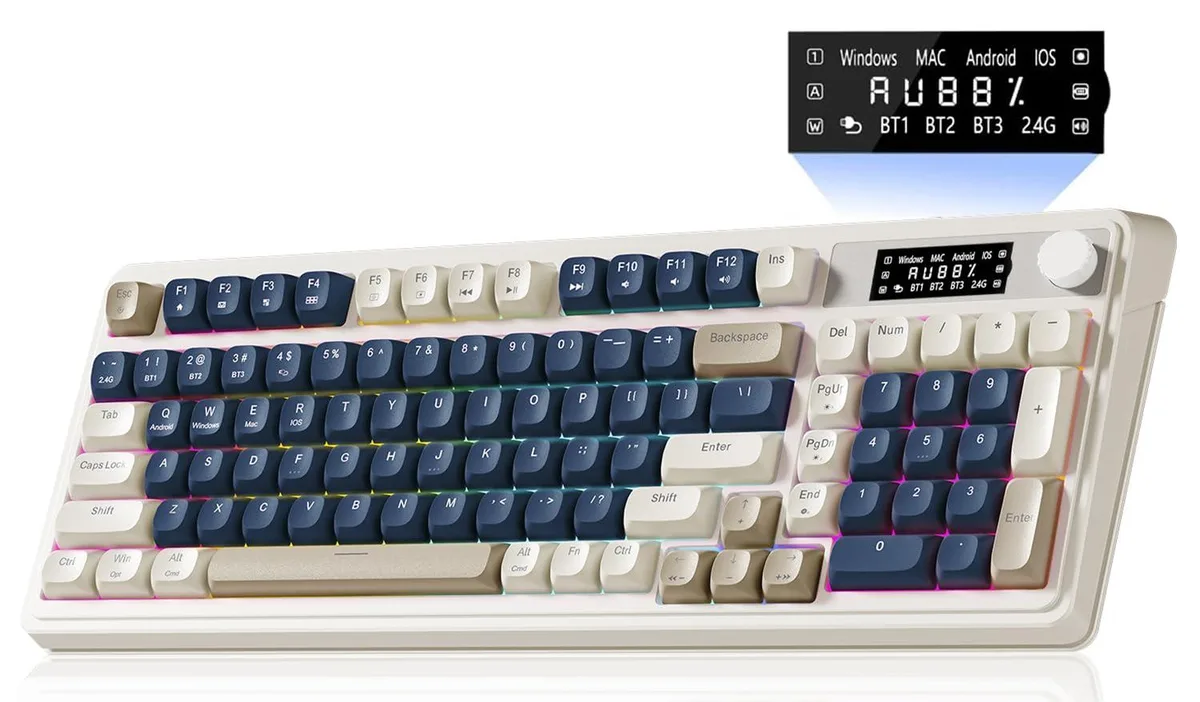


A 99-key membrane gaming keyboard with Bluetooth 5.0, 2.4 GHz wireless and USB-C connectivity, dedicated media knob and RGB backlighting in blue and white
The AULA S99Pro is a 99-key membrane gaming keyboard in a blue and white colourway. It is built for Windows or Mac users who want a compact layout with a dedicated media knob and an integrated LED status screen. The keyboard connects via Bluetooth 5.0, 2.4 GHz wireless or USB wired modes. It supports simultaneous pairing with up to five devices for multi-tasking workflows.
Connecting the keyboard is straightforward: plug the 2.4 GHz receiver into a USB port, pair via Bluetooth 5.0 or use the USB cable for wired operation. The FN key combination switches between the five paired devices instantly. A frequent issue is accidental mode changes when the FN layer is active during intense gaming sessions. The uncustomizable LED screen shows battery and connection status but cannot display user-defined information.
The keyboard uses linear membrane switches rather than mechanical switches, which determines the typing feel and sound profile. This makes it suitable for users who prefer a quieter, softer keystroke with consistent actuation. Buyers seeking the distinct tactile feedback or audible click of mechanical switches should look elsewhere. All 99 keys support macro programming for complex command sequences.
| Brand | AULA |
|---|---|
| Series | S99Pro |
| Name | S99Pro |
| Model | S99Pro |
| Part Number | aula s99 pro keyboard |
| Keyboard Interface | Bluetooth |
| Palm Rest | Retro |
| Function Keys | 9 |
| Mechanical Keyboard | USB Cable / Linear |
| Key Switch | Linear |
| Key Switch Type | Linear |
| Keycaps | Acrylonitrile Butadiene Styrene |
| Keyboard Color | Blue / White |
| Backlit | RGB |
| Dimensions | 72" |
| Type | 2.4 GHz / Bluetooth |
| Mouse Included | Retro |
| Mouse Interface | Wi-Fi |
| Mouse DPI | Membrane |
| Hand Orientation | Ambidextrous |
| Tracking Method | Ergonomic |
| Buttons | 9 |
| Scrolling Capability | Volume Roller |
| Mouse Color | Blue |
| Power Source | Battery Powered, Bluetooth |
| Operating Time | Battery Powered, true |
| Distance | 16.23 L x 7.28 W x 2.03 H inches |
| System Requirement | Wi-Fi |
| Features | rgb, Ambidextrous, Bluetooth |
The built-in LED screen shows real-time battery level and connection status so you can verify it is working.
The package contains the 99-key membrane keyboard with integrated knob and display; no separate mouse or palm rest is listed.
Use the 2.4 GHz wireless mode for a dedicated low-latency connection, or Bluetooth 5.0 for multi-device pairing up to five devices.
Également dans ce rayon
Même rayon, même caisse — huit monnaies et un taux bloqué 30 minutes.
Ce que vous envoyez, et ce dans quoi vous lisez les prix.
Envoyé depuis votre portefeuille à la caisse
Affichage seul — le catalogue est libellé en dollars
Aucune monnaie ne correspond.
Choisissez la langue dans laquelle le site vous parle.
Première visite ?
Vous avez déjà un compte ?
Il n’y a pas de réinitialisation automatique : cette boutique n’envoie aucun e-mail, il n’existe donc aucun lien à usage unique à demander. Laissez l’adresse sur le compte, elle sera traitée à la main.
Demande enregistrée
Rien n’arrivera dans votre boîte de réception — cette boutique n’envoie aucun e-mail. Quelqu’un s’en occupe à la main.
Vous l’avez retrouvé ?