

Celesttouch
Celesttouch C126HAX01.1 12.6" 2560x666 portable monitor
- Black
- 12.5"
120,99 $
0.00153183BTC
KrājumāMēs pieņemam kriptovalūtu — lai tā, kas Jums pieder, varētu nopirkt īstu aparatūru.Maksājiet kriptovalūtā, iztērējiet to īstai aparatūrai. Bezmaksas apdrošināta piegāde visā pasaulē virs 399 $. Vienkāršas, nemarķētas kastes, sūtītas no Vācijas.Bezmaksas apdrošināta piegāde virs 399 $. Jūsu kurss tiek fiksēts uz 30 minūtēm, tiklīdz atveras kase.Kurss fiksēts uz 30 minūtēm. Katra prece ir aizzīmogota, tās sērijas numurs ir pārbaudīts, un uz to attiecas 24 mēnešu garantija.Aizzīmogots, 24 mēnešu garantija.
DELL
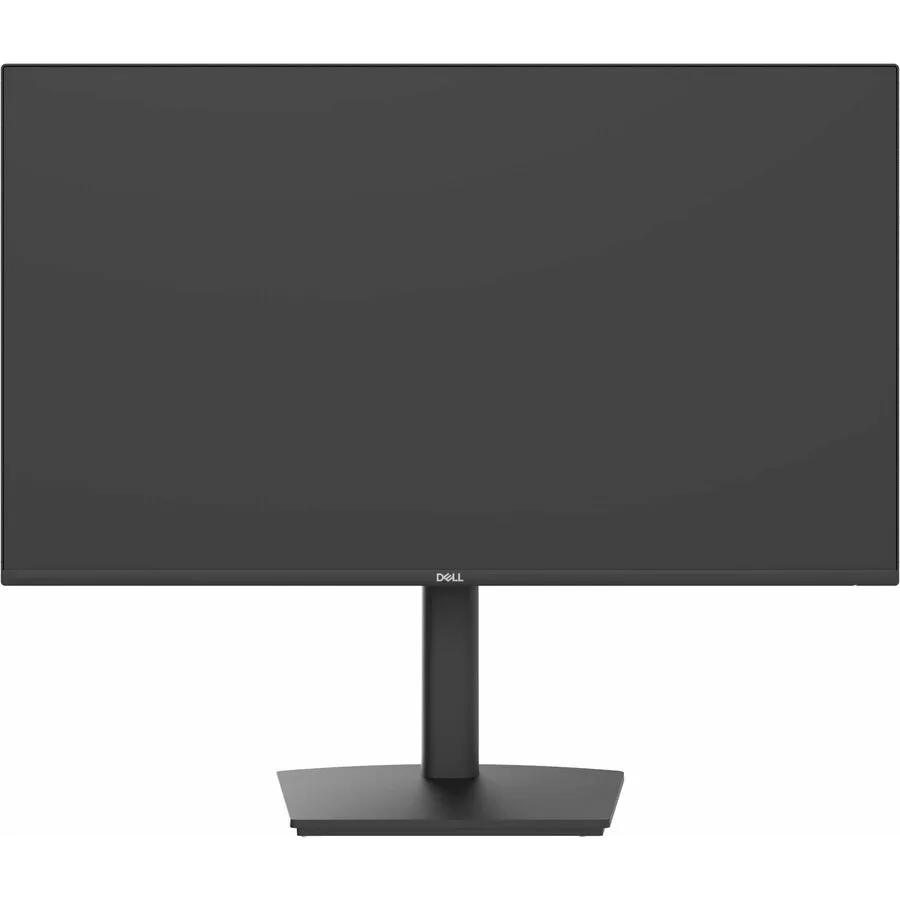
A 24 inch Full HD IPS monitor with 100 Hz refresh rate, USB-C docking and 90 W power delivery for a single-cable workspace
The Dell Pro P2426HE is a 24 inch IPS panel with a 1920 x 1080 resolution and a 100 Hz refresh rate. It includes a USB-C docking solution that delivers up to 90W power delivery alongside Gigabit Ethernet and a built-in USB hub. The anti-glare screen offers 300 nit brightness and a 1500:1 contrast ratio. Wide 178/178 viewing angles and 16.7 million colours support general business and productivity tasks.
This monitor suits professionals who want a single-cable docking setup for a compatible laptop and value flexible positioning. The fully adjustable stand provides height, pivot, swivel and tilt movement to match different desk layouts. Buyers needing higher pixel density for detailed design work or faster response times for competitive gaming should look at alternative models. The 16:9 aspect ratio and 5 ms response time define the core visual experience.
Installation is straightforward thanks to VESA compatibility and a stand that assembles without tools. The USB-C connection handles video, data, network and charging simultaneously, reducing cable count on the desk. Some users find the on-screen display menu navigation less intuitive at first. Ensuring the connected laptop supports the required USB-C alternate mode and power profile avoids the most common setup issues.
| Brand | Dell |
|---|---|
| Series | Pro P |
| Model | P2426HE |
| Part Number | DELL-P2426HE |
| Cabinet Color | Black |
| Screen Size | 24 inch |
| Glare Screen | Anti-Glare |
| LED Backlight | Yes |
| OLED | No |
| Widescreen | Yes |
| Maximum Resolution | 1920 x 1080 |
| Resolution | 1920 x 1080 |
| 3D Ready | No |
| Refresh Rate | 100 Hz |
| Viewing Angle | 178/178 |
| Display Colors | 16.7 Million Colors |
| Brightness | 300 Nit |
| Contrast Ratio | 1500:1 |
| Aspect Ratio | 16:9 |
| Response Time | 5 ms |
| Horizontal Refresh Rate | 100 Hz |
| Vertical Refresh Rate | 100 Hz |
| Sūtījuma svars | 6.80 kg |
| Sūtījuma izmēri | 592 × 409 × 173 mm |
A laptop USB-C port that supports DisplayPort Alt Mode and USB Power Delivery 90W is required to drive the 1920 x 1080 100Hz signal and charge the notebook simultaneously.
Yes, the HDMI and DisplayPort inputs each support the full 1920 x 1080 resolution at 100Hz, so older desktops without USB-C can still use the higher refresh rate.
Open the on-screen display menu, select Information, and verify the current timing reads 1920 x 1080 at 100Hz; Windows Advanced Display Settings will show the same refresh value.
Arī šajā sadaļā
Tas pats plaukts, tā pati kase — astoņas kriptovalūtas un kursa fiksēšana uz 30 minūtēm.
Kriptovalūta, kurā maksājat, un valūta, kurā redzat cenas.
Nosūtīts no Jūsu maciņa, noformējot pasūtījumu
Tikai informatīvi — katalogā cenas norādītas ASV dolāros
Neviena valūta neatbilst.
Izvēlieties valodu, kurā vietne sarunājas ar Jums.
Neviena valoda neatbilst.
Pirmo reizi šeit?
Jau ir konts?
Automātiskas atiestatīšanas nav: šis veikals nesūta e-pastus, tāpēc nav arī vienreizējas saites, ko pieprasīt. Atstājiet adresi kontā, un tā tiks apstrādāta manuāli.
Pieprasījums saņemts
Uz Jūsu e-pastu nekas neatnāks — šis veikals vispār nesūta e-pastus. Kāds šos pieprasījumus apstrādā manuāli.
Atcerējāties?


