

SanDisk
SanDisk Cruzer Blade 8 GB USB 2.0 USB flash drive Black SDCZ50-008G-B35
391,99 $
0.00501016BTC
KrājumāMēs pieņemam kriptovalūtu — lai tā, kas Jums pieder, varētu nopirkt īstu aparatūru.Maksājiet kriptovalūtā, iztērējiet to īstai aparatūrai. Bezmaksas apdrošināta piegāde visā pasaulē virs 399 $. Vienkāršas, nemarķētas kastes, sūtītas no Vācijas.Bezmaksas apdrošināta piegāde virs 399 $. Jūsu kurss tiek fiksēts uz 30 minūtēm, tiklīdz atveras kase.Kurss fiksēts uz 30 minūtēm. Katra prece ir aizzīmogota, tās sērijas numurs ir pārbaudīts, un uz to attiecas 24 mēnešu garantija.Aizzīmogots, 24 mēnešu garantija.


MCDODO
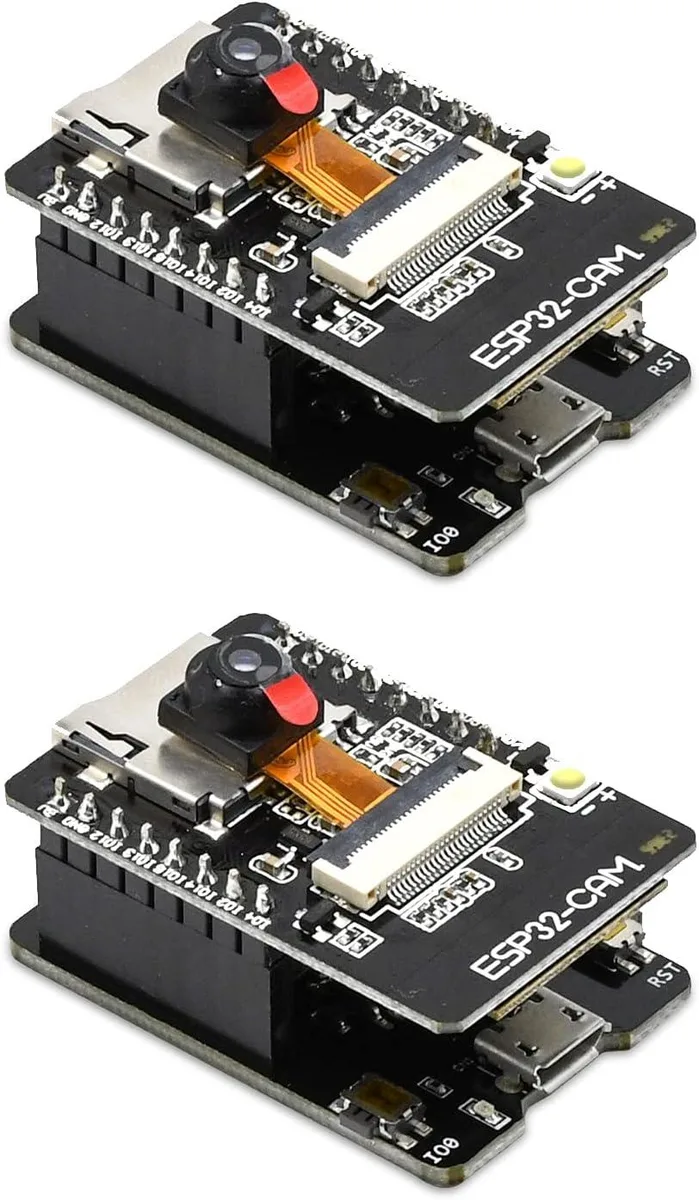
Two ESP32-CAM-MB boards with OV2640 2MP cameras and integrated USB-to-serial for direct programming
This pack contains two ESP32-CAM-MB boards each fitted with an OV2640 2MP camera module. The boards integrate a dual-mode Wi-Fi and Bluetooth SoC with two 32-bit LX6 CPUs running at 80 MHz to 240 MHz. They are aimed at makers building IoT edge devices that need wireless image capture.
Each board ships with a Micro USB connector and an on-board CH340G USB-to-serial adapter so no external programmer or complex wiring is required. The PCB antenna handles wireless traffic while the module can operate as a standalone minimal system. Deep-sleep current drops to 6 mA for battery-powered deployments.
Wireless connectivity is limited to 802.11 b/g/n rates so high-bandwidth streaming is not practical. The supplier notes that the board works with most Windows systems but may have compatibility issues on Mac platforms. Buyers needing 5 GHz Wi-Fi or guaranteed macOS support should look elsewhere.
| Type | Single Board Computers |
|---|
The board uses a Micro USB connector linked to an on-board CH-340G USB-to-serial converter for both power and code uploads.
Each board is a compact PCB with an OV2640 2MP camera; allow room for the Micro USB port, pin headers and the camera flex on both units.
Connect via Micro USB, choose manual or automatic download mode in the IDE, then press the on-board reset button if the upload stalls.
Arī šajā sadaļā
Tas pats plaukts, tā pati kase — astoņas kriptovalūtas un kursa fiksēšana uz 30 minūtēm.
Kriptovalūta, kurā maksājat, un valūta, kurā redzat cenas.
Nosūtīts no Jūsu maciņa, noformējot pasūtījumu
Tikai informatīvi — katalogā cenas norādītas ASV dolāros
Neviena valūta neatbilst.
Izvēlieties valodu, kurā vietne sarunājas ar Jums.
Neviena valoda neatbilst.
Pirmo reizi šeit?
Jau ir konts?
Automātiskas atiestatīšanas nav: šis veikals nesūta e-pastus, tāpēc nav arī vienreizējas saites, ko pieprasīt. Atstājiet adresi kontā, un tā tiks apstrādāta manuāli.
Pieprasījums saņemts
Uz Jūsu e-pastu nekas neatnāks — šis veikals vispār nesūta e-pastus. Kāds šos pieprasījumus apstrādā manuāli.
Atcerējāties?



