

SanDisk
SanDisk Cruzer Blade 8 GB USB 2.0 USB flash drive Black SDCZ50-008G-B35
USD 391.99
0.00501099BTC
Ada stokKami menerima kripto — jadi koin yang anda simpan boleh membeli perkakasan sebenar.Bayar dengan kripto, belanjakannya untuk perkakasan sebenar. Penghantaran berinsurans percuma ke seluruh dunia untuk belian melebihi USD 399. Kotak biasa tanpa jenama, dihantar dari Jerman.Penghantaran berinsurans percuma untuk belian melebihi USD 399. Kadar anda dikunci selama 30 minit sebaik sahaja proses pesanan bermula.Kadar dikunci selama 30 minit. Setiap item disegel, nombor sirinya disemak, dan dilindungi waranti 24 bulan.Disegel, waranti 24 bulan.


ASUS
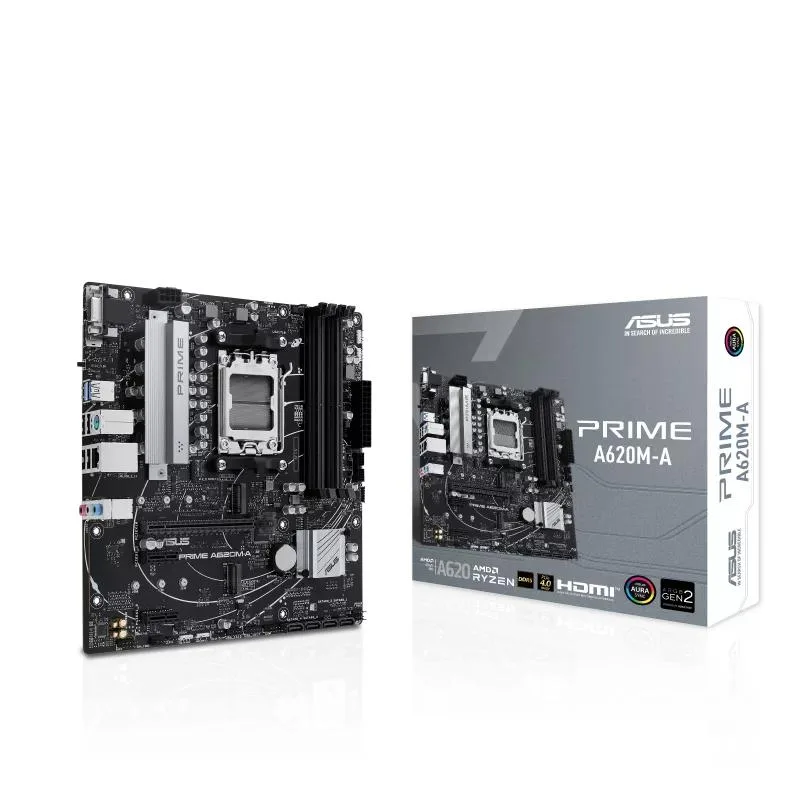
Micro-ATX AM5 board with PCIe 4.0, dual M.2, DDR5 support, USB 3.2 Gen 1 Type-C, AI noise reduction and AURA SYNC RGB
The ASUS PRIME A620M-A is a micro-ATX board built around the AM5 socket for AMD Ryzen 7000 series processors. It targets builders who want a compact platform with modern I/O and DDR5 memory support. Onboard video outputs include DisplayPort, HDMI and VGA for integrated graphics use.
This board replaces an AM4-based motherboard when moving to the Ryzen 7000 series and DDR5 memory. The jump is worthwhile when you need PCIe 4.0 bandwidth for graphics or storage and want USB 3.2 Gen 1 Type-C on the front panel. BIOS FlashBack allows firmware updates without a CPU installed.
Two M.2 sockets provide room for a boot drive and a secondary SSD, while four DDR5 slots support high-capacity memory kits. ASUS OptiMem II routing helps stability at higher data rates. VRM and PCH heatsinks with hybrid fan headers keep thermals in check under sustained loads.
| CPU Socket Type | AM5 |
|---|
The board uses the micro-ATX form factor, so it fits any case with micro-ATX or ATX standoff patterns and the standard I/O shield cut-out.
Open the single-sided latches, align the module notch with the slot key, press straight down until the latch clicks, and populate the slot furthest from the CPU socket first for best signal integrity.
The VRM heatsink, PCH heatsink and chassis fans connected to the hybrid headers should be cleaned of dust and have their thermal paste refreshed if temperatures rise.
Juga di rak ini
Rak yang sama, checkout yang sama — lapan koin kripto dan kunci kadar 30 minit.
Apa yang anda hantar untuk membayar, dan mata wang yang anda guna untuk membaca harga.
Dihantar daripada dompet anda semasa semak keluar
Untuk paparan sahaja — katalog diberi harga dalam USD
Tiada mata wang yang sepadan.
Pilih bahasa yang digunakan oleh laman web ini.
Tiada bahasa yang sepadan.
Pengguna baharu?
Sudah mempunyai akaun?
Tiada set semula automatik: kedai ini tidak menghantar sebarang e-mel, jadi tiada pautan sekali guna untuk diminta. Biarkan alamat pada akaun tersebut, ia akan diuruskan secara manual.
Permintaan direkodkan
Tiada apa-apa akan sampai ke peti masuk anda — kedai ini tidak menghantar sebarang e-mel. Seseorang akan menguruskannya secara manual.
Sudah teringat?



