

SanDisk
SanDisk Cruzer Blade 8 GB USB 2.0 USB flash drive Black SDCZ50-008G-B35
USD 391.99
0.00501811BTC
Ada stokKami menerima kripto — jadi koin yang anda simpan boleh membeli perkakasan sebenar.Bayar dengan kripto, belanjakannya untuk perkakasan sebenar. Penghantaran berinsurans percuma ke seluruh dunia untuk belian melebihi USD 399. Kotak biasa tanpa jenama, dihantar dari Jerman.Penghantaran berinsurans percuma untuk belian melebihi USD 399. Kadar anda dikunci selama 30 minit sebaik sahaja proses pesanan bermula.Kadar dikunci selama 30 minit. Setiap item disegel, nombor sirinya disemak, dan dilindungi waranti 24 bulan.Disegel, waranti 24 bulan.


ASUS
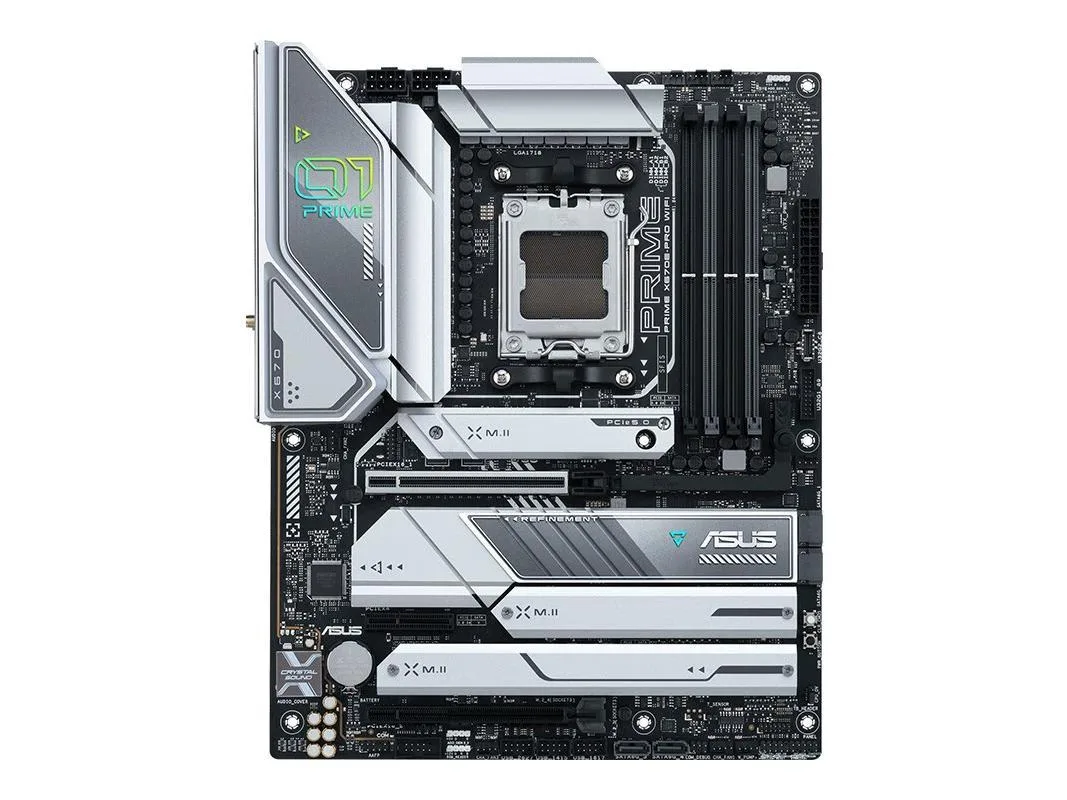
Socket AM5 ATX motherboard with AMD X670 chipset supporting up to 192GB DDR5 memory
The ASUS PRIME X670E-PRO WIFI is an ATX board built around the AMD X670 chipset and Socket AM5. It supports DDR5 memory up to 192GB capacity. The design targets system builders who need a full-size platform with integrated Wi-Fi and a standard rear I/O shield included.
The board uses conventional heatsinks on the VRM and chipset to manage heat during typical workloads. Fan headers allow automatic speed control so noise stays low at idle and rises only under sustained load. Power draw scales with the installed CPU and memory population rather than the board itself.
Moving to this board means adopting DDR5 and the AM5 socket, which requires a new processor and memory kit. The jump is worthwhile when your workload benefits from higher memory bandwidth and the newer CPU architecture. Existing SATA drives and the supplied cable carry over without changes.
| Brand | ASUS |
|---|---|
| Series | ASUS PRIME X670E-PRO WIFI |
| Model | ASUS PRIME X670E-PRO WIFI |
| CPU Socket Type | Socket AM5 |
| Chipset | AMD X670 |
| Maximum Memory Supported | 192GB |
Mount the board using all ATX standoffs, connect the 24-pin and CPU power cables, then fit the supplied I/O back panel before securing screws — many builders forget the back panel until the board is already fixed.
The included CMOS battery will eventually lose charge and should be swapped when BIOS settings stop saving; the supplied SATA cable can be replaced if the latch breaks or the connector wears.
The 192GB DDR5 memory ceiling is the hard cap — once populated you cannot add more capacity regardless of workload.
Juga di rak ini
Rak yang sama, checkout yang sama — lapan koin kripto dan kunci kadar 30 minit.
Apa yang anda hantar untuk membayar, dan mata wang yang anda guna untuk membaca harga.
Dihantar daripada dompet anda semasa semak keluar
Untuk paparan sahaja — katalog diberi harga dalam USD
Tiada mata wang yang sepadan.
Pilih bahasa yang digunakan oleh laman web ini.
Tiada bahasa yang sepadan.
Pengguna baharu?
Sudah mempunyai akaun?
Tiada set semula automatik: kedai ini tidak menghantar sebarang e-mel, jadi tiada pautan sekali guna untuk diminta. Biarkan alamat pada akaun tersebut, ia akan diuruskan secara manual.
Permintaan direkodkan
Tiada apa-apa akan sampai ke peti masuk anda — kedai ini tidak menghantar sebarang e-mel. Seseorang akan menguruskannya secara manual.
Sudah teringat?



