

SanDisk
SanDisk Cruzer Blade 8 GB USB 2.0 USB flash drive Black SDCZ50-008G-B35
USD 391.99
0.00500875BTC
Ada stokKami menerima kripto — jadi koin yang anda simpan boleh membeli perkakasan sebenar.Bayar dengan kripto, belanjakannya untuk perkakasan sebenar. Penghantaran berinsurans percuma ke seluruh dunia untuk belian melebihi USD 399. Kotak biasa tanpa jenama, dihantar dari Jerman.Penghantaran berinsurans percuma untuk belian melebihi USD 399. Kadar anda dikunci selama 30 minit sebaik sahaja proses pesanan bermula.Kadar dikunci selama 30 minit. Setiap item disegel, nombor sirinya disemak, dan dilindungi waranti 24 bulan.Disegel, waranti 24 bulan.
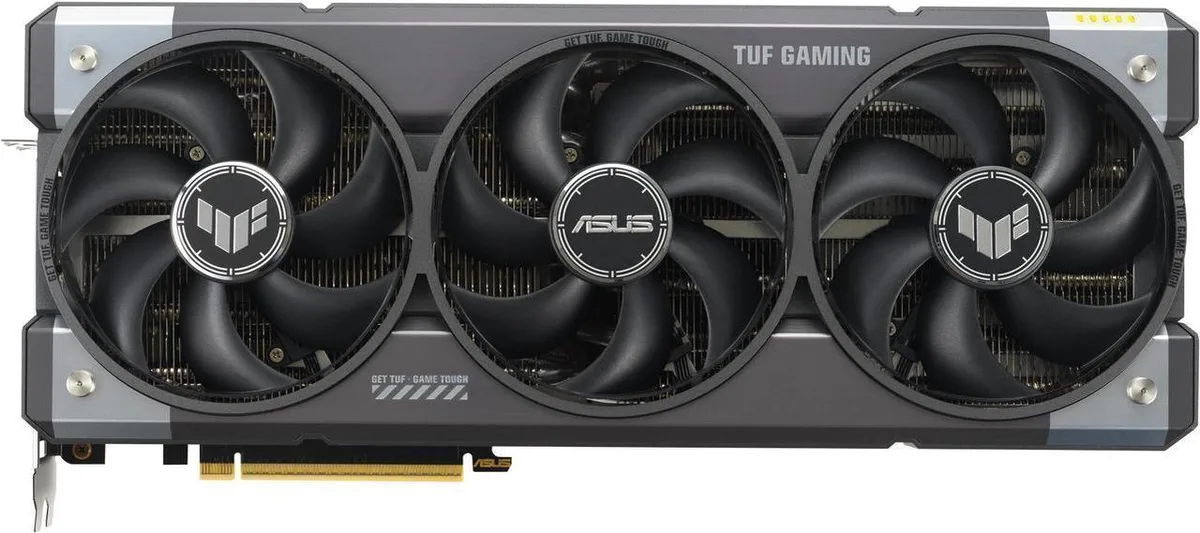


ASUS
Delivers 12 GB GDDR7 memory on a 192-bit bus with a 2640 MHz OC boost clock and 6144 CUDA cores for 4K gaming
This ASUS TUF Gaming GeForce RTX 5070 OC graphics card delivers 12GB of GDDR7 memory on a 192-bit interface with an effective 28 Gbps clock. The Blackwell architecture provides 6144 CUDA cores and supports DirectX 12 Ultimate plus OpenGL 4.6. A PCI Express 5.0 x16 link feeds the GPU, which boosts to 2640 MHz in OC mode or 2610 MHz in default mode. Three DisplayPort 2.1b and two HDMI 2.1b outputs drive up to four displays.
The 12GB frame buffer and 6144 cores suit 1440p high-refresh gaming and entry-level 4K with DLSS 4.0 upscaling. Content creators gain hardware AV1 encode and decode plus CUDA acceleration in supported apps. Builders needing more VRAM for heavy 4K textures or professional GPU compute should consider cards with larger memory buffers. Systems limited to PCIe 4.0 will still work but lose the full 5.0 x16 bandwidth.
A single 16-pin 12VHPWR connector supplies power, so the PSU must provide that cable or a certified adapter. The PCIe 5.0 x16 slot requires a compatible motherboard and CPU platform for maximum throughput. Three DisplayPort 2.1b and two HDMI 2.1b ports free up motherboard video outputs and support multi-monitor layouts without adapters. The dual-slot bracket keeps adjacent expansion slots available for add-in cards.
| Brand | ASUS |
|---|---|
| Series | TUF Gaming |
| Model | TUF-RTX5070-O12G-GAMING |
| Interface | PCI Express 5.0 x16 |
| Chipset Manufacturer | NVIDIA |
| GPU Series | NVIDIA GeForce RTX 50 Series |
| GPU | GeForce RTX 5070 |
| Architecture | Blackwell |
| Boost Clock | OC mode: 2640MHz Default mode: 2610MHz (Boost Clock) |
| CUDA Cores | 6144 |
| Effective Memory Clock | 28 Gbps |
| Memory Size | 12GB |
| Memory Interface | 192-Bit |
| Memory Type | GDDR7 |
| DirectX | DirectX 12 Ultimate |
| OpenGL | OpenGL 4.6 |
| Multi-Monitor Support | 4 |
| HDMI | 2 x HDMI 2.1b |
| DisplayPort | 3 x DisplayPort 2.1b |
| Color | Black |
| Max Resolution | 7680 x 4320 |
| CrossFireX Support | No |
| SLI Support | No |
| Virtual Reality Ready | Yes |
| Cooler | Triple Fans |
| Recommended PSU Wattage | 750W |
| Power Connector | 1 x 16-Pin |
| HDCP Ready | Yes |
| Form Factor | ATX |
| Max GPU Length | 329 mm |
| Card Dimensions (L x H) | 12.95 x 5.51 x 2.46 inch |
| Slot Width | 3.125 Slot |
| Package Contents | 1 x Speedsetup Manual 1 x TUF Graphics Card Holder 1 x TUF Velcro Hook & Loop 1 x TUF Magnet 1 x TUF Gaming Certificate 1 x Thank You Card 1 x Adpater Cable (1 to 2) |
The card draws power through a 12VHPWR connector; ensure your supply includes one or provides a native 12V-2x6 cable rated for the GPU's power target.
Yes, the interface is backward compatible; the RTX 5070 will operate at PCIe 4.0 x16 speeds with negligible bandwidth impact on the 12GB GDDR7 frame buffer.
Open GPU-Z or the ASUS GPU Tweak III overlay while running a 3D load; the sensors tab should report a boost frequency at or near 2640 MHz when the OC profile is active.
Juga di rak ini
Rak yang sama, checkout yang sama — lapan koin kripto dan kunci kadar 30 minit.
Apa yang anda hantar untuk membayar, dan mata wang yang anda guna untuk membaca harga.
Dihantar daripada dompet anda semasa semak keluar
Untuk paparan sahaja — katalog diberi harga dalam USD
Tiada mata wang yang sepadan.
Pilih bahasa yang digunakan oleh laman web ini.
Tiada bahasa yang sepadan.
Pengguna baharu?
Sudah mempunyai akaun?
Tiada set semula automatik: kedai ini tidak menghantar sebarang e-mel, jadi tiada pautan sekali guna untuk diminta. Biarkan alamat pada akaun tersebut, ia akan diuruskan secara manual.
Permintaan direkodkan
Tiada apa-apa akan sampai ke peti masuk anda — kedai ini tidak menghantar sebarang e-mel. Seseorang akan menguruskannya secara manual.
Sudah teringat?



