

SanDisk
SanDisk Cruzer Blade 8 GB USB 2.0 USB flash drive Black SDCZ50-008G-B35
USD 391.99
0.00501023BTC
Ada stokKami menerima kripto — jadi koin yang anda simpan boleh membeli perkakasan sebenar.Bayar dengan kripto, belanjakannya untuk perkakasan sebenar. Penghantaran berinsurans percuma ke seluruh dunia untuk belian melebihi USD 399. Kotak biasa tanpa jenama, dihantar dari Jerman.Penghantaran berinsurans percuma untuk belian melebihi USD 399. Kadar anda dikunci selama 30 minit sebaik sahaja proses pesanan bermula.Kadar dikunci selama 30 minit. Setiap item disegel, nombor sirinya disemak, dan dilindungi waranti 24 bulan.Disegel, waranti 24 bulan.
KHACHIMO
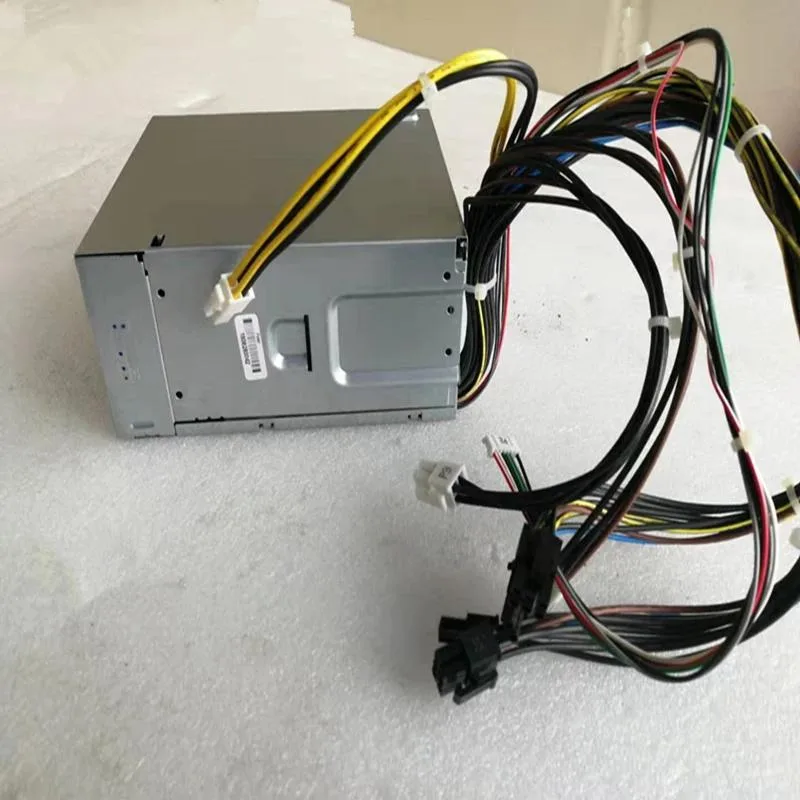
An 80 PLUS Gold ATX power supply delivering 650 W with Modern Standby support, Zero RPM fan mode and LLC resonant topology for silent, efficient operation
This 650W ATX power supply is built for PCs that use Modern Standby sleep states. It suits builders who want fast wake-from-sleep times and high efficiency at low loads. The unit matches part numbers L36048-003, L36049-003 and L57253-003 for direct replacement compatibility.
The 80 PLUS Gold certification means lower power draw, less heat and quieter running under typical loads. A Zero RPM fan mode stops the fan completely at low and medium loads for near-silent operation. Resonant LLC topology with DC-to-DC conversion delivers clean power and reduces coil whine.
This unit provides 650W of continuous power in a standard ATX size. It will not suit systems that require more output or a different physical format such as SFX or TFX. Buyers needing redundant or server-grade features should look elsewhere.
| Type | ATX |
|---|
It guarantees at least 80 percent efficiency at typical loads, reducing waste heat and fan noise while delivering the full 650W.
Standard ATX dimensions fit most mid-tower and full-tower cases with a dedicated PSU mounting bracket.
Align the keyed 4-pin connector with the motherboard socket and press firmly until the latch clicks; forcing it backwards bends pins.
Juga di rak ini
Rak yang sama, checkout yang sama — lapan koin kripto dan kunci kadar 30 minit.
Apa yang anda hantar untuk membayar, dan mata wang yang anda guna untuk membaca harga.
Dihantar daripada dompet anda semasa semak keluar
Untuk paparan sahaja — katalog diberi harga dalam USD
Tiada mata wang yang sepadan.
Pilih bahasa yang digunakan oleh laman web ini.
Tiada bahasa yang sepadan.
Pengguna baharu?
Sudah mempunyai akaun?
Tiada set semula automatik: kedai ini tidak menghantar sebarang e-mel, jadi tiada pautan sekali guna untuk diminta. Biarkan alamat pada akaun tersebut, ia akan diuruskan secara manual.
Permintaan direkodkan
Tiada apa-apa akan sampai ke peti masuk anda — kedai ini tidak menghantar sebarang e-mel. Seseorang akan menguruskannya secara manual.
Sudah teringat?



