

SanDisk
SanDisk Cruzer Blade 8 GB USB 2.0 USB flash drive Black SDCZ50-008G-B35
USD 391.99
0.00502139BTC
Ada stokKami menerima kripto — jadi koin yang anda simpan boleh membeli perkakasan sebenar.Bayar dengan kripto, belanjakannya untuk perkakasan sebenar. Penghantaran berinsurans percuma ke seluruh dunia untuk belian melebihi USD 399. Kotak biasa tanpa jenama, dihantar dari Jerman.Penghantaran berinsurans percuma untuk belian melebihi USD 399. Kadar anda dikunci selama 30 minit sebaik sahaja proses pesanan bermula.Kadar dikunci selama 30 minit. Setiap item disegel, nombor sirinya disemak, dan dilindungi waranti 24 bulan.Disegel, waranti 24 bulan.
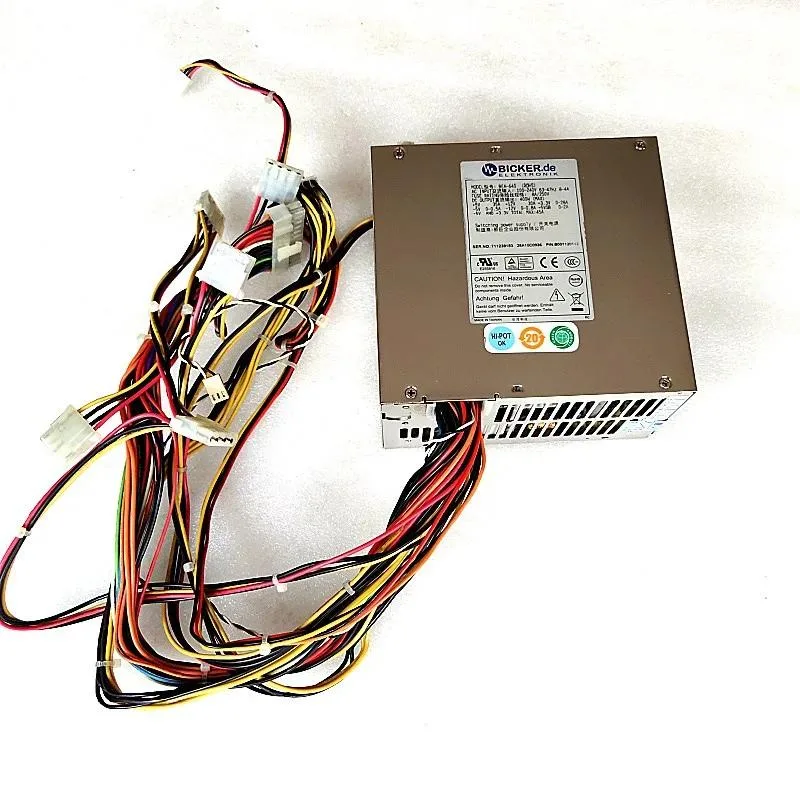
KHACHIMO
A 400 W ATX switching power supply tested for reliable operation in desktop builds
The KHACHIMO BEA-640 is a 400 W ATX power supply built for desktop computers that require a standard mains input. It suits builders assembling or repairing a system with modest power demands. Tested and confirmed working before dispatch.
The unit follows the ATX form factor so it fits regular chassis mounting points and aligns with standard motherboard power headers. Cables reach the mainboard, drive and peripheral connectors without adapters. Good-quality components are used throughout to support stable daily operation.
The continuous 400 W rating is the single figure that determines whether this supply matches your build. Systems with high-end graphics cards or multiple drives will exceed this ceiling and need a higher-capacity unit. Choose this model only when the total component draw stays within 400 W.
| Type | ATX |
|---|
The ATX form factor matches standard ATX cases and motherboards, so the unit fits the usual mounting points and supplies the 24-pin motherboard connector plus CPU and peripheral power leads.
It fits a standard ATX power-supply bay with four rear mounting screws; check your case depth to ensure the 14 cm length clears drive cages or cables.
Secure the unit with all four screws, connect the 24-pin and CPU power cables firmly, then route cables before powering on; the step often missed is seating the 24-pin connector fully until it clicks.
Juga di rak ini
Rak yang sama, checkout yang sama — lapan koin kripto dan kunci kadar 30 minit.
Apa yang anda hantar untuk membayar, dan mata wang yang anda guna untuk membaca harga.
Dihantar daripada dompet anda semasa semak keluar
Untuk paparan sahaja — katalog diberi harga dalam USD
Tiada mata wang yang sepadan.
Pilih bahasa yang digunakan oleh laman web ini.
Tiada bahasa yang sepadan.
Pengguna baharu?
Sudah mempunyai akaun?
Tiada set semula automatik: kedai ini tidak menghantar sebarang e-mel, jadi tiada pautan sekali guna untuk diminta. Biarkan alamat pada akaun tersebut, ia akan diuruskan secara manual.
Permintaan direkodkan
Tiada apa-apa akan sampai ke peti masuk anda — kedai ini tidak menghantar sebarang e-mel. Seseorang akan menguruskannya secara manual.
Sudah teringat?



