

SanDisk
SanDisk Cruzer Blade 8 GB USB 2.0 USB flash drive Black SDCZ50-008G-B35
USD 391.99
0.0050176BTC
Ada stokKami menerima kripto — jadi koin yang anda simpan boleh membeli perkakasan sebenar.Bayar dengan kripto, belanjakannya untuk perkakasan sebenar. Penghantaran berinsurans percuma ke seluruh dunia untuk belian melebihi USD 399. Kotak biasa tanpa jenama, dihantar dari Jerman.Penghantaran berinsurans percuma untuk belian melebihi USD 399. Kadar anda dikunci selama 30 minit sebaik sahaja proses pesanan bermula.Kadar dikunci selama 30 minit. Setiap item disegel, nombor sirinya disemak, dan dilindungi waranti 24 bulan.Disegel, waranti 24 bulan.
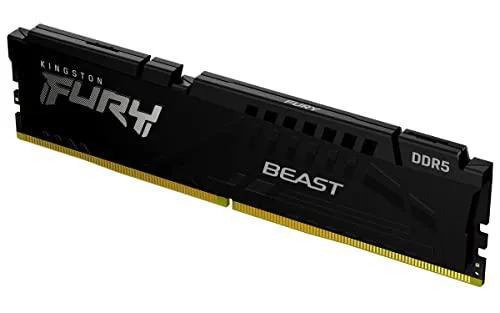

Kingston Technology Corp.
Single 8 GB DDR5 module rated at 5600 MT/s with CL40 latency and Intel XMP 3.0 support
This single 8GB DIMM delivers DDR5 performance at 5600MT/s for mainstream desktop builds and upgrades. It suits users who need a straightforward capacity increase without multi-module kits.
Operating at the standard 1.25V, the unbuffered module runs within JEDEC limits for typical workloads. No extra cooling or voltage headroom is required for the rated 5600MT/s speed.
The kit includes a certified XMP 3.0 profile at CL40 for one-click configuration on compatible Intel 600-series motherboards. Builders without XMP 3.0 support must run at base JEDEC timings instead.
| Brand | Kingston |
|---|---|
| Capacity | 8GB |
| Type | 288-Pin PC RAM |
| Speed | DDR5 5600 (PC5 44800) |
| Voltage | 1.25 |
| BIOS/Performance Profile | Intel XMP 3.0 |
| Berat penghantaran | 0.02 kg |
| Dimensi bungkusan | 127 × 76 × 13 mm |
Align the notch on the module with the slot key, press down firmly until both retention clips click, then enable the Intel XMP 3.0 profile in BIOS so the memory runs at 5600 MT/s instead of the default JEDEC speed.
No routine maintenance is required; keep the contacts clean and ensure case airflow stays adequate. If capacity becomes limiting, add a matching 8GB module rather than mixing speeds or latencies.
The CAS latency of CL40 at 1.25 V sets the timing floor; prolonged heavy use may hit thermal throttling before bandwidth limits, so maintain good airflow around the 5.3-inch DIMM.
Juga di rak ini
Rak yang sama, checkout yang sama — lapan koin kripto dan kunci kadar 30 minit.
Apa yang anda hantar untuk membayar, dan mata wang yang anda guna untuk membaca harga.
Dihantar daripada dompet anda semasa semak keluar
Untuk paparan sahaja — katalog diberi harga dalam USD
Tiada mata wang yang sepadan.
Pilih bahasa yang digunakan oleh laman web ini.
Tiada bahasa yang sepadan.
Pengguna baharu?
Sudah mempunyai akaun?
Tiada set semula automatik: kedai ini tidak menghantar sebarang e-mel, jadi tiada pautan sekali guna untuk diminta. Biarkan alamat pada akaun tersebut, ia akan diuruskan secara manual.
Permintaan direkodkan
Tiada apa-apa akan sampai ke peti masuk anda — kedai ini tidak menghantar sebarang e-mel. Seseorang akan menguruskannya secara manual.
Sudah teringat?



