

SanDisk
SanDisk Cruzer Blade 8 GB USB 2.0 USB flash drive Black SDCZ50-008G-B35
USD 391.99
0.00501202BTC
Ada stokKami menerima kripto — jadi koin yang anda simpan boleh membeli perkakasan sebenar.Bayar dengan kripto, belanjakannya untuk perkakasan sebenar. Penghantaran berinsurans percuma ke seluruh dunia untuk belian melebihi USD 399. Kotak biasa tanpa jenama, dihantar dari Jerman.Penghantaran berinsurans percuma untuk belian melebihi USD 399. Kadar anda dikunci selama 30 minit sebaik sahaja proses pesanan bermula.Kadar dikunci selama 30 minit. Setiap item disegel, nombor sirinya disemak, dan dilindungi waranti 24 bulan.Disegel, waranti 24 bulan.


MSI
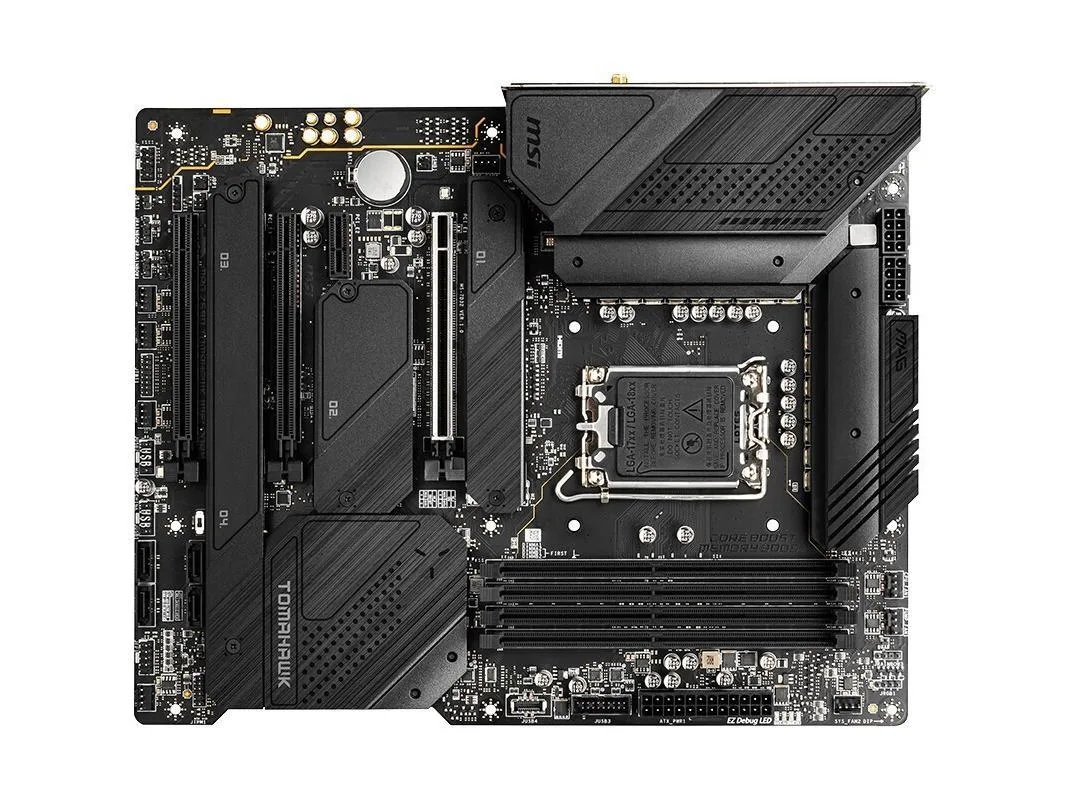
ATX Intel Z690 board for LGA 1700 CPUs with DDR4 to 5200 MHz, 128 GB max, 2.5 Gb LAN and Wi-Fi
The MSI MAG Z690 TOMAHAWK WIFI DDR4 is an ATX motherboard built around the Intel Z690 chipset and the LGA 1700 socket. It accepts 12th Gen Intel Core, Pentium Gold and Celeron CPUs and runs dual-channel DDR4 memory up to 5200 MHz overclocked with a maximum capacity of 128 GB. The board delivers a 2.5 Gbps Intel I225V LAN controller, Realtek ALC4080 7.1-channel audio and a USB 3.2 Gen 2×2 20 Gbps Type-C port on the rear I/O.
This board suits builders who want to reuse existing DDR4 modules or buy affordable DDR4 kits while still gaining Z690 features such as CPU-attached PCIe 5.0 x16 graphics bandwidth and four M.2 interfaces. It is less suited for users who need multiple PCIe 5.0 M.2 slots, because only the primary x16 slot operates at PCIe 5.0 while the chipset-linked M.2 connectors run at PCIe 3.0 x4.
The single specification that decides compatibility is the PCI_E1 slot wired directly to the processor and rated for PCIe 5.0 x16. A graphics card installed here receives the full 5.0 bandwidth, while the remaining two x16-sized slots and the four M.2 interfaces are limited to PCIe 3.0 speeds from the Z690 chipset.
| Brand | MSI |
|---|---|
| Series | MSI MAG Z690 TOMAHAWK WIFI DDR4 |
| Model | MSI MAG Z690 TOMAHAWK WIFI DDR4 |
| CPU Socket Type | LGA 1700 |
| CPU Type | Supports 12th Gen Intel Core™, Pentium Gold and Celeron processors Processor socket LGA1700 |
| Chipset | Intel Z690 |
| Memory Standard | Supports dual-channel DDR4 5200 + (OC) MHz memory |
| Maximum Memory Supported | 128GB |
| PCI Slots | 3x PCIe x16 slots PCI_E1 (From CPU) Support up to PCIe 5.0 x16 PCI_E3 (From Z690 chipset) Support up to PCIe 3.0 x4 PCI_E4 (From Z690 chipset) Support up to PCIe 3.0 x1 1x PCIe 3.0 x1 slot (From Z690 chipset) |
| SATA RAID | 4XM.2 interface, 6xSATA III interface |
| Audio Chipset | Realtek ALC4080 Codec 7.1-Channel High Definition Audio Supports S/PDIF output |
| LAN Chipset | 1x Intel I225V 2.5Gbps LAN controller |
| Onboard USB | Intel Z690 Chipset 1x USB3.2 Gen2x2 20Gbps Type-C port on the back panel 4x USB 3.2 Gen 2 10Gbps ports (1 Type-C internal connector, 3 Type-A ports on the back panel) 4x USB 3.2 Gen 1 5Gbps ports (2 Type-A ports on the back panel, 2 ports through the internal connector) 1x USB 2.0 Type-A port on the back panel Hub-GL850G 5x USB 2.0 ports (1 Type-A port on the back panel, 4 Type-A ports available through internal connectors) |
The motherboard uses an LGA 1700 socket and supports 12th Gen Intel Core, Pentium Gold and Celeron processors.
Yes, the primary PCIe x16 slot runs at PCIe 5.0 x16 from the CPU, while the second and third x16 slots operate at PCIe 3.0 x4 and x1 from the Z690 chipset.
Check Device Manager for the Intel I225V 2.5Gbps controller and the onboard Wi-Fi module, then confirm link speed in the network adapter properties.
Juga di rak ini
Rak yang sama, checkout yang sama — lapan koin kripto dan kunci kadar 30 minit.
Apa yang anda hantar untuk membayar, dan mata wang yang anda guna untuk membaca harga.
Dihantar daripada dompet anda semasa semak keluar
Untuk paparan sahaja — katalog diberi harga dalam USD
Tiada mata wang yang sepadan.
Pilih bahasa yang digunakan oleh laman web ini.
Tiada bahasa yang sepadan.
Pengguna baharu?
Sudah mempunyai akaun?
Tiada set semula automatik: kedai ini tidak menghantar sebarang e-mel, jadi tiada pautan sekali guna untuk diminta. Biarkan alamat pada akaun tersebut, ia akan diuruskan secara manual.
Permintaan direkodkan
Tiada apa-apa akan sampai ke peti masuk anda — kedai ini tidak menghantar sebarang e-mel. Seseorang akan menguruskannya secara manual.
Sudah teringat?



