

SanDisk
SanDisk Cruzer Blade 8 GB USB 2.0 USB flash drive Black SDCZ50-008G-B35
USD 391.99
0.00502532BTC
Ada stokKami menerima kripto — jadi koin yang anda simpan boleh membeli perkakasan sebenar.Bayar dengan kripto, belanjakannya untuk perkakasan sebenar. Penghantaran berinsurans percuma ke seluruh dunia untuk belian melebihi USD 399. Kotak biasa tanpa jenama, dihantar dari Jerman.Penghantaran berinsurans percuma untuk belian melebihi USD 399. Kadar anda dikunci selama 30 minit sebaik sahaja proses pesanan bermula.Kadar dikunci selama 30 minit. Setiap item disegel, nombor sirinya disemak, dan dilindungi waranti 24 bulan.Disegel, waranti 24 bulan.
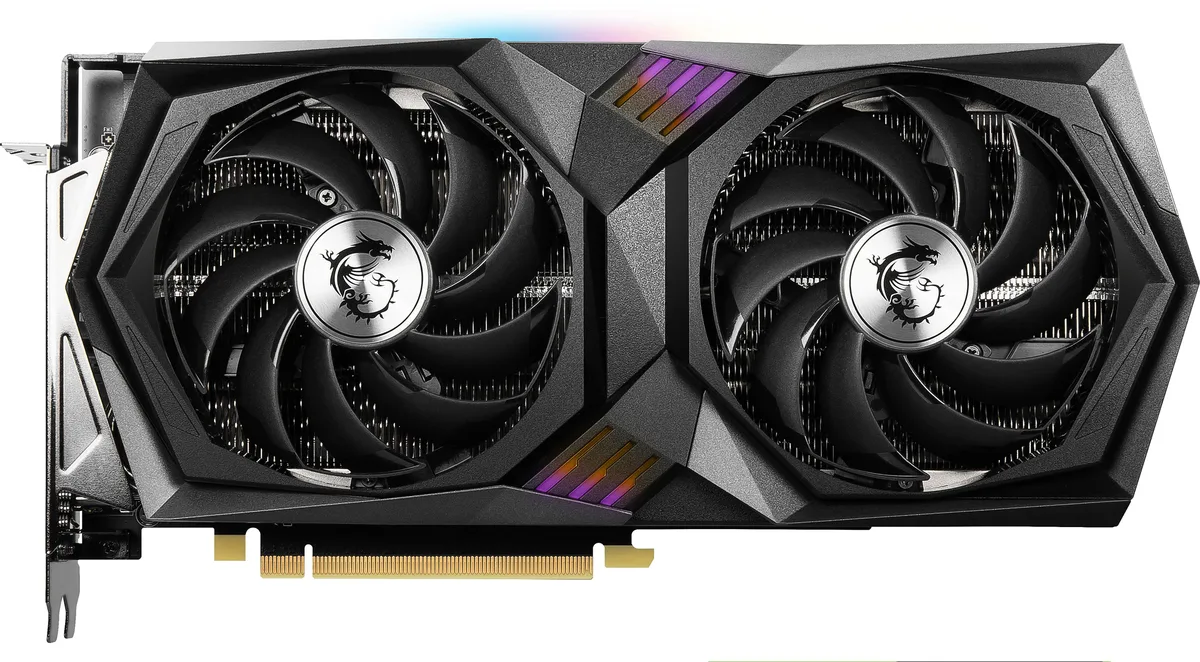


MSI
Refurbished GeForce RTX 3060 with 12GB GDDR6 memory, 3584 CUDA cores and a 1837 MHz boost clock on a 192-bit bus
The MSI RTX 3060 Gaming X 12G is a PCI Express 4.0 graphics card built around the NVIDIA GeForce RTX 3060 GPU. It delivers 3584 CUDA cores and a 1837 MHz boost clock for 1080p and 1440p gaming workloads. The 12GB GDDR6 frame buffer on a 192-bit bus provides ample capacity for modern textures. It suits gamers and creators who need reliable frame rates without moving to a higher tier.
Moving to this 12GB model makes sense when current VRAM limits force texture downgrades or stutter in newer titles. The 15 Gbps memory speed and 3584 CUDA cores lift minimum frame rates over 6GB variants of the same GPU. A 550W power supply and one 6-pin plus one 8-pin connector are required, so verify your PSU before swapping. The jump is worth it when VRAM, not raw compute, is the bottleneck.
The 12GB GDDR6 buffer comfortably handles high-resolution texture packs, multi-monitor setups and VR titles at 7680 x 4320 maximum resolution. Four display outputs — one HDMI 2.1 and three DisplayPort 1.4a — drive up to four screens simultaneously. At 170W TDP the TWIN FROZR 8 cooler with TORX Fan 4.0 keeps thermals in check during extended sessions. Headroom shrinks when ray-traced effects push memory usage past the 12GB ceiling at 4K ultra settings.
| Brand | MSI |
|---|---|
| Series | Gaming |
| Model | RTX 3060 Gaming X 12G |
| Interface | PCI Express 4.0 |
| Chipset Manufacturer | NVIDIA |
| GPU Series | NVIDIA GeForce RTX 30 Series |
| GPU | GeForce RTX 3060 |
| Boost Clock | 1837 MHz |
| CUDA Cores | 3584 |
| Effective Memory Clock | 15 Gbps |
| Memory Size | 12GB |
| Memory Interface | 192-Bit |
| Memory Type | GDDR6 |
| DirectX | DirectX 12 Ultimate |
| OpenGL | OpenGL 4.6 |
| Multi-Monitor Support | 4 |
| HDMI | 1 x HDMI 2.1 |
| DisplayPort | 3 x DisplayPort 1.4a |
| Max Resolution | 7680 x 4320 |
| Virtual Reality Ready | Yes |
| Cooler | Double Fans |
| Thermal Design Power | 170W |
| Recommended PSU Wattage | 550W |
| Power Connector | 1 x 6-Pin, 1 x 8-Pin |
| HDCP Ready | Yes |
| Features | TWIN FROZR 8 Thermal Design: TORX Fan 4.0: A masterpiece of teamwork, fan blades work in pairs to create unprecedented levels of focused air pressure. Core Pipe: Precision-crafted heat pipes ensure max contact to the GPU and spread heat along the full length of the heatsink. Airflow Control: Don't sweat it, Airflow Control guides the air to exactly where it needs to be for maximum cooling. RGB Mystic Light: Mystic Light gives you complete control of the RGB lighting for MSI devices and compatible RGB products. Dragon Center: MSI's exclusive Dragon Center software lets you monitor, tw |
| Max GPU Length | 276 mm |
| Card Dimensions (L x H) | 10.87" x 5.16" |
| Berat penghantaran | 1.61 kg |
| Dimensi bungkusan | 381 × 268 × 83 mm |
The card uses a dual-slot bracket and draws 170W TDP, so your case must accept a dual-slot GPU and your power supply should meet the 550W recommendation.
Attach one 6-pin and one 8-pin PCIe connector from the PSU directly to the card; the frequent error is using a single daisy-chained cable instead of two separate runs.
Re-paste the GPU core and memory pads after roughly three to four years or if temperatures rise noticeably under load.
Juga di rak ini
Rak yang sama, checkout yang sama — lapan koin kripto dan kunci kadar 30 minit.
Apa yang anda hantar untuk membayar, dan mata wang yang anda guna untuk membaca harga.
Dihantar daripada dompet anda semasa semak keluar
Untuk paparan sahaja — katalog diberi harga dalam USD
Tiada mata wang yang sepadan.
Pilih bahasa yang digunakan oleh laman web ini.
Tiada bahasa yang sepadan.
Pengguna baharu?
Sudah mempunyai akaun?
Tiada set semula automatik: kedai ini tidak menghantar sebarang e-mel, jadi tiada pautan sekali guna untuk diminta. Biarkan alamat pada akaun tersebut, ia akan diuruskan secara manual.
Permintaan direkodkan
Tiada apa-apa akan sampai ke peti masuk anda — kedai ini tidak menghantar sebarang e-mel. Seseorang akan menguruskannya secara manual.
Sudah teringat?



