

SanDisk
SanDisk Cruzer Blade 8 GB USB 2.0 USB flash drive Black SDCZ50-008G-B35
USD 391.99
0.00502448BTC
Ada stokKami menerima kripto — jadi koin yang anda simpan boleh membeli perkakasan sebenar.Bayar dengan kripto, belanjakannya untuk perkakasan sebenar. Penghantaran berinsurans percuma ke seluruh dunia untuk belian melebihi USD 399. Kotak biasa tanpa jenama, dihantar dari Jerman.Penghantaran berinsurans percuma untuk belian melebihi USD 399. Kadar anda dikunci selama 30 minit sebaik sahaja proses pesanan bermula.Kadar dikunci selama 30 minit. Setiap item disegel, nombor sirinya disemak, dan dilindungi waranti 24 bulan.Disegel, waranti 24 bulan.


STARTECH
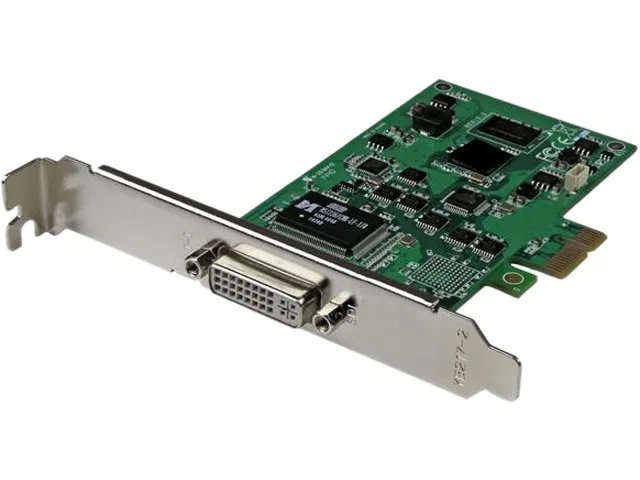
A PCI Express capture card records 1080p video at 30 frames per second from HDMI, DVI, VGA or component sources with H.264 encoding
The StarTech PEXHDCAP2 is a PCI Express capture card that records 1080p video at 30 frames per second with stereo audio. It accepts HDMI, DVI, VGA and component signals through the supplied adapters and breakout cable. H.264 encoding produces compatible files for editing and archiving. The card fits both low-profile and full-profile PCIe slots in workstations or servers.
Install the card into any available PCI Express slot and attach the low-profile bracket if required. Connect the source using the DVI-I to HDMI adapter, DVI-I to VGA adapter or the component breakout cable. Drivers support Windows XP through Windows 10 in 32-bit and 64-bit versions. No external power connection is needed beyond the PCIe slot.
Verify that your system has a free PCI Express slot and that the chassis can accommodate the card height you need. The maximum capture resolution is 1080p at 30 frames per second, so sources delivering higher frame rates will be limited. Ensure your recording software can work with H.264 encoded streams. Buyers needing 60 fps capture or 4K input should consider a different capture solution.
| Brand | StarTech.com |
|---|---|
| Model | PEXHDCAP2 |
| Type | PCI Express to DVI Port |
| External Ports | 1 x PCI Express Male Output |
| Internal Ports | 1 x DVI-I (29 pin) Female Input |
| Operating Systems Supported | Windows 10 (32/64), 8/8.1 (32/64), 7 (32/64), Vista (32/64), XP (32/64) |
| Specifications | Industry Standards NTSC, PAL-M, PAL-60, PAL Video Encoding: MPEG4/H.264 Audio Specifications 16-Bit 48000Hz, HDMI 2Ch Audio or RCA Stereo input Maximum Digital Resolutions 1080p30 Supported Resolutions TV: 1080i/p, 720p, 576i/p, 480i/p PC: 1920 x 1080, 1440 x 900, 1280 x 1024, 1280 x 960, 1280 x 720, 1024 x 768, 800 x 600 Humidity: 20% to 80% (non-condensing) Operating Temperature: 0 to 40 degree centigrade Storage Temperature: -5 to 40 degree centigrade |
| Features | Support for HDMI, DVI, VGA, and component input sources, lets you record from virtually any device H.264 encoding ensures wide device compatibility with exported video files Brilliant picture quality with support for capturing resolutions up to 1080p at 30 frames per second Dual profile card with low-profile and full-profile brackets included NTSC and PAL systems supported Supports 16:9 and 4:3 aspect ratio Supports 2-channel stereo audio (HDMI / RCA) |
| Dimensions | 0.80" x 4.70" x 4.70" |
| Weight | 2.00 oz. |
| Package Contents | 1 x PCIe video capture card 1 x DVI-D to HDMI adapter 1 x DVI-I to VGA adapter 1 x DVI-I breakout cable 1 x low profile bracket 1 x quick install guide |
| Berat penghantaran | 0.91 kg |
| Dimensi bungkusan | 305 × 229 × 102 mm |
Open the supplied capture software, start a preview from your source and verify the status panel shows 1080p at 30 frames per second with H.264 selected; a test recording should play back smoothly at that resolution.
The box contains the PCIe capture card, a DVI-D to HDMI adapter, a DVI-I to VGA adapter, a DVI-I breakout cable for component, a low-profile bracket and a quick install guide — no extra cables are required for the listed inputs.
Use the included low-profile bracket; the card is designed to fit both low-profile and full-profile PCIe slots, and the low-profile bracket is the correct height for 2U or 4U rack chassis.
Juga di rak ini
Rak yang sama, checkout yang sama — lapan koin kripto dan kunci kadar 30 minit.
Apa yang anda hantar untuk membayar, dan mata wang yang anda guna untuk membaca harga.
Dihantar daripada dompet anda semasa semak keluar
Untuk paparan sahaja — katalog diberi harga dalam USD
Tiada mata wang yang sepadan.
Pilih bahasa yang digunakan oleh laman web ini.
Tiada bahasa yang sepadan.
Pengguna baharu?
Sudah mempunyai akaun?
Tiada set semula automatik: kedai ini tidak menghantar sebarang e-mel, jadi tiada pautan sekali guna untuk diminta. Biarkan alamat pada akaun tersebut, ia akan diuruskan secara manual.
Permintaan direkodkan
Tiada apa-apa akan sampai ke peti masuk anda — kedai ini tidak menghantar sebarang e-mel. Seseorang akan menguruskannya secara manual.
Sudah teringat?



