

ASUS
ASUS CR1104FTA-YZ84T Chromebook 11.6" Touch N150 8GB 64GB Mineral Gray
- 11.6"
414,99 USD
0.00528441BTC
Yra sandėlyjePriimame kriptovaliutą — taip monetos, kurias turite, gali nupirkti tikrą techniką.Mokėkite kriptovaliuta, išleiskite ją tikrai technikai. Nemokamas apdraustas pristatymas visame pasaulyje virš 399 $. Paprastos, be žymų siuntos dėžės, siunčiamos iš Vokietijos.Nemokamas apdraustas pristatymas virš 399 $. Jūsų kursas fiksuojamas 30 minučių, kai tik prasideda atsiskaitymas.Kursas fiksuojamas 30 minučių. Kiekvienas gaminys užplombuotas, jo serijos numeris patikrintas, ir jam taikoma 24 mėnesių garantija.Užplombuota, 24 mėnesių garantija.


HP
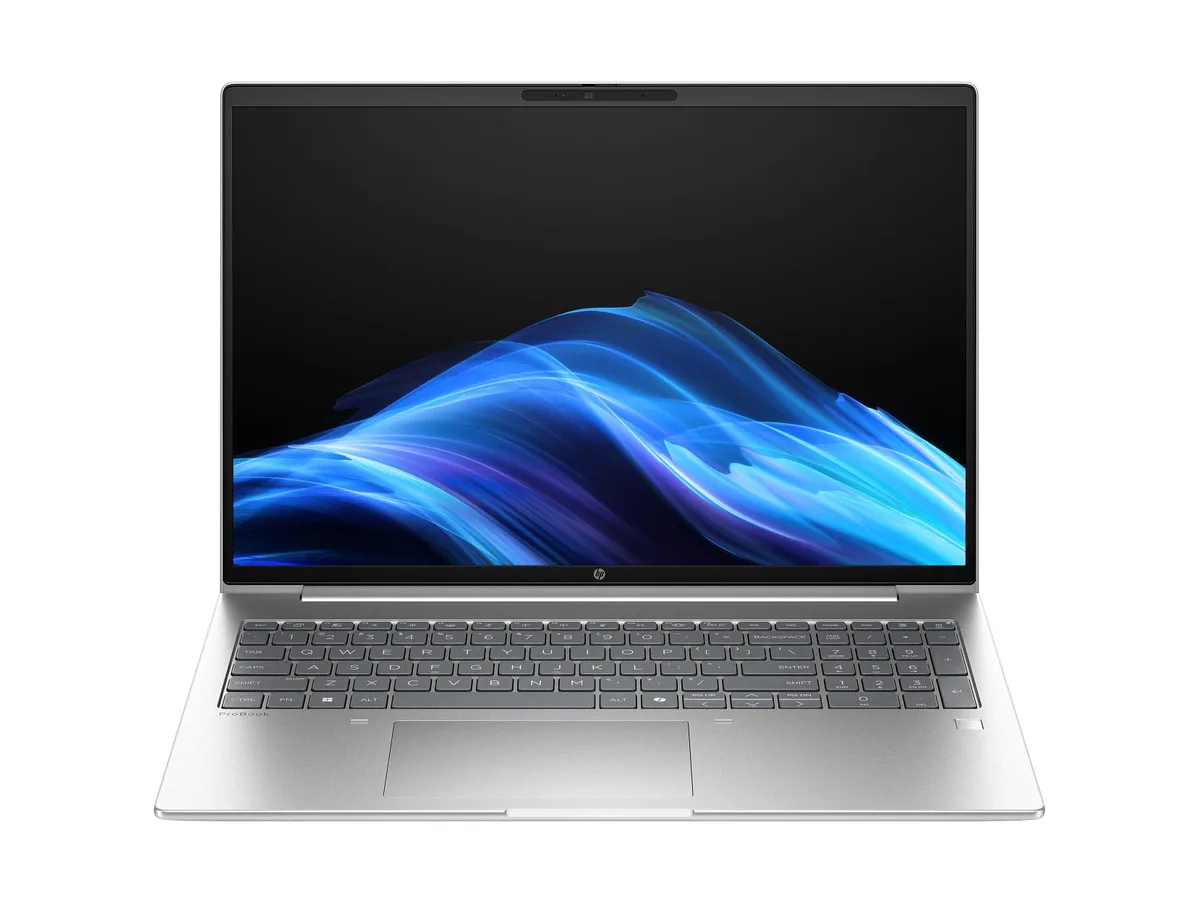
A 16-inch WUXGA touch laptop with an AMD Ryzen 7 250 processor, 24 GB DDR5 memory, and a 1 TB drive running Windows 11 Pro
The HP ProBook 4 G1a is a 16-inch business laptop built around an AMD Ryzen 7 250 processor with 8 cores and a 5.1 GHz boost clock. It ships with Windows 11 Pro, 24 GB of DDR5-5600 memory in a single module, and a 1 TB solid-state drive. Integrated AMD Radeon 780M graphics drive the 1920 x 1200 WUXGA touchscreen, which offers an anti-glare IPS surface rated at 300 nits and 62.5% sRGB coverage. A 5 MP IR webcam and Poly Studio audio with dual speakers and dual microphones support video conferencing.
This configuration suits professionals who need a responsive touchscreen for annotation, presentations, or touch-based workflows in a 16:10 format. The single memory module leaves one slot free for future expansion, and the 56 Whr battery targets all-day mobility. Buyers who require dedicated graphics performance for 3D rendering, video editing, or gaming should look at systems with discrete GPUs. Users needing factory-calibrated wide-gamut colour for creative work will find the 62.5% sRGB panel limiting.
The defining specification is the 16-inch WUXGA touch panel with IPS, anti-glare coating, and 300-nit brightness. If a touchscreen is essential for your daily tasks — signing documents, sketching, or navigating touch-optimised apps — this display delivers that capability in a business chassis. If you never use touch input, a non-touch model with the same processor and memory will offer a similar experience at potentially lower cost or weight.
| Brand | HP |
|---|---|
| Part Number | D6DS5UA#ABA |
| Color | Silver |
| Operating System | Windows 11 Pro |
| CPU Type | AMD Ryzen 7 |
| Screen Size | 16.0" |
| GPU/VPU | AMD Radeon 780M Graphics |
| Graphic Type | Integrated Card |
| WLAN | MediaTek Wi-Fi 7 MT7925 (2x2) and Bluetooth® 5.4 wireless card |
| Bluetooth | Bluetooth® 5.4 |
| Audio Ports | Audio by Poly Studio, dual stereo speakers, dual array microphones |
| Webcam | 5 MP IR camera |
| Type | Work / Business |
| Battery | 3-cell Lithium Ion |
| Battery Life | 56 Whr |
| Dimensions (W x D x H) | 14.15 x 9.88 x 0.43 in (front); 14.15 x 9.88 x 0.67 in (rear) |
| Weight | 3.8600 lb |
The built-in 16-inch IPS panel runs at 1920 x 1200 with touch support and 300 nits brightness.
It measures 14.15 x 9.88 x 0.43 in at the front, 0.67 in at the rear, and weighs 3.8600 lb.
Remove the base cover, insert the new DDR5 stick at 30 degrees until it clicks, then press flat — do not force it straight down.
Taip pat šiame skyriuje
Ta pati lentyna, tas pats atsiskaitymas — aštuonios monetos ir 30 minučių fiksuotas kursas.
Tai, kuo mokate, ir valiuta, kuria matote kainas.
Išsiunčiama iš Jūsų piniginės atsiskaitant
Tik rodoma — katalogo kainos nurodytos doleriais
Tokios valiutos nerasta.
Pasirinkite kalbą, kuria Jums kalbės svetainė.
Tokios kalbos nerasta.
Pirmą kartą čia?
Jau turite paskyrą?
Automatinio atstatymo nėra: ši parduotuvė nesiunčia jokių el. laiškų, todėl nėra jokios vienkartinės nuorodos, kurios būtų galima paprašyti. Palikite adresą paskyroje, ir juo bus pasirūpinta rankiniu būdu.
Prašymas užfiksuotas
Į Jūsų pašto dėžutę niekas nekeliauja — ši parduotuvė apskritai nesiunčia jokių el. laiškų. Šiuos prašymus kažkas peržiūri rankiniu būdu.
Prisiminėte?


