Logitech
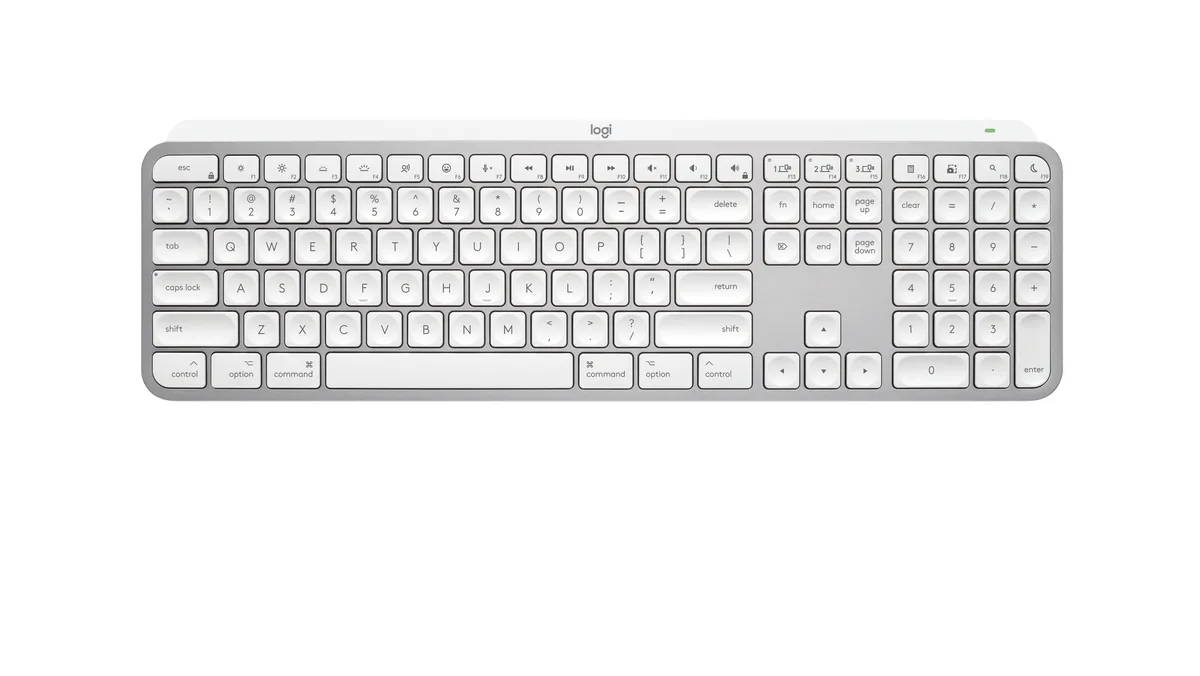
Logitech MX Keys Mini for Mac 920-012644 keyboard
- Bluetooth
- Compact
83,99 USD98,99 USD−15%
0.00106934BTC
Yra sandėlyjePriimame kriptovaliutą — taip monetos, kurias turite, gali nupirkti tikrą techniką.Mokėkite kriptovaliuta, išleiskite ją tikrai technikai. Nemokamas apdraustas pristatymas visame pasaulyje virš 399 $. Paprastos, be žymų siuntos dėžės, siunčiamos iš Vokietijos.Nemokamas apdraustas pristatymas virš 399 $. Jūsų kursas fiksuojamas 30 minučių, kai tik prasideda atsiskaitymas.Kursas fiksuojamas 30 minučių. Kiekvienas gaminys užplombuotas, jo serijos numeris patikrintas, ir jam taikoma 24 mėnesių garantija.Užplombuota, 24 mėnesių garantija.


Logitech
Full-size Bluetooth keyboard with Mac layout, backlit keys and USB-C rechargeable battery lasting up to 10 days or 5 months without backlight
Size Full-Size
The MX Keys S for Mac uses a full-size layout with Apple-specific key legends and Space Grey finish that matches MacBook Pro, MacBook Air, iMac and iPad aesthetics. It connects via Bluetooth Low Energy and requires macOS 10.15 or later, iOS 14 or later, or iPadOS 14 or later. The keyboard is engineered for Intel Evo laptops and also works with the optional Logi Bolt USB receiver. Buyers who need a Windows key layout or mechanical switches should look elsewhere.
A 1500 mAh rechargeable Li-Po battery delivers up to 10 days of use with backlighting active or up to 5 months with the backlight off. Keys illuminate automatically when hands approach and adjust brightness to ambient conditions. The low-profile 20.5 mm depth and 5.18 in height keep the typing angle comfortable for long sessions. No numeric rating for noise or power draw is provided by the manufacturer.
The Logi Options+ app adds Smart Actions that let a single keystroke trigger multi-step workflows across macOS. Lighting behaviour, key assignments and cross-device switching between up to three paired Apple products are managed in the same software. The box contains only the keyboard, a USB-C to USB-C charging cable and user documentation. No Logi Bolt receiver, mouse or palm rest is included.
| Brand | Logitech |
|---|---|
| Model | MX Keys S for Mac |
| Part Number | 920-011621 |
| Keyboard Interface | Bluetooth |
| Design Style | Standard |
| Layout | Full-size |
| Palm Rest | No |
| Mechanical Keyboard | No |
| Key Switch | No |
| Backlit | Yes |
| Keyboard Color | Space Gray |
| Dimensions | Height: 5.18 in (131.63 mm) Width: 16.94 in (430.2 mm) Depth: 0.81 in (20.5 mm) Weight: 28.57 oz (810 g) |
| Type | Bluetooth Wireless |
| Mouse Included | No |
| Power Source | Rechargeable Li-Po (1500 mAh) battery |
| Operating Time | up to 10 days or up to 5 months with backlighting off |
| Distance | 33-ft (10 m) |
| Operating System Supported | Bluetooth Low Energy Required: Bluetooth Low Energy Technology Engineered for Intel® Evo™ Laptops macOS 10.15 or later iOS 14 or later iPadOS 14 or later Compatible with Logi Bolt USB Receiver (not included) Not compatible with other Logitech USB receivers. |
| Features | Advanced Wireless Illuminated Keyboard |
| Package Contents | Keyboard USB-C charging cable (USB-C to USB-C) User documentation |
| Siuntos svoris | 1.02 kg |
| Pakuotės dydis | 447 × 147 × 41 mm |
Kiti šio modelio variantai
Ta pati šeima, bet skiriasi atmintis, aušintuvas ar dažnis — palyginkite prieš apsispręsdami.
Enable Bluetooth on your Mac running macOS 10.15 or later, open System Settings, select the keyboard when it appears, then confirm the numeric code on the keyboard itself — skipping the on-keyboard confirmation is the step most people miss.
The built-in 1500 mAh Li-Po battery is not user-replaceable; after several hundred charge cycles its capacity drops, so the whole keyboard eventually needs replacing rather than a simple cell swap.
Proximity sensors extinguish the backlight a few seconds after hands leave the 430.2 mm key area; it relights instantly when hands return, so sustained typing keeps it on while pauses save power.
Taip pat šiame skyriuje
Ta pati lentyna, tas pats atsiskaitymas — aštuonios monetos ir 30 minučių fiksuotas kursas.
Tai, kuo mokate, ir valiuta, kuria matote kainas.
Išsiunčiama iš Jūsų piniginės atsiskaitant
Tik rodoma — katalogo kainos nurodytos doleriais
Tokios valiutos nerasta.
Pasirinkite kalbą, kuria Jums kalbės svetainė.
Tokios kalbos nerasta.
Pirmą kartą čia?
Jau turite paskyrą?
Automatinio atstatymo nėra: ši parduotuvė nesiunčia jokių el. laiškų, todėl nėra jokios vienkartinės nuorodos, kurios būtų galima paprašyti. Palikite adresą paskyroje, ir juo bus pasirūpinta rankiniu būdu.
Prašymas užfiksuotas
Į Jūsų pašto dėžutę niekas nekeliauja — ši parduotuvė apskritai nesiunčia jokių el. laiškų. Šiuos prašymus kažkas peržiūri rankiniu būdu.
Prisiminėte?