Logitech
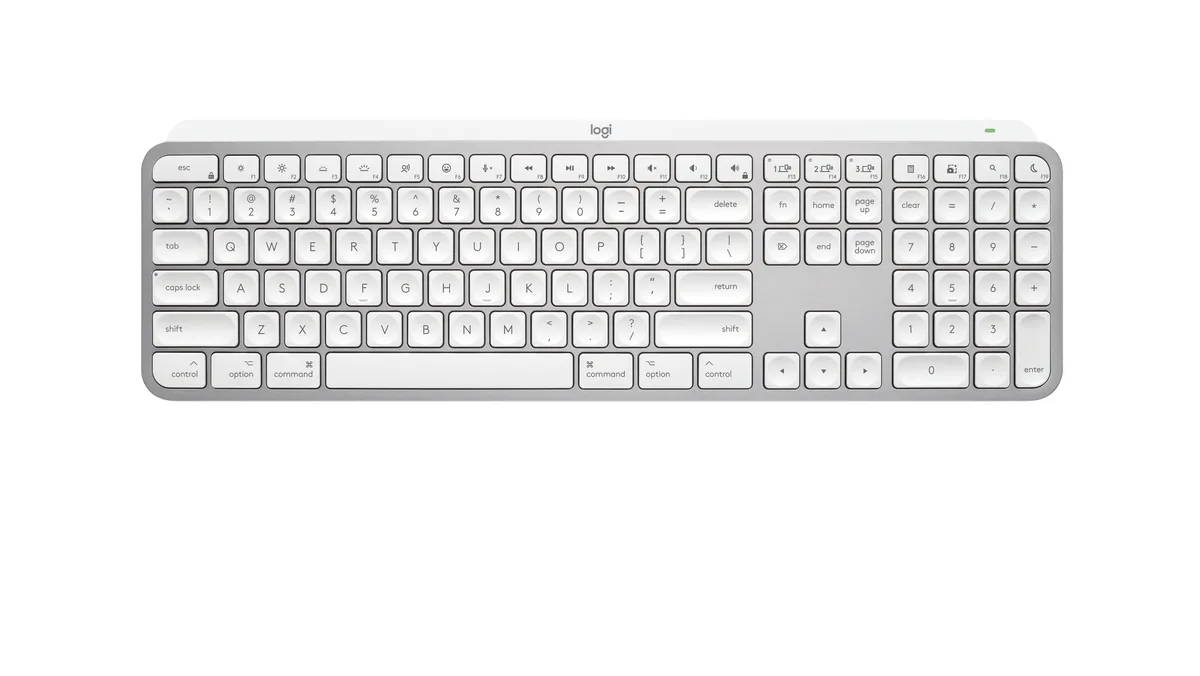
Logitech MX Keys Mini for Mac 920-012644 keyboard
- Bluetooth
- Compact
US$83.99US$98.99−15%
0.00106462BTC
現貨


Logitech
Full-size Bluetooth keyboard with Mac layout, backlit keys and USB-C rechargeable battery lasting up to 10 days or 5 months without backlight
Size Full-Size
The MX Keys S for Mac uses a full-size layout with Apple-specific key legends and Space Grey finish that matches MacBook Pro, MacBook Air, iMac and iPad aesthetics. It connects via Bluetooth Low Energy and requires macOS 10.15 or later, iOS 14 or later, or iPadOS 14 or later. The keyboard is engineered for Intel Evo laptops and also works with the optional Logi Bolt USB receiver. Buyers who need a Windows key layout or mechanical switches should look elsewhere.
A 1500 mAh rechargeable Li-Po battery delivers up to 10 days of use with backlighting active or up to 5 months with the backlight off. Keys illuminate automatically when hands approach and adjust brightness to ambient conditions. The low-profile 20.5 mm depth and 5.18 in height keep the typing angle comfortable for long sessions. No numeric rating for noise or power draw is provided by the manufacturer.
The Logi Options+ app adds Smart Actions that let a single keystroke trigger multi-step workflows across macOS. Lighting behaviour, key assignments and cross-device switching between up to three paired Apple products are managed in the same software. The box contains only the keyboard, a USB-C to USB-C charging cable and user documentation. No Logi Bolt receiver, mouse or palm rest is included.
| Brand | Logitech |
|---|---|
| Model | MX Keys S for Mac |
| Part Number | 920-011621 |
| Keyboard Interface | Bluetooth |
| Design Style | Standard |
| Layout | Full-size |
| Palm Rest | No |
| Mechanical Keyboard | No |
| Key Switch | No |
| Backlit | Yes |
| Keyboard Color | Space Gray |
| Dimensions | Height: 5.18 in (131.63 mm) Width: 16.94 in (430.2 mm) Depth: 0.81 in (20.5 mm) Weight: 28.57 oz (810 g) |
| Type | Bluetooth Wireless |
| Mouse Included | No |
| Power Source | Rechargeable Li-Po (1500 mAh) battery |
| Operating Time | up to 10 days or up to 5 months with backlighting off |
| Distance | 33-ft (10 m) |
| Operating System Supported | Bluetooth Low Energy Required: Bluetooth Low Energy Technology Engineered for Intel® Evo™ Laptops macOS 10.15 or later iOS 14 or later iPadOS 14 or later Compatible with Logi Bolt USB Receiver (not included) Not compatible with other Logitech USB receivers. |
| Features | Advanced Wireless Illuminated Keyboard |
| Package Contents | Keyboard USB-C charging cable (USB-C to USB-C) User documentation |
| 出貨重量 | 1.02 kg |
| 包裝尺寸 | 447 × 147 × 41 mm |
其他版本
同系列產品,記憶體、散熱器或時脈不同 — 下單前請先比較。
Enable Bluetooth on your Mac running macOS 10.15 or later, open System Settings, select the keyboard when it appears, then confirm the numeric code on the keyboard itself — skipping the on-keyboard confirmation is the step most people miss.
The built-in 1500 mAh Li-Po battery is not user-replaceable; after several hundred charge cycles its capacity drops, so the whole keyboard eventually needs replacing rather than a simple cell swap.
Proximity sensors extinguish the backlight a few seconds after hands leave the 430.2 mm key area; it relights instantly when hands return, so sustained typing keeps it on while pauses save power.
同類商品
同一分類,同一套結帳流程 — 支援八種加密貨幣,匯率鎖定 30 分鐘。
您支付所用的幣種,以及查看價格所用的貨幣。
結帳時由您的錢包發送
僅供顯示 — 商品目錄以美元計價
查無符合的貨幣。
請選擇網站使用的語言。
查無符合的語言。
初次造訪?
已經有帳戶了嗎?
本店沒有自動重設密碼的機制:由於不寄送電子郵件,也就沒有一次性連結可供申請。只要將地址留在帳戶中,之後將由專人處理。
請求已收到
不會有任何郵件寄到您的信箱 — 本商店完全不寄送電子郵件。會有人親自處理這些申請。
想起來了嗎?