Logitech
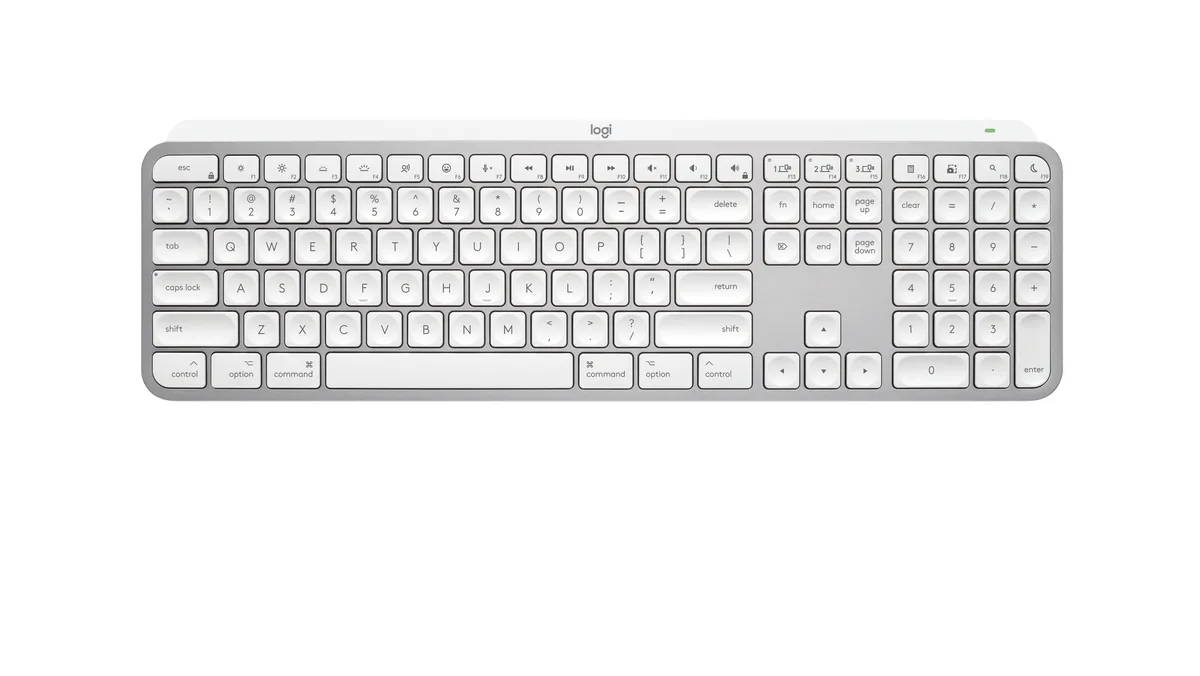
Logitech MX Keys Mini for Mac 920-012644 keyboard
- Bluetooth
- Compact
83,99 $98,99 $−15%
0.00107041BTC
VarastossaHyväksymme kryptoa — hallussasi olevat kolikot voivat näin ostaa oikeaa laitteistoa.Maksa kryptolla, käytä se oikeaan laitteistoon. Ilmainen vakuutettu toimitus maailmanlaajuisesti yli 399 $. Neutraalit, tuotemerkittömät ulkopakkaukset, lähetetään Saksasta.Ilmainen vakuutettu toimitus yli 399 $. Kurssisi lukitaan 30 minuutiksi heti, kun kassa avautuu.Kurssi lukittu 30 minuutiksi. Jokainen tuote on sinetöity, sen sarjanumero on tarkistettu, ja sillä on 24 kuukauden takuu.Sinetöity, 24 kuukauden takuu.


Logitech
Full-size Bluetooth keyboard with Mac layout, backlit keys and USB-C rechargeable battery lasting up to 10 days or 5 months without backlight
Size Full-Size
The MX Keys S for Mac uses a full-size layout with Apple-specific key legends and Space Grey finish that matches MacBook Pro, MacBook Air, iMac and iPad aesthetics. It connects via Bluetooth Low Energy and requires macOS 10.15 or later, iOS 14 or later, or iPadOS 14 or later. The keyboard is engineered for Intel Evo laptops and also works with the optional Logi Bolt USB receiver. Buyers who need a Windows key layout or mechanical switches should look elsewhere.
A 1500 mAh rechargeable Li-Po battery delivers up to 10 days of use with backlighting active or up to 5 months with the backlight off. Keys illuminate automatically when hands approach and adjust brightness to ambient conditions. The low-profile 20.5 mm depth and 5.18 in height keep the typing angle comfortable for long sessions. No numeric rating for noise or power draw is provided by the manufacturer.
The Logi Options+ app adds Smart Actions that let a single keystroke trigger multi-step workflows across macOS. Lighting behaviour, key assignments and cross-device switching between up to three paired Apple products are managed in the same software. The box contains only the keyboard, a USB-C to USB-C charging cable and user documentation. No Logi Bolt receiver, mouse or palm rest is included.
| Brand | Logitech |
|---|---|
| Model | MX Keys S for Mac |
| Part Number | 920-011621 |
| Keyboard Interface | Bluetooth |
| Design Style | Standard |
| Layout | Full-size |
| Palm Rest | No |
| Mechanical Keyboard | No |
| Key Switch | No |
| Backlit | Yes |
| Keyboard Color | Space Gray |
| Dimensions | Height: 5.18 in (131.63 mm) Width: 16.94 in (430.2 mm) Depth: 0.81 in (20.5 mm) Weight: 28.57 oz (810 g) |
| Type | Bluetooth Wireless |
| Mouse Included | No |
| Power Source | Rechargeable Li-Po (1500 mAh) battery |
| Operating Time | up to 10 days or up to 5 months with backlighting off |
| Distance | 33-ft (10 m) |
| Operating System Supported | Bluetooth Low Energy Required: Bluetooth Low Energy Technology Engineered for Intel® Evo™ Laptops macOS 10.15 or later iOS 14 or later iPadOS 14 or later Compatible with Logi Bolt USB Receiver (not included) Not compatible with other Logitech USB receivers. |
| Features | Advanced Wireless Illuminated Keyboard |
| Package Contents | Keyboard USB-C charging cable (USB-C to USB-C) User documentation |
| Lähetyspaino | 1.02 kg |
| Pakkauksen mitat | 447 × 147 × 41 mm |
Tämän mallin muut versiot
Sama tuoteperhe, eri muisti, jäähdytin tai kellotaajuus — vertaile ennen päätöstä.
Enable Bluetooth on your Mac running macOS 10.15 or later, open System Settings, select the keyboard when it appears, then confirm the numeric code on the keyboard itself — skipping the on-keyboard confirmation is the step most people miss.
The built-in 1500 mAh Li-Po battery is not user-replaceable; after several hundred charge cycles its capacity drops, so the whole keyboard eventually needs replacing rather than a simple cell swap.
Proximity sensors extinguish the backlight a few seconds after hands leave the 430.2 mm key area; it relights instantly when hands return, so sustained typing keeps it on while pauses save power.
Myös tällä osastolla
Sama osasto, sama kassa — kahdeksan kryptovaluuttaa ja 30 minuutin kurssilukko.
Valuutta, jolla maksetaan, sekä valuutta, jossa hinnat näytetään.
Lähetetään lompakostasi kassalla
Vain näyttöä varten — hinnat ovat Yhdysvaltain dollareissa
Valuuttaa ei löytynyt.
Valitse kieli, jolla sivusto puhuu sinulle.
Ei vastaavaa kieltä.
Uusi täällä?
Onko sinulla jo tili?
Automaattista palautusta ei ole: kauppa ei lähetä sähköpostia lainkaan, joten kertakäyttöistä linkkiä ei ole mistä pyytää. Jätä osoite tilille, niin se käsitellään käsin.
Pyyntö kirjattu
Mikään ei ole tulossa sähköpostiisi — tämä kauppa ei lähetä sähköpostia lainkaan. Joku käsittelee nämä pyynnöt käsin.
Muistitko sen?