
SAMSUNG
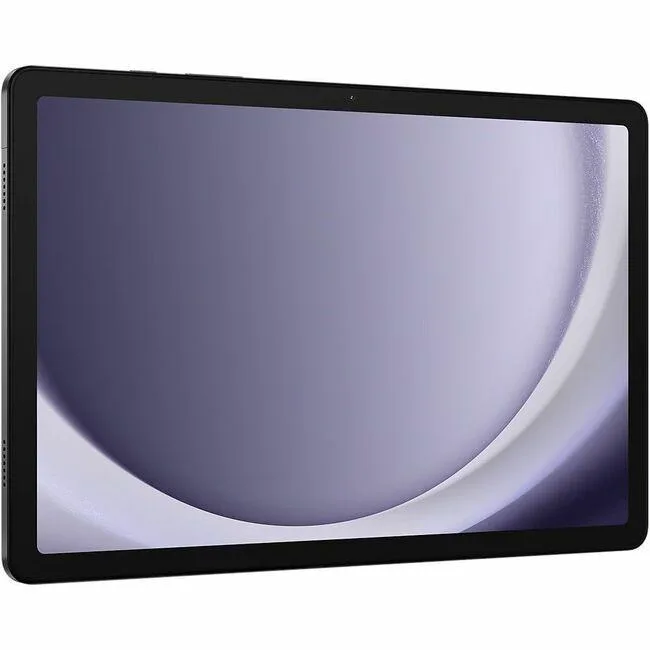
SAMSUNG SM-X210NZAEXAR Galaxy Tab A9+ tablet 11" 8GB 128GB Graphite
- Graphite
- Android 14
202,99 USD247,99 USD−18%
0.00259661BTC
Yra sandėlyjePriimame kriptovaliutą — taip monetos, kurias turite, gali nupirkti tikrą techniką.Mokėkite kriptovaliuta, išleiskite ją tikrai technikai. Nemokamas apdraustas pristatymas visame pasaulyje virš 399 $. Paprastos, be žymų siuntos dėžės, siunčiamos iš Vokietijos.Nemokamas apdraustas pristatymas virš 399 $. Jūsų kursas fiksuojamas 30 minučių, kai tik prasideda atsiskaitymas.Kursas fiksuojamas 30 minučių. Kiekvienas gaminys užplombuotas, jo serijos numeris patikrintas, ir jam taikoma 24 mėnesių garantija.Užplombuota, 24 mėnesių garantija.


SAMSUNG
An 11-inch Android 14 tablet with 90Hz WUXGA display, Snapdragon 69 processor, 4GB RAM and 64GB storage
Screen Size 11.0"
Perbrauktos versijos egzistuoja, bet šiame sandėlyje jų nėra.
Built-in Storage 64GB
The Samsung Galaxy Tab A9+ is an 11-inch tablet running Android 14 with a WUXGA display at 1920 x 1200 resolution. It uses a Qualcomm Snapdragon 69 processor paired with 4GB of RAM and 64GB of built-in storage. The graphite metal body measures 257.1 x 6.9 x 168.7 mm and houses a 7,040mAh battery. Connectivity includes dual-band 802.11 Wi-Fi and Bluetooth v5.1.
This model suits users who want a slim 90Hz screen for reading, video playback and casual multitasking with split-screen support. The 4GB RAM and 64GB storage limit heavy multitasking and large local libraries. Buyers who need more storage or memory for demanding apps should look at configurations with higher capacities. The single USB 2.0 port restricts high-speed peripheral use.
The tablet provides a 480-nit display and Dolby Atmos speakers for media consumption without external hardware. An 8.0 MP rear camera and 5.0 MP front camera handle video calls and basic photography. MicroSD expansion up to 1TB frees internal space for offline files. The USB 2.0 port charges the battery and connects basic accessories, while wireless standards cover network and accessory pairing.
| Brand | SAMSUNG |
|---|---|
| Series | Galaxy Tab |
| Model | A9+ |
| Part Number | SM-X210NZAAXAR |
| Color | Graphite |
| Operating System | Android 14 |
| CPU Type | Qualcomm |
| Screen Size | 11" |
| Display Type | WUXGA |
| Resolution | 1920 x 1200 |
| Webcam | Yes |
| Front-Facing Camera | 5.0 MP |
| Rear Camera | 8.0 MP |
| Built-in Storage | 64GB |
| Memory | 4GB |
| WLAN | 802.11 a/b/g/n/ac 2.4G+5GHz, VHT80 |
| Bluetooth | Bluetooth v5.1 |
| USB | 1 x USB 2.0/1.1 |
| Battery | 7,040mAh |
| Dimensions (W x D x H) | 257.1 x 6.9 x 168.7 mm |
| Weight | 1.06 lbs |
| Siuntos svoris | 0.75 kg |
| Pakuotės dydis | 264 × 175 × 28 mm |
Kiti šio modelio variantai
Ta pati šeima, bet skiriasi atmintis, aušintuvas ar dažnis — palyginkite prieš apsispręsdami.
The tablet accepts a microSD card up to 1TB, so you can add one if you want more space beyond the built-in 64GB.
Yes, the tablet supports 802.11 a/b/g/n/ac on both 2.4GHz and 5GHz bands, so it works with older 2.4GHz routers.
Open Settings, go to Motion smoothness or Display, and verify the High refresh rate option is selected for the 90Hz panel.
Taip pat šiame skyriuje
Ta pati lentyna, tas pats atsiskaitymas — aštuonios monetos ir 30 minučių fiksuotas kursas.
Tai, kuo mokate, ir valiuta, kuria matote kainas.
Išsiunčiama iš Jūsų piniginės atsiskaitant
Tik rodoma — katalogo kainos nurodytos doleriais
Tokios valiutos nerasta.
Pasirinkite kalbą, kuria Jums kalbės svetainė.
Tokios kalbos nerasta.
Pirmą kartą čia?
Jau turite paskyrą?
Automatinio atstatymo nėra: ši parduotuvė nesiunčia jokių el. laiškų, todėl nėra jokios vienkartinės nuorodos, kurios būtų galima paprašyti. Palikite adresą paskyroje, ir juo bus pasirūpinta rankiniu būdu.
Prašymas užfiksuotas
Į Jūsų pašto dėžutę niekas nekeliauja — ši parduotuvė apskritai nesiunčia jokių el. laiškų. Šiuos prašymus kažkas peržiūri rankiniu būdu.
Prisiminėte?


