
SAMSUNG
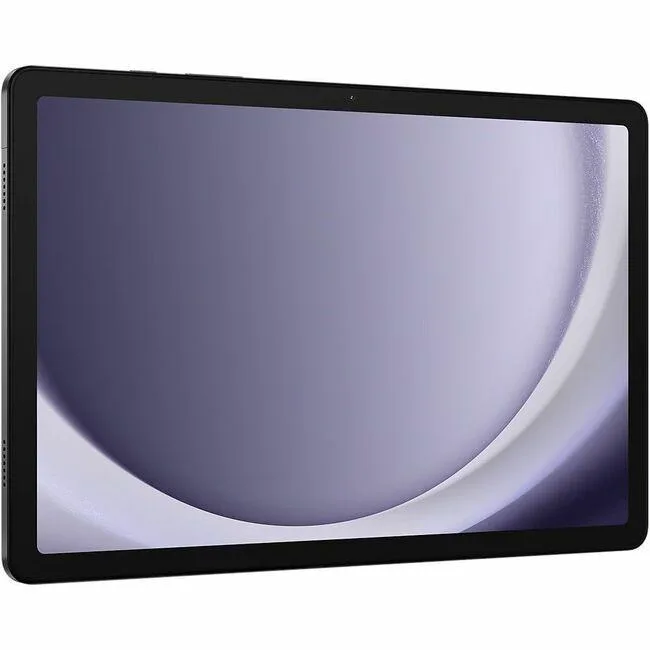
SAMSUNG SM-X210NZAEXAR Galaxy Tab A9+ tablet 11" 8GB 128GB Graphite
- Graphite
- Android 14
202,99 USD247,99 USD−18%
0.00259661BTC
În stocAcceptăm criptomonede — astfel, criptomonedele pe care le dețineți pot cumpăra echipamente reale.Plătiți în cripto, cheltuiți-o pe echipamente reale. Livrare asigurată gratuită oriunde în lume peste 399 $. Cartoane neutre, fără marcă, expediate din Germania.Livrare asigurată gratuită peste 399 $. Cursul dumneavoastră este blocat timp de 30 de minute de la deschiderea paginii de plată.Curs blocat 30 de minute. Fiecare articol este sigilat, numărul de serie este verificat, iar produsul este acoperit de o garanție de 24 de luni.Sigilat, garantat 24 de luni.


SAMSUNG
An 11-inch Android 14 tablet with 90Hz WUXGA display, Snapdragon 69 processor, 4GB RAM and 64GB storage
Screen Size 11.0"
Versiunile tăiate există, dar nu sunt disponibile aici.
Built-in Storage 64GB
The Samsung Galaxy Tab A9+ is an 11-inch tablet running Android 14 with a WUXGA display at 1920 x 1200 resolution. It uses a Qualcomm Snapdragon 69 processor paired with 4GB of RAM and 64GB of built-in storage. The graphite metal body measures 257.1 x 6.9 x 168.7 mm and houses a 7,040mAh battery. Connectivity includes dual-band 802.11 Wi-Fi and Bluetooth v5.1.
This model suits users who want a slim 90Hz screen for reading, video playback and casual multitasking with split-screen support. The 4GB RAM and 64GB storage limit heavy multitasking and large local libraries. Buyers who need more storage or memory for demanding apps should look at configurations with higher capacities. The single USB 2.0 port restricts high-speed peripheral use.
The tablet provides a 480-nit display and Dolby Atmos speakers for media consumption without external hardware. An 8.0 MP rear camera and 5.0 MP front camera handle video calls and basic photography. MicroSD expansion up to 1TB frees internal space for offline files. The USB 2.0 port charges the battery and connects basic accessories, while wireless standards cover network and accessory pairing.
| Brand | SAMSUNG |
|---|---|
| Series | Galaxy Tab |
| Model | A9+ |
| Part Number | SM-X210NZAAXAR |
| Color | Graphite |
| Operating System | Android 14 |
| CPU Type | Qualcomm |
| Screen Size | 11" |
| Display Type | WUXGA |
| Resolution | 1920 x 1200 |
| Webcam | Yes |
| Front-Facing Camera | 5.0 MP |
| Rear Camera | 8.0 MP |
| Built-in Storage | 64GB |
| Memory | 4GB |
| WLAN | 802.11 a/b/g/n/ac 2.4G+5GHz, VHT80 |
| Bluetooth | Bluetooth v5.1 |
| USB | 1 x USB 2.0/1.1 |
| Battery | 7,040mAh |
| Dimensions (W x D x H) | 257.1 x 6.9 x 168.7 mm |
| Weight | 1.06 lbs |
| Greutate la expediere | 0.75 kg |
| Dimensiunile coletului | 264 × 175 × 28 mm |
Alte versiuni ale acestui model
Aceeași familie, memorie, radiator sau frecvență diferite — comparați înainte de a vă decide.
The tablet accepts a microSD card up to 1TB, so you can add one if you want more space beyond the built-in 64GB.
Yes, the tablet supports 802.11 a/b/g/n/ac on both 2.4GHz and 5GHz bands, so it works with older 2.4GHz routers.
Open Settings, go to Motion smoothness or Display, and verify the High refresh rate option is selected for the 90Hz panel.
Tot din acest raion
Același raion, aceeași finalizare a comenzii — opt monede și un curs blocat 30 de minute.
În ce monedă plătiți și în ce monedă citiți prețurile.
Trimis din portofelul dumneavoastră la finalizarea comenzii
Doar pentru afișare — catalogul este exprimat în dolari
Nicio monedă nu corespunde.
Alegeți limba în care vă vorbește site-ul.
Nicio limbă nu corespunde.
Prima vizită?
Aveți deja un cont?
Nu există o resetare automată: acest magazin nu trimite niciun e-mail, deci nu există niciun link de unică folosință de solicitat. Lăsați adresa în cont. Va fi tratată manual.
Cerere înregistrată
Nu veți primi nimic în căsuța de e-mail — acest magazin nu trimite niciun e-mail. Cineva se ocupă de asta manual.
V-ați amintit-o?


