

EN-Labs
EN-Labs 11-001-366 PCIe x4 USB 3.2 10Gbps 5-port card
- no
- 12CM Case fan,screw…
31,99 $
0.00041077BTC
KrājumāMēs pieņemam kriptovalūtu — lai tā, kas Jums pieder, varētu nopirkt īstu aparatūru.Maksājiet kriptovalūtā, iztērējiet to īstai aparatūrai. Bezmaksas apdrošināta piegāde visā pasaulē virs 399 $. Vienkāršas, nemarķētas kastes, sūtītas no Vācijas.Bezmaksas apdrošināta piegāde virs 399 $. Jūsu kurss tiek fiksēts uz 30 minūtēm, tiklīdz atveras kase.Kurss fiksēts uz 30 minūtēm. Katra prece ir aizzīmogota, tās sērijas numurs ir pārbaudīts, un uz to attiecas 24 mēnešu garantija.Aizzīmogots, 24 mēnešu garantija.


MSI
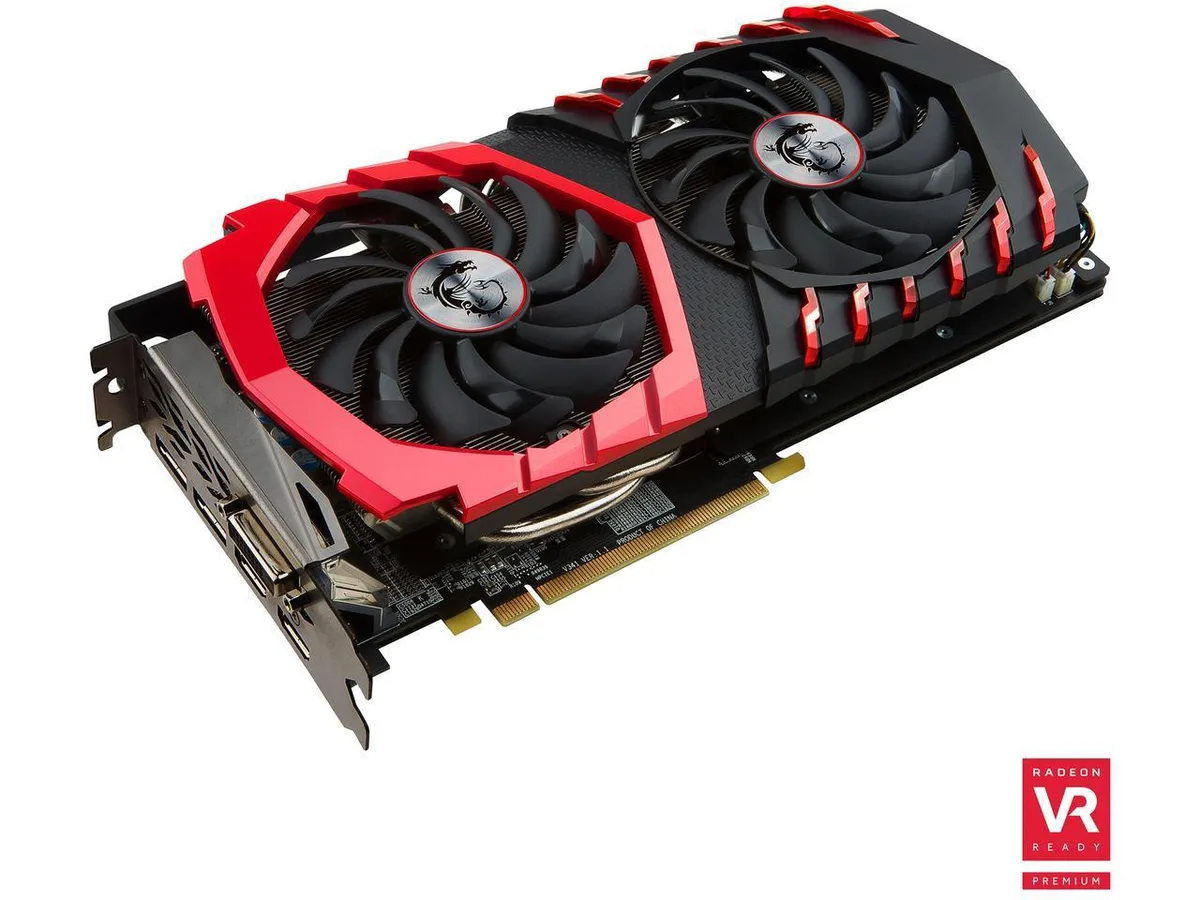
Delivers 8 GB GDDR5 graphics on a 256-bit bus with DirectX 12 support, dual HDMI and dual DisplayPort outputs, and a 500 W power requirement
The MSI Radeon RX 580 GAMING X 8G equips an AMD Radeon RX 580 chipset with 8GB of GDDR5 memory across a 256-bit interface. It connects via a PCI-Express 3.0 x16 slot and drives up to five displays through one dual-link DVI-D, two HDMI and two DisplayPort outputs. The card targets gamers who want smooth 1080p performance in modern titles.
Moving from a 4GB model or an earlier architecture removes the texture budget ceiling that forces quality drops in current games. The 8GB frame buffer and Polaris architecture deliver higher, more consistent frame rates at 1080p, making the jump worthwhile when your present card stutters on high settings or lacks the video outputs you need for a multi-monitor layout.
Verify that your system power supply meets the 500W requirement and provides the necessary PCIe power connectors for this board. Confirm the physical length fits your chassis and that the dual-slot cooler has adequate airflow. Ensure the motherboard offers a free PCI-Express 3.0 x16 slot and that your display cables match the available HDMI, DisplayPort or DVI-D outputs.
| Brand | MSI |
|---|
It installs in a standard PCI-Express 3.0 x16 slot and occupies two expansion brackets; measure from the rear bracket to any drive cage or cable to confirm the card length will fit.
Connect both 8-pin PCIe power cables from the PSU; the common error is leaving one connector loose or using a single daisy-chained cable, which can cause instability under load.
Re-paste every two to three years or if GPU temperatures rise noticeably under the same fan curve; use a pea-sized drop of non-conductive paste and clean the old compound completely before reassembly.
Arī šajā sadaļā
Tas pats plaukts, tā pati kase — astoņas kriptovalūtas un kursa fiksēšana uz 30 minūtēm.
Kriptovalūta, kurā maksājat, un valūta, kurā redzat cenas.
Nosūtīts no Jūsu maciņa, noformējot pasūtījumu
Tikai informatīvi — katalogā cenas norādītas ASV dolāros
Neviena valūta neatbilst.
Izvēlieties valodu, kurā vietne sarunājas ar Jums.
Neviena valoda neatbilst.
Pirmo reizi šeit?
Jau ir konts?
Automātiskas atiestatīšanas nav: šis veikals nesūta e-pastus, tāpēc nav arī vienreizējas saites, ko pieprasīt. Atstājiet adresi kontā, un tā tiks apstrādāta manuāli.
Pieprasījums saņemts
Uz Jūsu e-pastu nekas neatnāks — šis veikals vispār nesūta e-pastus. Kāds šos pieprasījumus apstrādā manuāli.
Atcerējāties?



