

EVESKY
EVESKY MW4500 Wireless Vertical Ergonomic Mouse 1200 DPI 6 Buttons
157,99 $
0.00204203BTC
KrājumāMēs pieņemam kriptovalūtu — lai tā, kas Jums pieder, varētu nopirkt īstu aparatūru.Maksājiet kriptovalūtā, iztērējiet to īstai aparatūrai. Bezmaksas apdrošināta piegāde visā pasaulē virs 399 $. Vienkāršas, nemarķētas kastes, sūtītas no Vācijas.Bezmaksas apdrošināta piegāde virs 399 $. Jūsu kurss tiek fiksēts uz 30 minūtēm, tiklīdz atveras kase.Kurss fiksēts uz 30 minūtēm. Katra prece ir aizzīmogota, tās sērijas numurs ir pārbaudīts, un uz to attiecas 24 mēnešu garantija.Aizzīmogots, 24 mēnešu garantija.


SPTUO
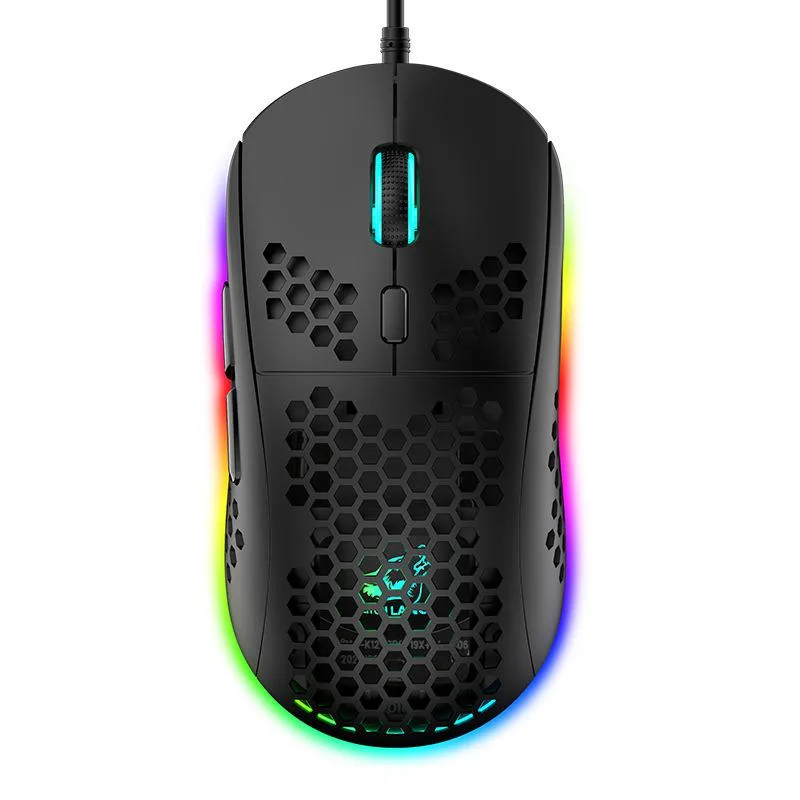
Lightweight honeycomb-shell wired mouse with six DPI steps up to 6400 and 16-million-colour RGB lighting
The SPTUO M8 is a wired gaming mouse built around a hollow honeycomb shell that reduces weight and improves airflow during long sessions. It connects through a 1.7 m USB cable and works with Windows, macOS and iOS systems without extra drivers.
The open honeycomb structure lets heat escape naturally so the surface stays comfortable during extended use. As a wired USB device it draws power directly from the host port, eliminating battery concerns and keeping latency consistent.
The optical sensor offers six fixed steps from 800 to 6400 DPI, selectable through a dedicated button for quick sensitivity changes. Buyers who need on-the-fly software profiles or wireless freedom should look elsewhere.
| Color | Black |
|---|
Plug the 1.7 m USB cable into a free port; the step people miss is pressing the DPI button to cycle through 800, 1600, 2400, 3200, 4800 and 6400 DPI for their preferred sensitivity.
Wipe the ABS honeycomb shell with a dry cloth to remove dust from the openings; no internal lubrication or part replacement is required.
The fixed 1.7 m cable length restricts movement before any sensor or button limit is reached.
Arī šajā sadaļā
Tas pats plaukts, tā pati kase — astoņas kriptovalūtas un kursa fiksēšana uz 30 minūtēm.
Kriptovalūta, kurā maksājat, un valūta, kurā redzat cenas.
Nosūtīts no Jūsu maciņa, noformējot pasūtījumu
Tikai informatīvi — katalogā cenas norādītas ASV dolāros
Neviena valūta neatbilst.
Izvēlieties valodu, kurā vietne sarunājas ar Jums.
Pirmo reizi šeit?
Jau ir konts?
Automātiskas atiestatīšanas nav: šis veikals nesūta e-pastus, tāpēc nav arī vienreizējas saites, ko pieprasīt. Atstājiet adresi kontā, un tā tiks apstrādāta manuāli.
Pieprasījums saņemts
Uz Jūsu e-pastu nekas neatnāks — šis veikals vispār nesūta e-pastus. Kāds šos pieprasījumus apstrādā manuāli.
Atcerējāties?


