

EVESKY
EVESKY MW4500 Wireless Vertical Ergonomic Mouse 1200 DPI 6 Buttons
157,99 US$
0.0020297BTC
SklademPřijímáme kryptoměny — takže to, co držíte, můžete utratit za skutečný hardware.Plaťte kryptem, utrácejte ho za skutečný hardware. Pojištěná doprava zdarma po celém světě nad 399 $. Neutrální přepravní krabice bez loga, odesílané z Německa.Pojištěná doprava zdarma nad 399 $. Jakmile se otevře pokladna, je váš kurz zablokovaný na 30 minut.Kurz zablokovaný na 30 minut. Každý výrobek je zapečetěný, jeho sériové číslo je zkontrolované a vztahuje se na něj 24měsíční záruka.Zapečetěno, záruka 24 měsíců.
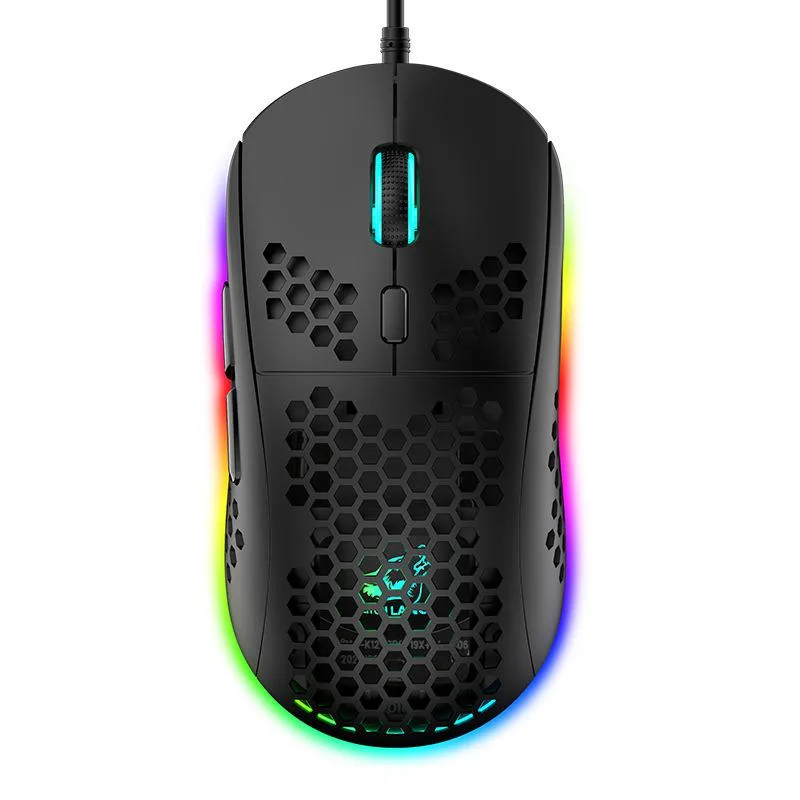


SPTUO
Lightweight honeycomb-shell wired mouse with six DPI steps up to 6400 and 16-million-colour RGB lighting
The SPTUO M8 is a wired gaming mouse built around a hollow honeycomb shell that reduces weight and improves airflow during long sessions. It connects through a 1.7 m USB cable and works with Windows, macOS and iOS systems without extra drivers.
The open honeycomb structure lets heat escape naturally so the surface stays comfortable during extended use. As a wired USB device it draws power directly from the host port, eliminating battery concerns and keeping latency consistent.
The optical sensor offers six fixed steps from 800 to 6400 DPI, selectable through a dedicated button for quick sensitivity changes. Buyers who need on-the-fly software profiles or wireless freedom should look elsewhere.
| Color | Black |
|---|
Plug the 1.7 m USB cable into a free port; the step people miss is pressing the DPI button to cycle through 800, 1600, 2400, 3200, 4800 and 6400 DPI for their preferred sensitivity.
Wipe the ABS honeycomb shell with a dry cloth to remove dust from the openings; no internal lubrication or part replacement is required.
The fixed 1.7 m cable length restricts movement before any sensor or button limit is reached.
Také v této kategorii
Stejná kategorie, stejná pokladna — osm měn a kurz zamčený na 30 minut.
Měna, ve které platíte, a měna, ve které se zobrazují ceny.
Odesláno z vaší peněženky u pokladny
Pouze pro zobrazení — katalog je veden v dolarech
Žádná měna neodpovídá.
Vyberte jazyk, ve kterém s vámi bude web komunikovat.
Poprvé tady?
Už účet máte?
Neexistuje žádná automatická obnova hesla: tento obchod neposílá žádné e-maily, takže neexistuje jednorázový odkaz, o který by bylo možné požádat. Nechte adresu uvedenou u účtu, vyřídíme ji ručně.
Žádost zaznamenána
Do vaší schránky nic nedorazí — tento obchod neposílá žádné e-maily. Někdo se o to postará ručně.
Vzpomněli jste si?


