

EVESKY
EVESKY MW4500 Wireless Vertical Ergonomic Mouse 1200 DPI 6 Buttons
157,99 USD
0.001977BTC
På lagerVi tar imot kryptovaluta — slik kan kryptovalutaene du eier, kjøpe ekte maskinvare.Betal med krypto, bruk den på ekte maskinvare. Gratis, forsikret levering verden over for bestillinger over 399 $. Nøytrale kartonger uten merking, sendt fra Tyskland.Gratis, forsikret levering over 399 $. Kursen din er låst i 30 minutter når kassen åpnes.Kurs låst i 30 minutter. Alle varer er forseglet, serienummerkontrollert og dekket av 24 måneders garanti.Forseglet, 24 måneders garanti.
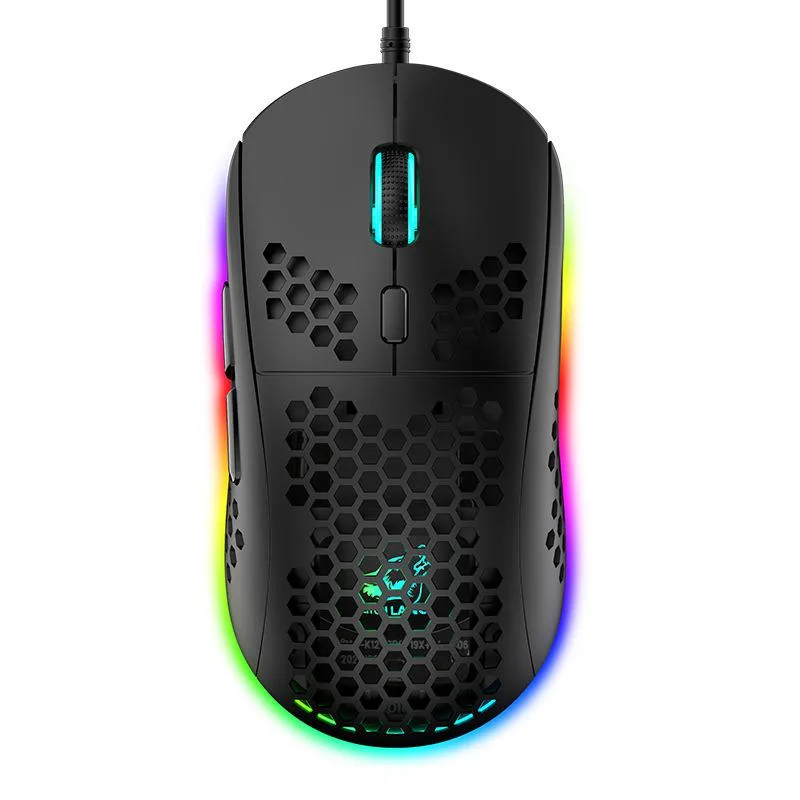


SPTUO
Lightweight honeycomb-shell wired mouse with six DPI steps up to 6400 and 16-million-colour RGB lighting
The SPTUO M8 is a wired gaming mouse built around a hollow honeycomb shell that reduces weight and improves airflow during long sessions. It connects through a 1.7 m USB cable and works with Windows, macOS and iOS systems without extra drivers.
The open honeycomb structure lets heat escape naturally so the surface stays comfortable during extended use. As a wired USB device it draws power directly from the host port, eliminating battery concerns and keeping latency consistent.
The optical sensor offers six fixed steps from 800 to 6400 DPI, selectable through a dedicated button for quick sensitivity changes. Buyers who need on-the-fly software profiles or wireless freedom should look elsewhere.
| Color | Black |
|---|
Plug the 1.7 m USB cable into a free port; the step people miss is pressing the DPI button to cycle through 800, 1600, 2400, 3200, 4800 and 6400 DPI for their preferred sensitivity.
Wipe the ABS honeycomb shell with a dry cloth to remove dust from the openings; no internal lubrication or part replacement is required.
The fixed 1.7 m cable length restricts movement before any sensor or button limit is reached.
Også i denne avdelingen
Samme hylle, samme kasse — åtte mynter og 30 minutters kurslås.
Det du betaler med, og det du ser prisene i.
Sendes fra lommeboken din i kassen
Kun visning — katalogen er prissatt i USD
Fant ingen valuta.
Velg språket nettstedet snakker til deg på.
Ny her?
Har du allerede en konto?
Det finnes ingen automatisk tilbakestilling: butikken sender ikke e-post, så det finnes ingen engangslenke å be om. La adressen stå på kontoen, så blir den behandlet manuelt.
Forespørsel registrert
Ingenting er på vei til innboksen din — butikken sender ingen e-post i det hele tatt. Noen behandler dette manuelt.
Husket du det likevel?


