

SanDisk
SanDisk Cruzer Blade 8 GB USB 2.0 USB flash drive Black SDCZ50-008G-B35
USD 391.99
0.00501099BTC
Ada stokKami menerima kripto — jadi koin yang anda simpan boleh membeli perkakasan sebenar.Bayar dengan kripto, belanjakannya untuk perkakasan sebenar. Penghantaran berinsurans percuma ke seluruh dunia untuk belian melebihi USD 399. Kotak biasa tanpa jenama, dihantar dari Jerman.Penghantaran berinsurans percuma untuk belian melebihi USD 399. Kadar anda dikunci selama 30 minit sebaik sahaja proses pesanan bermula.Kadar dikunci selama 30 minit. Setiap item disegel, nombor sirinya disemak, dan dilindungi waranti 24 bulan.Disegel, waranti 24 bulan.


ASUS
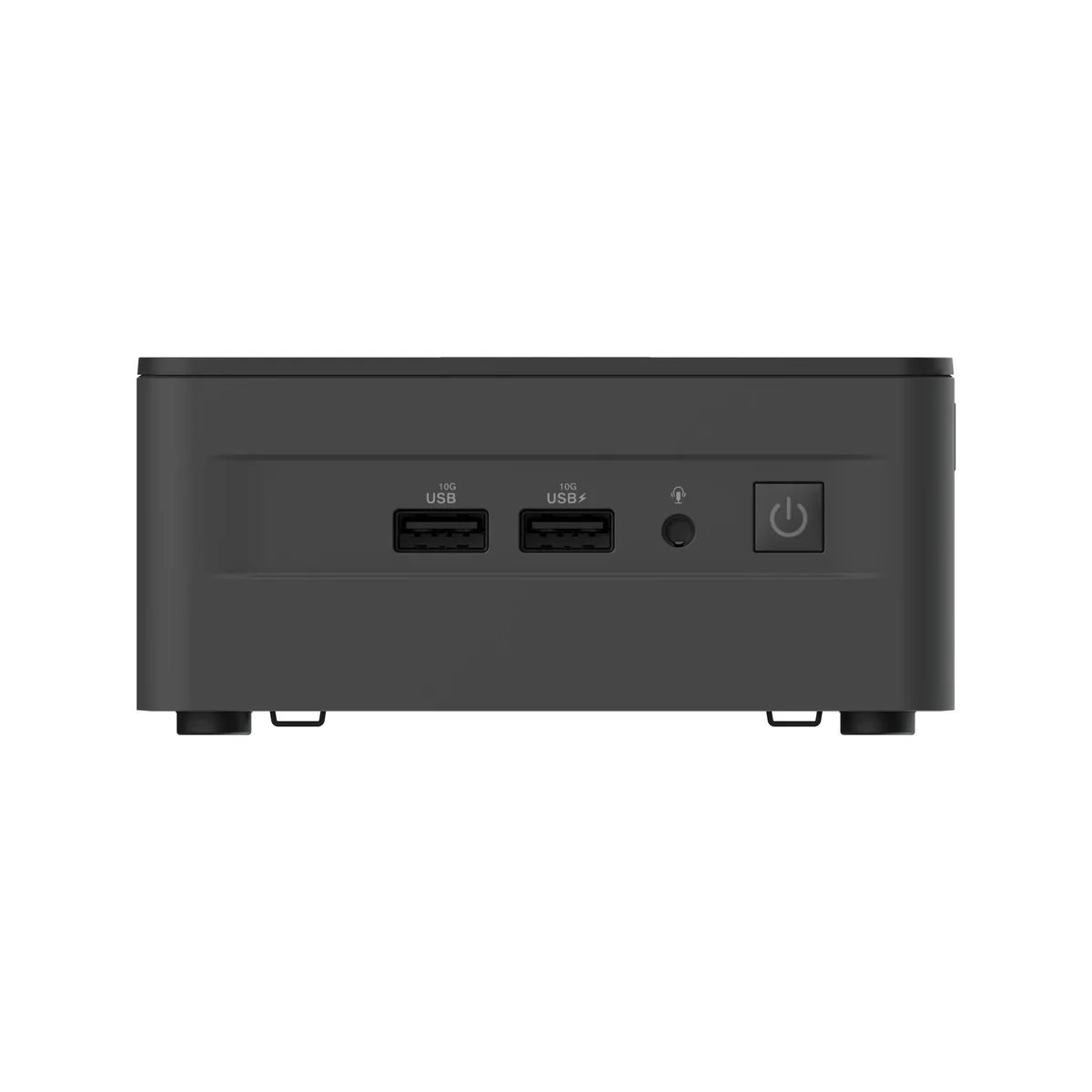
Barebone mini PC with a 13th Gen Intel Core i5-1340P, dual DDR4-3200 SO-DIMM slots supporting 64 GB, M.2 NVMe and SATA drive bays, Intel Iris Xe graphics, 2.5 GbE, Wi-Fi 6E AX211, Bluetooth 5.3.
The ASUS NUC 13 Pro RNUC13ANHi5000U is a tall mini PC barebone built around an Intel Core i5-1340P processor with 12 MB cache and peak clocks of 4.60 GHz on performance cores and 3.40 GHz on efficient cores. It targets businesses and integrators who want a compact, vPro-capable platform they can finish with their own memory, storage and operating system.
This kit replaces earlier 4x4 barebones by adding 13th Gen Intel Core architecture, dual-channel DDR4-3200 SO-DIMM slots supporting up to 64 GB at 1.2 V, and three internal drive bays: one M.2 2280 PCIe Gen4x4 slot, one M.2 2242 PCIe Gen3 slot and one SATA 6.0 Gb/s connector. The jump is worthwhile when you need Thunderbolt 4, Wi-Fi 6E AX211 and 2.5 Gbps Ethernet in the same small footprint.
The tall chassis provides extra internal volume for airflow, helping the i5-1340P maintain higher clocks during extended compile, render or virtualisation sessions. Dual HDMI 2.1 and dual DisplayPort 1.4a over USB-C drive up to four displays continuously, while Intel Iris Xe graphics handle hardware-accelerated encode and decode without throttling the CPU package.
| Brand | ASUS |
|---|---|
| Series | NUC 13 Pro |
| Model | RNUC13ANHi5000U |
| Form Factor | Tall |
| CPU Type | Intel Core i5 13th Gen 1340P (P-core 4.60 GHz, E-core 3.40 GHz) |
| Memory installed | No Memory |
| Memory slot | 2 x 260Pin SO-DIMM |
| Memory Type Supported | DDR4 3200 |
| Max Memory Supported | 64GB |
| Dual Channel Memory Supported | Yes |
| Storage Installed | No Hard Drive |
| Serial ATA | 1 x SATA 6.0Gb/s |
| M.2 Slot | 1 x M.2 2280 PCIe Gen4x4 NVMe SSD Slot (key M) 1 x M.2 2242 PCIe Gen3 NVMe SSD Slot (key B) |
| Integrated Graphics | Intel Iris Xe Graphics |
| LAN | Intel i226V |
| Max LAN Speed | 2.5Gbps |
| Wireless LAN | Intel Wi-Fi 6E AX211 (Gig+) |
| WiFi Generation | Wi-Fi 6E |
| Bluetooth | Bluetooth 5.3 |
| Front USB | 2 x USB 3.2 Gen 2 Type-A |
| HDMI | 2 x HDMI 2.1 TMDS |
| DisplayPort | 2 x DisplayPort 1.4a via Type C |
| Rear USB | 2 x USB 4 (type C) 1 x USB 3.2 1 x USB 2.0 |
| RJ45 | 1x RJ45 (2.5Gb Ethernet) |
| Internal Connectors | 1 x USB 3.2 on m.2 22x42 (pins), 2 x USB 2.0 (headers) |
| Dimensions | 4.61" x 4.41" x 2.13" |
The board has two 260-pin SO-DIMM slots for DDR4 3200 laptop memory up to 64 GB total.
Insert the 2280 NVMe SSD into the key-M slot, press it flat, and secure it with the retention screw.
The single M.2 2280 NVMe SSD is the primary boot drive and the first candidate for a larger replacement.
Juga di rak ini
Rak yang sama, checkout yang sama — lapan koin kripto dan kunci kadar 30 minit.
Apa yang anda hantar untuk membayar, dan mata wang yang anda guna untuk membaca harga.
Dihantar daripada dompet anda semasa semak keluar
Untuk paparan sahaja — katalog diberi harga dalam USD
Tiada mata wang yang sepadan.
Pilih bahasa yang digunakan oleh laman web ini.
Tiada bahasa yang sepadan.
Pengguna baharu?
Sudah mempunyai akaun?
Tiada set semula automatik: kedai ini tidak menghantar sebarang e-mel, jadi tiada pautan sekali guna untuk diminta. Biarkan alamat pada akaun tersebut, ia akan diuruskan secara manual.
Permintaan direkodkan
Tiada apa-apa akan sampai ke peti masuk anda — kedai ini tidak menghantar sebarang e-mel. Seseorang akan menguruskannya secara manual.
Sudah teringat?



