

SanDisk
SanDisk Cruzer Blade 8 GB USB 2.0 USB flash drive Black SDCZ50-008G-B35
USD 391.99
0.00502435BTC
Ada stokKami menerima kripto — jadi koin yang anda simpan boleh membeli perkakasan sebenar.Bayar dengan kripto, belanjakannya untuk perkakasan sebenar. Penghantaran berinsurans percuma ke seluruh dunia untuk belian melebihi USD 399. Kotak biasa tanpa jenama, dihantar dari Jerman.Penghantaran berinsurans percuma untuk belian melebihi USD 399. Kadar anda dikunci selama 30 minit sebaik sahaja proses pesanan bermula.Kadar dikunci selama 30 minit. Setiap item disegel, nombor sirinya disemak, dan dilindungi waranti 24 bulan.Disegel, waranti 24 bulan.


ASUS
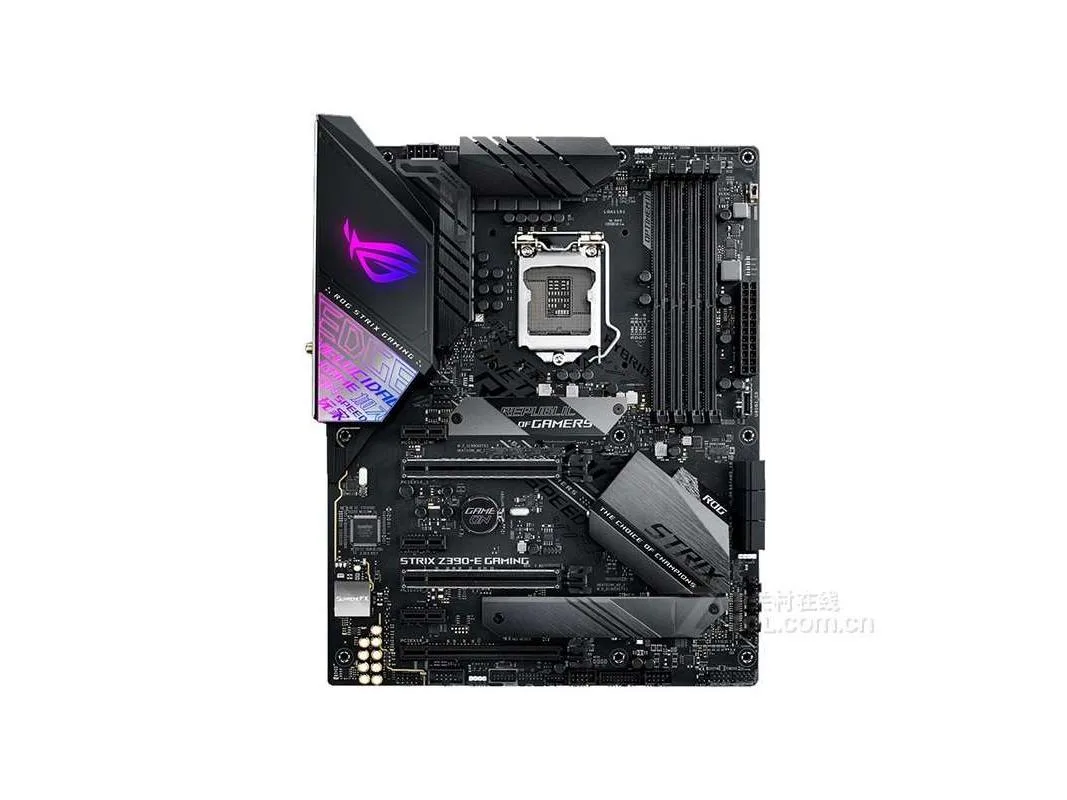
ATX Intel Z390 motherboard with LGA 1151 socket supporting up to 64GB DDR4 memory
This ASUS board uses the Intel Z390 chipset and an LGA 1151 socket to support 8th and 9th generation Intel Core processors. It accepts up to 64GB of DDR4 memory across four slots. The ATX form factor fits standard full-size chassis and provides room for multiple expansion cards.
Suits users upgrading or replacing a board for a current 8th or 9th generation Intel processor who want the Z390 feature set. Builders starting a new system on a newer socket, or those needing more than 64GB of memory, should look elsewhere.
The board tops out at 64GB of DDR4 RAM, which is the hard limit for total system memory on this platform. If your workload demands more capacity, this motherboard cannot meet it.
| Brand | ASUS |
|---|---|
| Model | ASUS ROG STRIX Z390-E GAMING |
| CPU Socket Type | LGA 1151 |
| Chipset | Intel Z390 |
| Maximum Memory Supported | 64GB |
Mount the nine ATX standoffs, align the I/O shield, secure the board with screws, connect the 24-pin and 8-pin power cables, then attach the front-panel headers — the step most often missed is plugging in the 8-pin CPU power connector near the socket.
Reseat DDR4 modules if contact oxidation appears after several years; replace the metal coin-cell battery when the system loses CMOS settings or the clock drifts.
The VRM thermal ceiling is reached before the chipset or memory limits, so sustained all-core loads will throttle unless case airflow or a VRM heatsink fan is added.
Juga di rak ini
Rak yang sama, checkout yang sama — lapan koin kripto dan kunci kadar 30 minit.
Apa yang anda hantar untuk membayar, dan mata wang yang anda guna untuk membaca harga.
Dihantar daripada dompet anda semasa semak keluar
Untuk paparan sahaja — katalog diberi harga dalam USD
Tiada mata wang yang sepadan.
Pilih bahasa yang digunakan oleh laman web ini.
Tiada bahasa yang sepadan.
Pengguna baharu?
Sudah mempunyai akaun?
Tiada set semula automatik: kedai ini tidak menghantar sebarang e-mel, jadi tiada pautan sekali guna untuk diminta. Biarkan alamat pada akaun tersebut, ia akan diuruskan secara manual.
Permintaan direkodkan
Tiada apa-apa akan sampai ke peti masuk anda — kedai ini tidak menghantar sebarang e-mel. Seseorang akan menguruskannya secara manual.
Sudah teringat?



