

SanDisk
SanDisk Cruzer Blade 8 GB USB 2.0 USB flash drive Black SDCZ50-008G-B35
USD 391.99
0.0050133BTC
Ada stokKami menerima kripto — jadi koin yang anda simpan boleh membeli perkakasan sebenar.Bayar dengan kripto, belanjakannya untuk perkakasan sebenar. Penghantaran berinsurans percuma ke seluruh dunia untuk belian melebihi USD 399. Kotak biasa tanpa jenama, dihantar dari Jerman.Penghantaran berinsurans percuma untuk belian melebihi USD 399. Kadar anda dikunci selama 30 minit sebaik sahaja proses pesanan bermula.Kadar dikunci selama 30 minit. Setiap item disegel, nombor sirinya disemak, dan dilindungi waranti 24 bulan.Disegel, waranti 24 bulan.
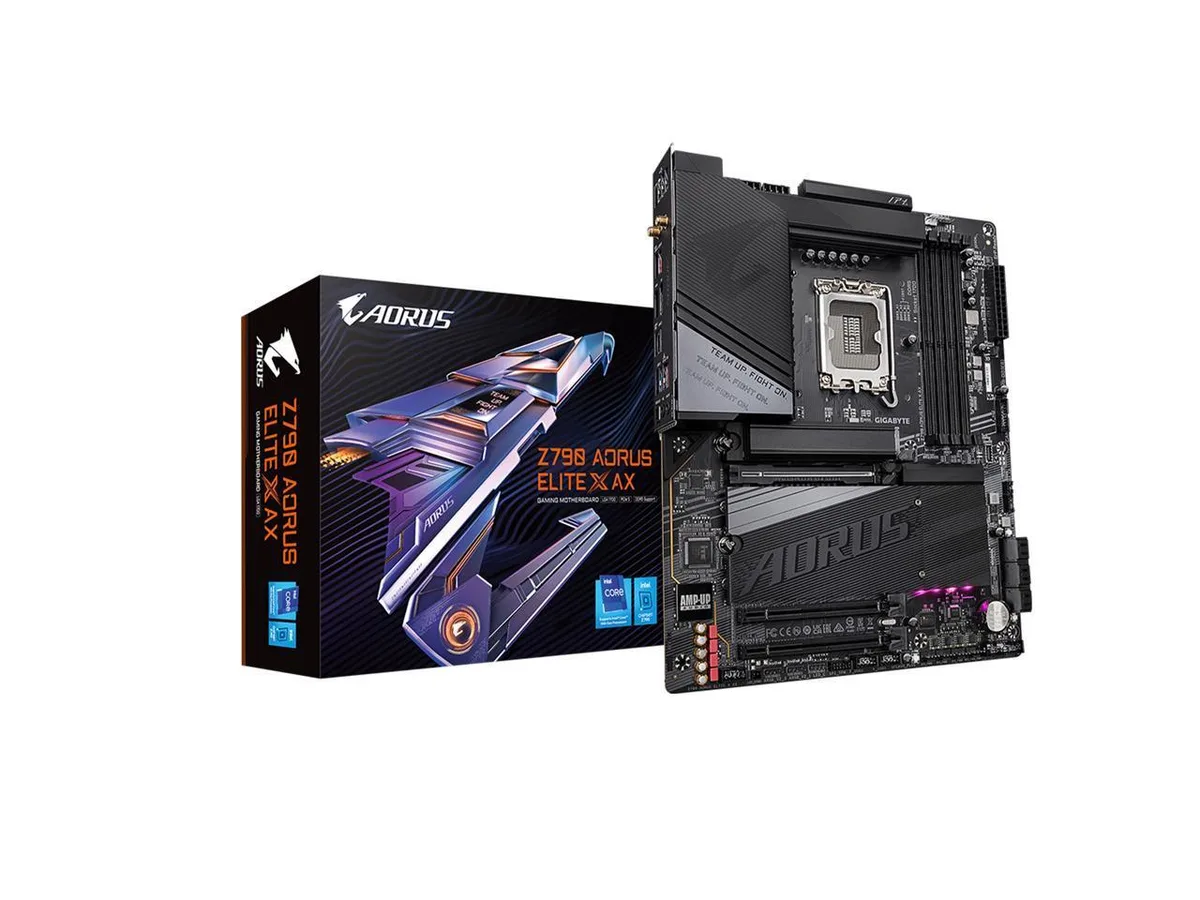


GIGABYTE
ATX board for 13th and 14th gen Intel CPUs with DDR5 up to 192 GB, four PCIe 4.0 M.2 slots, 2.5 GbE LAN, Wi-Fi 6E and BLUETOOTH 5.3
This ATX motherboard pairs the Intel Z790 Express chipset with an LGA 1700 socket that supports 13th and 14th generation processors. Four DDR5 DIMM slots accept up to 192 GB of memory with XMP 3.0 profiles. It targets builders who need high core counts, fast storage lanes and modern wireless connectivity in a single chassis.
A twin 16+1+2 phase digital VRM solution feeds the CPU while heatsinks cover the power stages and M.2 slots. Smart Fan 6 controls curve points based on onboard sensors to keep component temperatures in check during sustained loads. The 2.5 GbE LAN and Wi-Fi 6E controllers run without active cooling.
One CPU-attached slot and three chipset-attached slots each deliver four lanes of PCIe 4.0 bandwidth for 2280 or 22110 solid-state drives. This density lets the platform serve as a primary workstation drive array or a compact gaming library without sacrificing the PCIe 5.0 x16 graphics slot.
| Brand | GIGABYTE |
|---|---|
| Model | Z790 AORUS ELITE X AX |
| CPU Socket Type | LGA 1700 |
| CPU Type | Intel LGA 1700 Socket: Supports 13th and next-gen processors |
| Chipset | Intel Z790 Express Chipset |
| Number of Memory Slots | 4x288pin (DDR5) |
| Memory Standard | Support for DDR5 8266(O.C) / 8200(O.C) / 8000(O.C) / 7950(O.C) / 7900(O.C) / 7800(O.C) / 7600(O.C.) / 7400(O.C.) / 7200(O.C.) / 7000(O.C.) / 6800(O.C.) / 6600(O.C.) / 6400(O.C.) / 6200(O.C.) / 6000(O.C.) / 5800(O.C.) / 5600(O.C.) / 5400(O.C.) / 5200(O.C.) / 4800 / 4000 MT/s memory modules |
| Maximum Memory Supported | 192GB |
| Channel Supported | Dual Channel |
| Memory Feature | 4 x DDR5 DIMM sockets supporting up to 192 GB (48 GB single DIMM capacity) of system memory Dual channel memory architecture Support for ECC Un-buffered DIMM 1Rx8/2Rx8 memory modules (operate in non-ECC mode) Support for non-ECC Un-buffered DIMM 1Rx8/2Rx8/1Rx16 memory modules Support for Extreme Memory Profile (XMP) memory modules (The CPU and memory configuration may affect the supported memory types, data rate (speed), and number of DRAM modules, please refer to "Memory Support List" for more information.) |
| PCI Express 5.0 x16 | CPU: - 1 x PCI Express x16 slot, supporting PCIe 5.0 and running at x16 (PCIEX16) * For optimum performance, if only one PCI Express graphics card is to be installed, be sure to install it in the PCIEX16 slot. |
| PCI Express 4.0 x16 | Chipset: - 2 x PCI Express x16 slots, supporting PCIe 4.0 and running at x4 (PCIEX4_1/PCIEX4_2) |
| Serial ATA (SATA) | 6 x SATA 6Gb/s |
| M.2 | CPU: - 1 x M.2 connector (Socket 3, M key, type 22110/2280 PCIe 4.0 x4/x2 SSD support) (M2A_CPU) Chipset: - 2 x M.2 connectors (Socket 3, M key, type 22110/2280 PCIe 4.0 x4/x2 SSD support) (M2P_SB, M2Q_SB) - 1 x M.2 connector (Socket 3, M key, type 22110/2280 SATA and PCIe 4.0 x4 SSD support) (M2M_SB) |
| SATA RAID | RAID 0, RAID 1, RAID 5, and RAID 10 support for NVMe SSD storage devices RAID 0, RAID 1, RAID 5, and RAID 10 support for SATA storage devices |
| Audio Chipset | Realtek ALC1220-VB CODEC * The back panel line out jack supports DSD audio. High Definition Audio 2/4/5.1/7.1-channel * You can change the functionality of an audio jack using the audio software. To configure 7.1-channel audio, access the audio software for audio settings. Support for S/PDIF Out |
| Audio Channels | 7.1 Channels |
| LAN Chipset | Intel 2.5GbE LAN chip (2.5 Gbps/1 Gbps/100 Mbps) |
| Max LAN Speed | 2.5Gbps |
| Wireless LAN | Wi-Fi 6E - WIFI a, b, g, n, ac, ax, supporting 2.4/5/6 GHz carrier frequency bands - BLUETOOTH 5.3 - Support for 11ax 160MHz wireless standard (Actual data rate may vary depending on environment and equipment.) |
| Bluetooth | Yes |
| Back I/O Ports | 1 x USB Type-C port, with USB 3.2 Gen 2x2 support 2 x USB 3.2 Gen 2 Type-A ports (red) 3 x USB 3.2 Gen 1 ports 4 x USB 2.0/1.1 ports 2 x SMA antenna connectors (2T2R) 1 x HDMI port 1 x DisplayPort 1 x RJ-45 port 1 x optical S/PDIF Out connector 2 x audio jacks |
| Onboard USB | 1 x USB Type-C header, with USB 3.2 Gen 2 support 1 x USB 3.2 Gen 1 header 2 x USB 2.0/1.1 headers |
| Other Connectors | 1 x CPU fan header 1 x CPU fan/water cooling pump header 3 x system fan headers 1 x system fan/water cooling pump header 3 x addressable RGB Gen2 LED strip headers 1 x RGB LED strip header 4 x M.2 Socket 3 connectors 6 x SATA 6Gb/s connectors 1 x front panel header 1 x front panel audio header 2 x Thunderbolt add-in card connectors 1 x Trusted Platform Module header (For the GC-TPM2.0 SPI/GC-TPM2.0 SPI 2.0/GC-TPM2.0 SPI V2 module only) 1 x reset button 1 x Q-Flash Plus button 1 x Clear CMOS button 1 x reset jumper 1 x Clear CMOS jumper |
| Windows 11 | Supported |
| Form Factor | ATX |
| Dimensions (W x L) | 30.5cm x 24.4cm |
| Power Pin | 1 x 24-pin ATX main power connector 2 x 8-pin ATX 12V power connectors |
| Features | Support for GIGABYTE Control Center (GCC) * Available applications in GCC may vary by motherboard model. Supported functions of each application may also vary depending on motherboard specifications. Support for Q-Flash Support for Q-Flash Plus Support for Smart Backup |
With the 24-pin and 8-pin power cables connected, insert a USB drive containing the renamed BIOS file into the dedicated Q-Flash Plus USB port, then press the Q-Flash Plus button; the LED will flash during the update and stay solid when finished.
The pre-applied pads on the M.2 heatsinks covering the four PCIe 4.0 x4 slots (M2A_CPU, M2P_SB, M2Q_SB and the fourth slot) can be peeled off and replaced with 1 mm pads of similar conductivity.
The 16+1+2 phase digital VRM is rated for the full supported range up to DDR5 8266 (O.C.), so the CPU or memory ICs typically throttle before the VRM reaches its thermal ceiling.
Juga di rak ini
Rak yang sama, checkout yang sama — lapan koin kripto dan kunci kadar 30 minit.
Apa yang anda hantar untuk membayar, dan mata wang yang anda guna untuk membaca harga.
Dihantar daripada dompet anda semasa semak keluar
Untuk paparan sahaja — katalog diberi harga dalam USD
Tiada mata wang yang sepadan.
Pilih bahasa yang digunakan oleh laman web ini.
Tiada bahasa yang sepadan.
Pengguna baharu?
Sudah mempunyai akaun?
Tiada set semula automatik: kedai ini tidak menghantar sebarang e-mel, jadi tiada pautan sekali guna untuk diminta. Biarkan alamat pada akaun tersebut, ia akan diuruskan secara manual.
Permintaan direkodkan
Tiada apa-apa akan sampai ke peti masuk anda — kedai ini tidak menghantar sebarang e-mel. Seseorang akan menguruskannya secara manual.
Sudah teringat?



