Lenovo
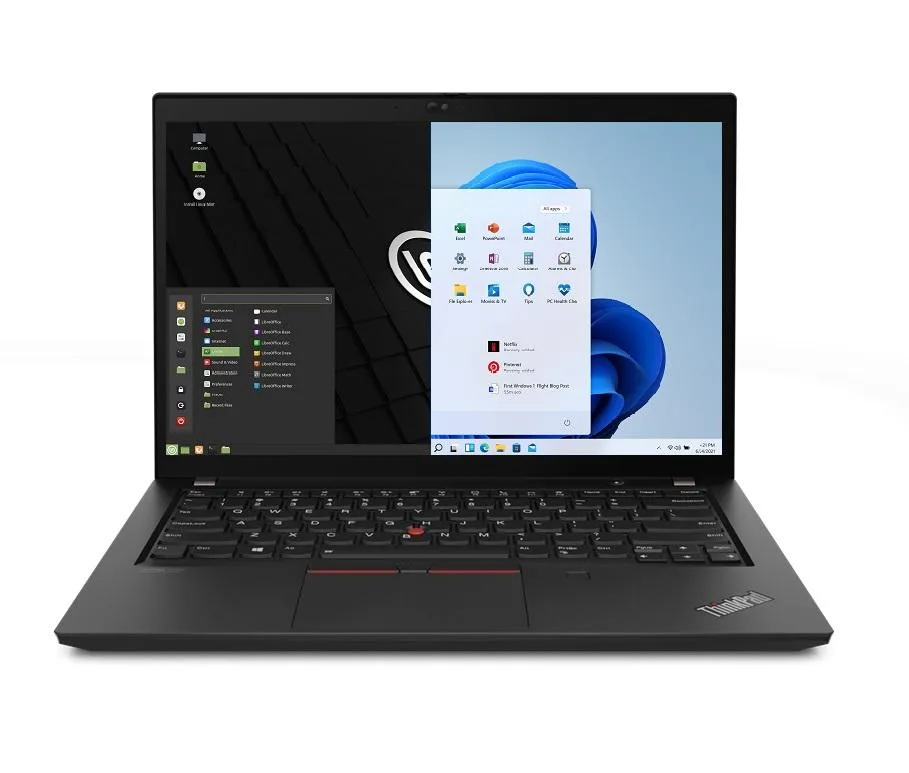
Lenovo Thinkpad T14 Gen 2 laptop i5-1135G7 48GB 500GB 14.0" FHD
- 48GB
- DDR4
USD 1,101.99
0.01405976BTC
Ada stokKami menerima kripto — jadi koin yang anda simpan boleh membeli perkakasan sebenar.Bayar dengan kripto, belanjakannya untuk perkakasan sebenar. Penghantaran berinsurans percuma ke seluruh dunia untuk belian melebihi USD 399. Kotak biasa tanpa jenama, dihantar dari Jerman.Penghantaran berinsurans percuma untuk belian melebihi USD 399. Kadar anda dikunci selama 30 minit sebaik sahaja proses pesanan bermula.Kadar dikunci selama 30 minit. Setiap item disegel, nombor sirinya disemak, dan dilindungi waranti 24 bulan.Disegel, waranti 24 bulan.


Lenovo
Business laptop with 11th Gen Intel Core i5-1135G7, 48GB DDR4, 1TB PCIe SSD, 14.0" FHD IPS display, Wi-Fi 6, Bluetooth 5.2, Thunderbolt, Ethernet, HDMI and dual-boot Windows 11 Pro with Linux Mint
Options 48GB/1TB
The Lenovo Thinkpad T14 Gen 2 is a new 14.0 inch business laptop built around an 11th Gen Intel Core i5-1135G7 processor with four cores and a 4.2 GHz maximum turbo frequency. It ships with 48GB of DDR4 memory and a 1TB PCIe SSD, providing ample capacity for multitasking and local data storage. The dual-boot configuration loads either Windows 11 Pro or Linux Mint at startup, requiring a reboot to switch between operating systems.
A 1920 x 1080 Full HD IPS panel delivers a 16:9 aspect ratio without touch input, while a 720p webcam handles video calls. Two USB-C Thunderbolt 4 ports, two USB-A 3.2 Gen1 ports, one HDMI output, a microSD reader and a Gigabit Ethernet jack cover docking, display and wired network needs. The chassis measures 12.9 by 8.9 by .70 inches and weighs 3.23lb, with a black finish suited to professional environments.
Intel Iris Xe integrated graphics drive the internal screen and external displays through the available video outputs. Wireless connectivity relies on Wi-Fi 6 and Bluetooth 5.2 for modern peripheral and network support. A 65W power supply charges the integrated 50WHr lithium-polymer battery, which powers the system during typical office workloads away from a wall outlet.
| Memory | 48GB |
|---|---|
| Memory Speed | DDR4 |
| Type | Work / Business |
| Resolution | 1920 x 1080 |
| Screen Size | 14.0" |
| Display Type | Full HD |
| Touchscreen | No |
| SSD | 1 TB |
| HDD | No |
| Storage Spec | 1TB PCIe SSD |
| Brand | Lenovo |
| Series | Thinkpad T14 Gen 2 |
| Part Number | T14 |
| Model | Thinkpad |
| Color | Black |
| GPU/VPU | Intel Iris Xe Graphics |
| Operating System | Linux |
| WiFi Generation | Wi-Fi 6 |
| LAN | 10/100/1000Mbps |
| WLAN | Wi-Fi 6 |
| Bluetooth | Bluetooth 5.2 |
| CPU Type | Intel Core i5 11th Gen |
| Optical Drive Type | No |
| Webcam | Yes |
| Touchpad | ThinkPad UltraNav |
| Keyboard | Standard |
| Card Reader | Micro SD |
| Battery | Lithium Polymer |
| USB | 2 x USB 3.2 Gen 1 |
| Thunderbolt | 2 x Thunderbolt 4 |
| Video Port | 1 x HDMI |
| Ethernet | 1 x RJ-45 |
| Audio Ports | 1 x Headphone/Microphone Combo Jack |
| Audio | Integrated Sound card |
| Speaker | Integrated Stereo Speakers |
Versi lain model ini
Keluarga yang sama, memori, penyejuk atau kelajuan jam yang berbeza — bandingkan sebelum membuat keputusan.
The two USB‑C ports are Thunderbolt 4 and run at up to 40 Gb/s, which also sets the ceiling for any dock or external GPU you attach.
The laptop measures 12.9 in wide, 8.9 in deep and 0.70 in thick, weighing 3.23 lb.
Press F12 repeatedly after power‑on; the one‑time boot menu appears and lets you pick Windows 10 Pro or Linux Mint 20.
Juga di rak ini
Rak yang sama, checkout yang sama — lapan koin kripto dan kunci kadar 30 minit.
Apa yang anda hantar untuk membayar, dan mata wang yang anda guna untuk membaca harga.
Dihantar daripada dompet anda semasa semak keluar
Untuk paparan sahaja — katalog diberi harga dalam USD
Tiada mata wang yang sepadan.
Pilih bahasa yang digunakan oleh laman web ini.
Tiada bahasa yang sepadan.
Pengguna baharu?
Sudah mempunyai akaun?
Tiada set semula automatik: kedai ini tidak menghantar sebarang e-mel, jadi tiada pautan sekali guna untuk diminta. Biarkan alamat pada akaun tersebut, ia akan diuruskan secara manual.
Permintaan direkodkan
Tiada apa-apa akan sampai ke peti masuk anda — kedai ini tidak menghantar sebarang e-mel. Seseorang akan menguruskannya secara manual.
Sudah teringat?