

Celesttouch
Celesttouch C126HAX01.1 12.6" 2560x666 portable monitor
- Black
- 12.5"
$120,99
0.00153679BTC
StoktaKripto para kabul ediyoruz — böylece elinizdeki koinlerle gerçek donanım alabilirsiniz.Kripto parayla ödeyin, onu gerçek donanıma harcayın. $399 üzeri siparişlerde dünya genelinde sigortalı kargo ücretsizdir. Sade, markasız koliler Almanya’dan gönderilir.$399 üzeri siparişlerde sigortalı kargo ücretsizdir. Ödeme sayfası açıldığında kurunuz 30 dakika kilitli kalır.Kur 30 dakika kilitli. Her ürün mühürlüdür, seri numarası kontrol edilir ve 24 ay garanti kapsamındadır.Mühürlü, 24 ay garantili.


MSI
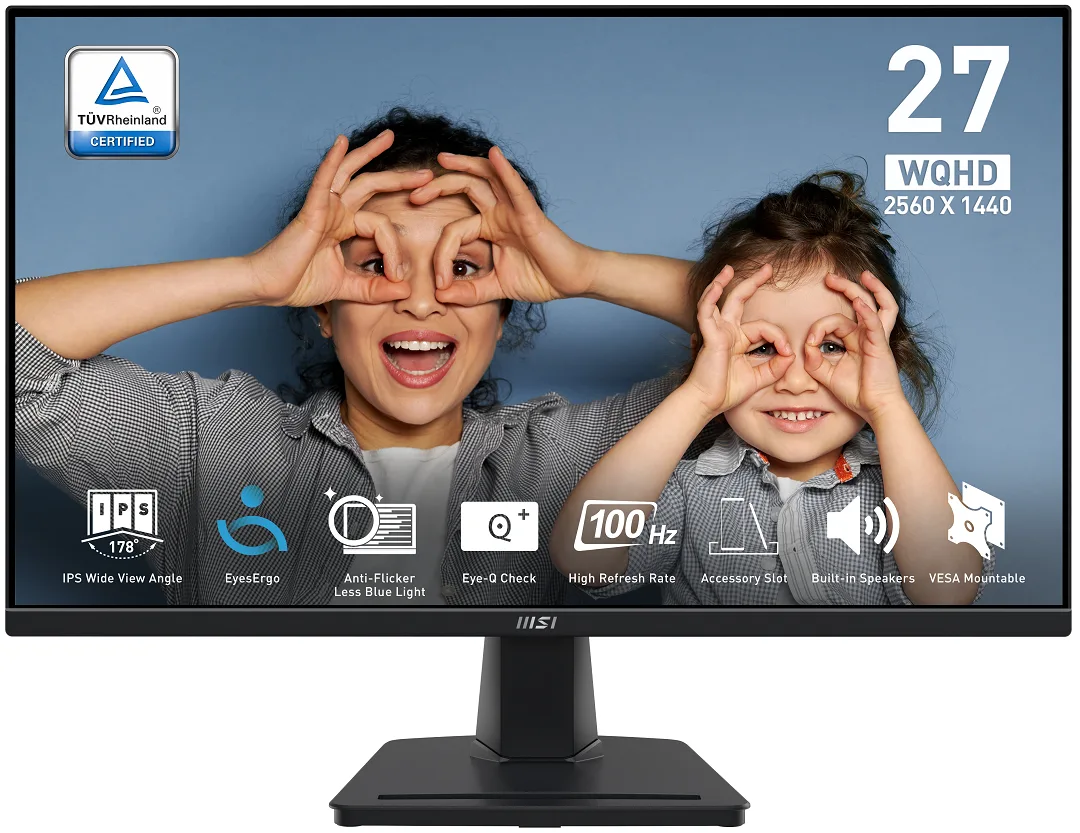
A 27-inch IPS panel delivers 2560 x 1440 resolution at 100 Hz with 100% sRGB coverage and 300 cd/m² brightness for sharp, colour-accurate work and play
The MSI PRO MP275Q is a 27-inch IPS monitor with a 2560 x 1440 resolution and a 100Hz refresh rate. It covers 100% sRGB with 1.07 billion colours and 300 cd/m² brightness. The flat panel includes Adaptive Sync, a 1ms MPRT response time and built-in 2W speakers for everyday productivity and casual gaming.
TÜV Rheinland Eye Comfort certification, Less Blue Light and Anti-Flicker suit users who spend long hours at the desk. The tilt-only stand and 100mm VESA mount work for fixed desk layouts. Buyers who require height, swivel or pivot adjustment, or who need higher refresh rates for competitive play, should look at other models.
The 2560 x 1440 panel gives ample workspace for documents, code and creative timelines while the 100Hz rate smooths scrolling and video playback. 10-bit colour (8-bit + FRC) and 1300:1 contrast handle photo editing and media consumption comfortably. The 300 cd/m² peak brightness and lack of certified HDR metadata mean bright HDR highlights and deep blacks in dark rooms are where the monitor runs out of headroom.
| Brand | MSI |
|---|---|
| Model | MP275Q |
| Cabinet Color | Matte Black |
| Screen Size | 27" |
| Glare Screen | Anti-glare |
| Widescreen | Yes |
| Resolution | 2560 x 1440 (2K) |
| Refresh Rate | 100Hz |
| Viewing Angle | 178° (H) / 178° (V) |
| Monitor Pixel Density | 0.3114mm |
| Display Colors | 1.07B / 10 bits (8 bits + FRC) |
| Brightness | 300 cd/m2 |
| Contrast Ratio | 1,300:1 |
| Aspect Ratio | 16:9 |
| Response Time | 1ms (MPRT) / 4ms (GTG) |
| Panel | IPS |
| Color Gamut | 100% sRGB |
| HDR Standard | HDR Ready |
| Adaptive Sync Technology | Adaptive Sync |
| Curved Surface Screen | Flat Panel |
| Video Ports | 1 x DisplayPort 1.2a / 2 x HDMI 2.0b |
| HDMI | 2 x HDMI 2.0b |
| DisplayPort | 1 x DisplayPort 1.2 |
| Headphone | 1 |
| Power Supply | 100 - 240 VAC, 50/60Hz |
| Power Consumption | Power On: 26W Power Saving/Off: <0.5W |
| Stand Adjustments | Tilt |
| Built-in Speakers | 2 x 2W |
| Built-in Webcam | No |
| VESA Compatibility - Mountable | 100 x 100mm |
| Dimensions | 14.22" x 24.17" x 2.20" w/o stand 17.98" x 24.17" x 8.16" w/ stand |
| Weight | 9.04 lbs. w/ stand |
| Package Contents | 1x HDMI Cable (1.5m), 1x Power Cord, 1x Quick Guide |
| Kargo ağırlığı | 5.54 kg |
| Koli boyutu | 688 × 448 × 128 mm |
The monitor accepts HDMI 2.0b and DisplayPort 1.2a; either port can deliver the full 2560 x 1440 resolution at 100 Hz.
Yes, an HDMI 1.4 source will display a picture, but it is limited to 2560 x 1440 at 60 Hz instead of the panel's 100 Hz maximum.
Open the on-screen display menu and check the information page, or use the MSI Display Kit app; both will report the current refresh rate as 100 Hz when the link is correct.
Bu reyondan diğerleri
Aynı raf, aynı sipariş tamamlama — sekiz koin ve 30 dakikalık kur kilidi.
Ödediğiniz koin ve fiyatları gördüğünüz para birimi.
Ödeme sırasında cüzdanınızdan gönderilir.
Yalnızca görüntüleme içindir — katalog USD cinsinden fiyatlandırılır.
Eşleşen para birimi yok.
Sitenin size hangi dilde hitap edeceğini seçin.
Eşleşen dil yok.
İlk kez mi geliyorsunuz?
Zaten hesabınız var mı?
Otomatik bir sıfırlama yoktur: bu mağaza hiç e-posta göndermez, dolayısıyla talep edilecek tek kullanımlık bir bağlantı da yoktur. Adresi hesapta bırakın, elle işleme alınır.
Talep alındı
Gelen kutunuza doğru giden hiçbir şey yok — bu mağaza hiç e-posta göndermez. Bunları biri elle işleme alır.
Hatırladınız mı?


