

Laptomo
Laptomo 15.6" Dual Portable Monitor 1080P IPS 60Hz USB-C HDMI
- Black
- Portable Monitor
100.99 US$
0.00129539BTC
متوفرنقبل الدفع بالعملة المشفرة — لذلك يمكن للعملات الرقمية التي تملكها أن تشتري أجهزة حقيقية.ادفع بالعملة المشفرة، وأنفقها على أجهزة حقيقية. شحن مؤمن مجانا إلى كل أنحاء العالم لما يتجاوز 399 US$. صناديق شحن بسيطة بلا علامة تجارية، ترسل من ألمانيا.شحن مؤمن مجانا لما يتجاوز 399 US$. يُقفل سعرك لمدة 30 دقيقة بمجرد فتح صفحة الدفع.السعر مقفل لمدة 30 دقيقة. كل قطعة مختومة، ورقمها التسلسلي متحقق منه، ومشمولة بضمان 24 شهرا.مختوم، وبضمان 24 شهرا.


MSI
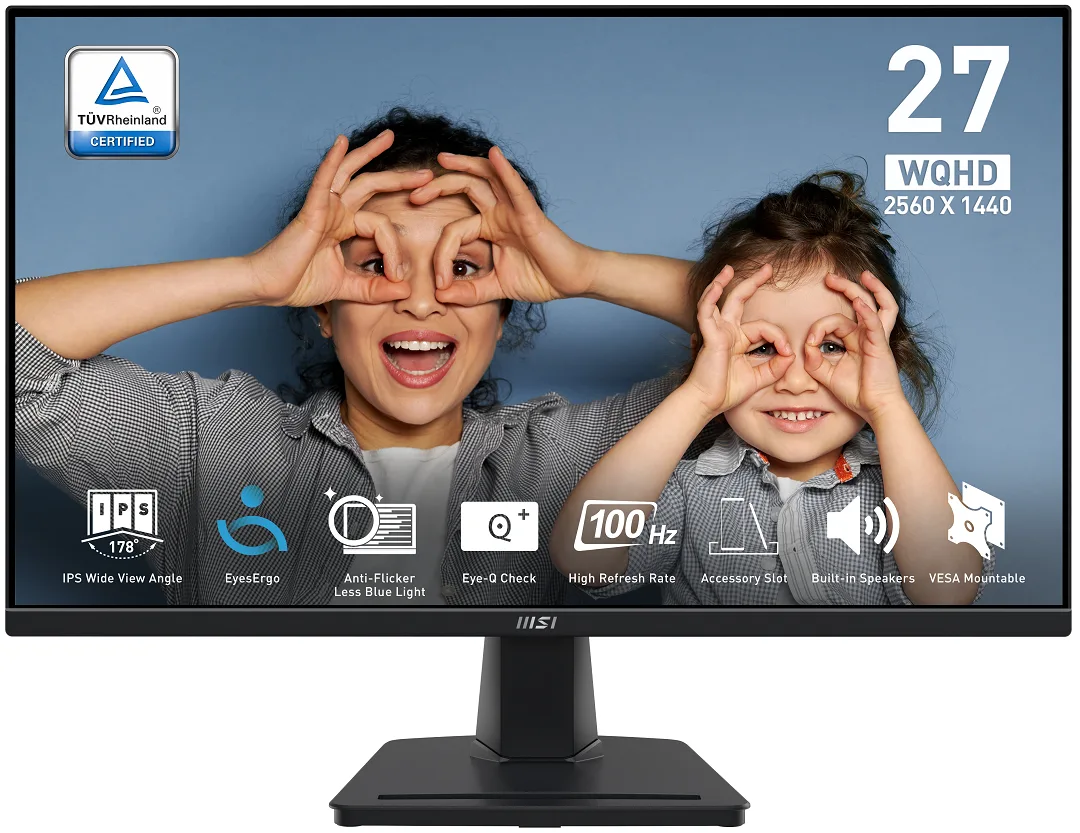
A 27-inch IPS panel delivers 2560 x 1440 resolution at 100 Hz with 100% sRGB coverage and 300 cd/m² brightness for sharp, colour-accurate work and play
The MSI PRO MP275Q is a 27-inch IPS monitor with a 2560 x 1440 resolution and a 100Hz refresh rate. It covers 100% sRGB with 1.07 billion colours and 300 cd/m² brightness. The flat panel includes Adaptive Sync, a 1ms MPRT response time and built-in 2W speakers for everyday productivity and casual gaming.
TÜV Rheinland Eye Comfort certification, Less Blue Light and Anti-Flicker suit users who spend long hours at the desk. The tilt-only stand and 100mm VESA mount work for fixed desk layouts. Buyers who require height, swivel or pivot adjustment, or who need higher refresh rates for competitive play, should look at other models.
The 2560 x 1440 panel gives ample workspace for documents, code and creative timelines while the 100Hz rate smooths scrolling and video playback. 10-bit colour (8-bit + FRC) and 1300:1 contrast handle photo editing and media consumption comfortably. The 300 cd/m² peak brightness and lack of certified HDR metadata mean bright HDR highlights and deep blacks in dark rooms are where the monitor runs out of headroom.
| Brand | MSI |
|---|---|
| Model | MP275Q |
| Cabinet Color | Matte Black |
| Screen Size | 27" |
| Glare Screen | Anti-glare |
| Widescreen | Yes |
| Resolution | 2560 x 1440 (2K) |
| Refresh Rate | 100Hz |
| Viewing Angle | 178° (H) / 178° (V) |
| Monitor Pixel Density | 0.3114mm |
| Display Colors | 1.07B / 10 bits (8 bits + FRC) |
| Brightness | 300 cd/m2 |
| Contrast Ratio | 1,300:1 |
| Aspect Ratio | 16:9 |
| Response Time | 1ms (MPRT) / 4ms (GTG) |
| Panel | IPS |
| Color Gamut | 100% sRGB |
| HDR Standard | HDR Ready |
| Adaptive Sync Technology | Adaptive Sync |
| Curved Surface Screen | Flat Panel |
| Video Ports | 1 x DisplayPort 1.2a / 2 x HDMI 2.0b |
| HDMI | 2 x HDMI 2.0b |
| DisplayPort | 1 x DisplayPort 1.2 |
| Headphone | 1 |
| Power Supply | 100 - 240 VAC, 50/60Hz |
| Power Consumption | Power On: 26W Power Saving/Off: <0.5W |
| Stand Adjustments | Tilt |
| Built-in Speakers | 2 x 2W |
| Built-in Webcam | No |
| VESA Compatibility - Mountable | 100 x 100mm |
| Dimensions | 14.22" x 24.17" x 2.20" w/o stand 17.98" x 24.17" x 8.16" w/ stand |
| Weight | 9.04 lbs. w/ stand |
| Package Contents | 1x HDMI Cable (1.5m), 1x Power Cord, 1x Quick Guide |
| وزن الشحنة | 5.54 kg |
| أبعاد الطرد | 688 × 448 × 128 mm |
The monitor accepts HDMI 2.0b and DisplayPort 1.2a; either port can deliver the full 2560 x 1440 resolution at 100 Hz.
Yes, an HDMI 1.4 source will display a picture, but it is limited to 2560 x 1440 at 60 Hz instead of the panel's 100 Hz maximum.
Open the on-screen display menu and check the information page, or use the MSI Display Kit app; both will report the current refresh rate as 100 Hz when the link is correct.
أيضًا في هذا القسم
نفس القسم، ونفس صفحة الدفع — ثماني عملات رقمية وقفل سعر لمدة 30 دقيقة.
ما تدفعه، وما تُعرض به الأسعار.
يُرسَل من محفظتك عند إتمام الطلب
للعرض فقط — أسعار الكتالوج بالدولار الأمريكي
لا توجد عملة مطابقة.
اختر اللغة التي يخاطبك بها الموقع.
لا توجد لغة مطابقة.
هل أنت جديد هنا؟
لديك حساب بالفعل؟
لا توجد إعادة تعيين تلقائية: هذا المتجر لا يُرسل أي بريد، فلا يوجد رابط لمرة واحدة يمكن طلبه. اترك العنوان في الحساب، وسيُعالَج الأمر يدويًا.
تم تسجيل الطلب
لا شيء في طريقه إلى بريدك الوارد — هذا المتجر لا يُرسل أي بريد إطلاقًا. يتولّى أحدهم معالجة هذه الطلبات يدويًا.
تذكّرتها؟


