

BFKK
BFKK 3U Rackmount Server Chassis EATX/ATX/MATX 4x5.25 6x3.5 Top/Side Cooling
- Rackmount
214,99 $
0.00278214BTC
ΔιαθέσιμοΔεχόμαστε κρυπτονομίσματα — έτσι ώστε αυτά που κατέχετε να μπορούν να αγοράσουν πραγματικό εξοπλισμό.Πληρώστε σε κρυπτονομίσματα, ξοδέψτε τα σε πραγματικό εξοπλισμό. Δωρεάν ασφαλισμένη αποστολή παγκοσμίως άνω των 399 $. Ουδέτερες κούτες αποστολής, χωρίς σήμανση, από τη Γερμανία.Δωρεάν ασφαλισμένη αποστολή άνω των 399 $. Η ισοτιμία σας κλειδώνει για 30 λεπτά μόλις ανοίξει το ταμείο.Κλείδωμα ισοτιμίας 30 λεπτών. Κάθε προϊόν είναι σφραγισμένο, ελεγμένο ως προς τον σειριακό αριθμό του, και καλύπτεται από εγγύηση 24 μηνών.Σφραγισμένο, με εγγύηση 24 μηνών.


DELL
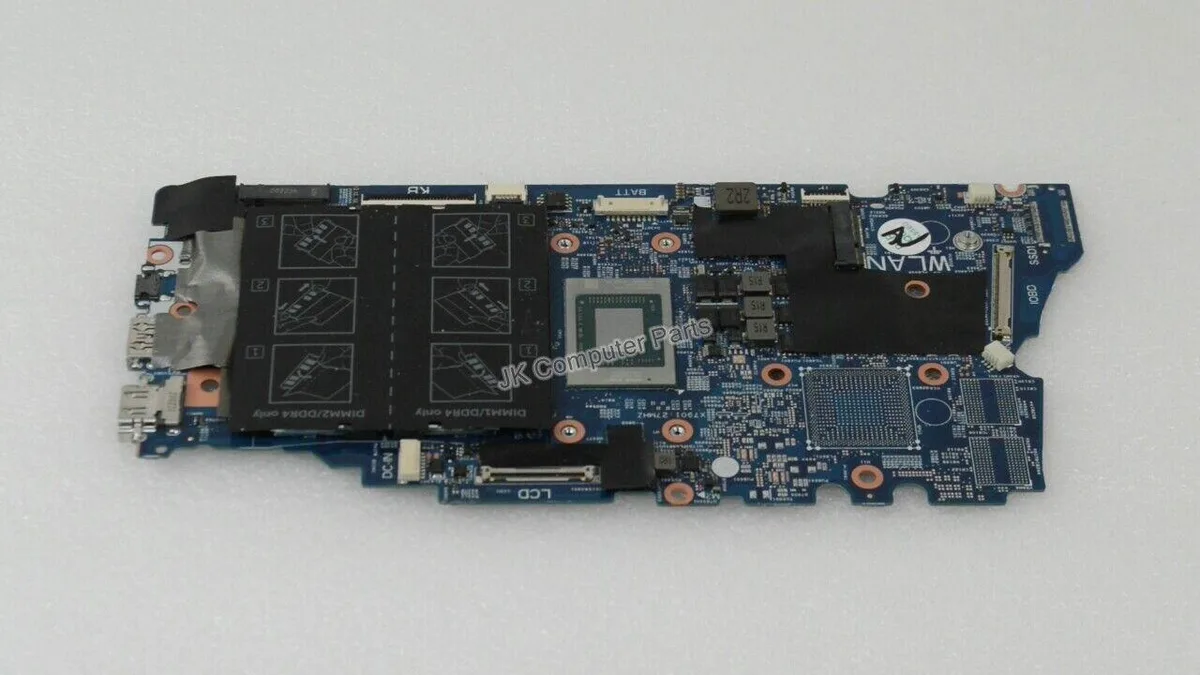
Replacement motherboard for the Inspiron 7405 2-in-1 laptop with a Ryzen 5 4500U processor
This replacement board fits the Inspiron 7405 convertible laptop and carries the AMD Ryzen 5 4500U processor. It is intended for technicians repairing a damaged system or upgrading a compatible chassis. The part number NNDRC identifies the exact revision required for proper fit and firmware alignment.
The integrated Ryzen 5 4500U operates within a low thermal envelope suited to the slim 2-in-1 design. Fan activity remains modest during typical productivity workloads and the board draws only the power needed for the processor and onboard components. No discrete graphics circuitry is present so heat output stays predictable.
| Brand | DELL |
|---|---|
| Model | INSPIRON 7405 |
| Part Number | NNDRC |
| CPU Type | A- Series/E-Series |
Remove the battery first, then disconnect all ribbon cables and antenna wires before unscrewing the board. The step often missed is reattaching the Wi‑Fi antenna cables to the correct terminals.
The CMOS battery will eventually need replacement to keep system time. Because the CPU is soldered, processor upgrades are not possible, so plan for a full board swap if performance demands increase.
Επίσης σε αυτό το ράφι
Ίδιο ράφι, ίδιο ταμείο — οκτώ νομίσματα και κλείδωμα ισοτιμίας 30 λεπτών.
Το νόμισμα στο οποίο πληρώνετε, και αυτό στο οποίο βλέπετε τις τιμές.
Αποστέλλεται από το πορτοφόλι σας στο ταμείο
Μόνο για προβολή — ο κατάλογος αναγράφεται σε δολάρια
Κανένα νόμισμα δεν αντιστοιχεί.
Επιλέξτε τη γλώσσα στην οποία σας μιλάει ο ιστότοπος.
Καμία γλώσσα δεν ταιριάζει.
Πρώτη επίσκεψη;
Έχετε ήδη λογαριασμό;
Δεν υπάρχει αυτόματη επαναφορά κωδικού: αυτό το κατάστημα δεν στέλνει e-mail, άρα δεν υπάρχει σύνδεσμος μίας χρήσης να ζητήσετε. Αφήστε τη διεύθυνση στον λογαριασμό σας και κάποιος θα την επεξεργαστεί με το χέρι.
Το αίτημα καταχωρίστηκε
Δεν θα λάβετε τίποτα στα εισερχόμενά σας — το κατάστημα δεν στέλνει κανένα e-mail. Κάποιος το διαχειρίζεται με το χέρι.
Τον θυμηθήκατε;



