

BFKK
BFKK 3U Rackmount Server Chassis EATX/ATX/MATX 4x5.25 6x3.5 Top/Side Cooling
- Rackmount
USD 214.99
0.0027736BTC
Ada stokKami menerima kripto — jadi koin yang anda simpan boleh membeli perkakasan sebenar.Bayar dengan kripto, belanjakannya untuk perkakasan sebenar. Penghantaran berinsurans percuma ke seluruh dunia untuk belian melebihi USD 399. Kotak biasa tanpa jenama, dihantar dari Jerman.Penghantaran berinsurans percuma untuk belian melebihi USD 399. Kadar anda dikunci selama 30 minit sebaik sahaja proses pesanan bermula.Kadar dikunci selama 30 minit. Setiap item disegel, nombor sirinya disemak, dan dilindungi waranti 24 bulan.Disegel, waranti 24 bulan.


DELL
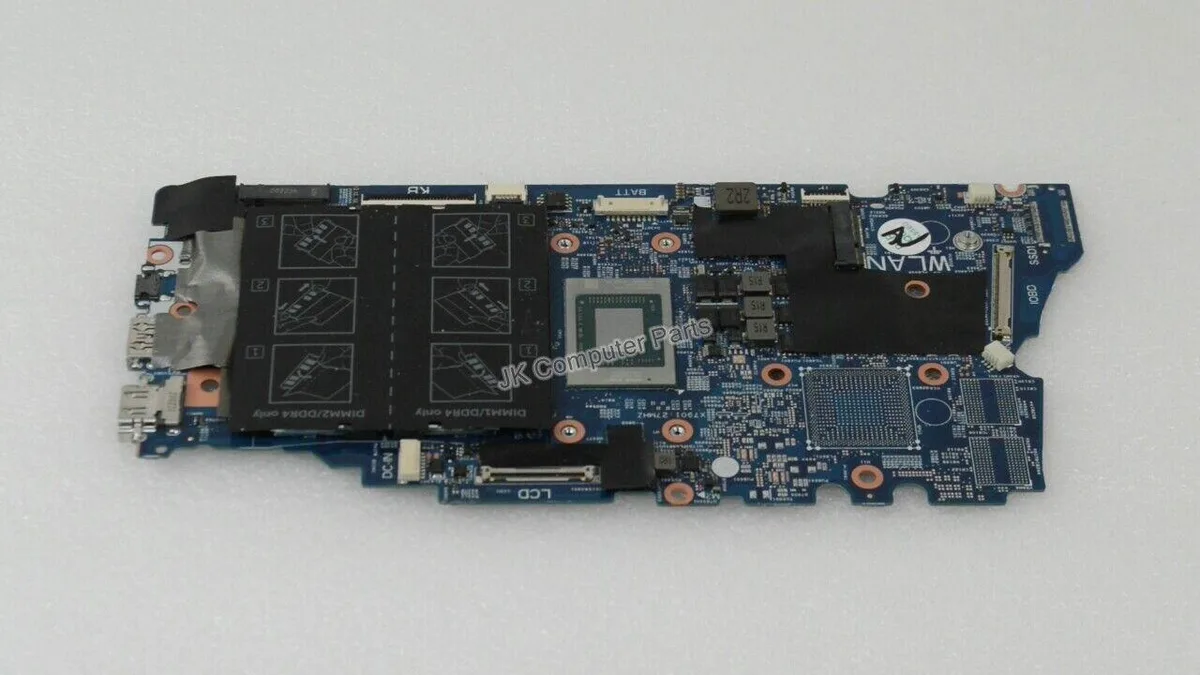
Replacement motherboard for the Inspiron 7405 2-in-1 laptop with a Ryzen 5 4500U processor
This replacement board fits the Inspiron 7405 convertible laptop and carries the AMD Ryzen 5 4500U processor. It is intended for technicians repairing a damaged system or upgrading a compatible chassis. The part number NNDRC identifies the exact revision required for proper fit and firmware alignment.
The integrated Ryzen 5 4500U operates within a low thermal envelope suited to the slim 2-in-1 design. Fan activity remains modest during typical productivity workloads and the board draws only the power needed for the processor and onboard components. No discrete graphics circuitry is present so heat output stays predictable.
| Brand | DELL |
|---|---|
| Model | INSPIRON 7405 |
| Part Number | NNDRC |
| CPU Type | A- Series/E-Series |
Remove the battery first, then disconnect all ribbon cables and antenna wires before unscrewing the board. The step often missed is reattaching the Wi‑Fi antenna cables to the correct terminals.
The CMOS battery will eventually need replacement to keep system time. Because the CPU is soldered, processor upgrades are not possible, so plan for a full board swap if performance demands increase.
Juga di rak ini
Rak yang sama, checkout yang sama — lapan koin kripto dan kunci kadar 30 minit.
Apa yang anda hantar untuk membayar, dan mata wang yang anda guna untuk membaca harga.
Dihantar daripada dompet anda semasa semak keluar
Untuk paparan sahaja — katalog diberi harga dalam USD
Tiada mata wang yang sepadan.
Pilih bahasa yang digunakan oleh laman web ini.
Tiada bahasa yang sepadan.
Pengguna baharu?
Sudah mempunyai akaun?
Tiada set semula automatik: kedai ini tidak menghantar sebarang e-mel, jadi tiada pautan sekali guna untuk diminta. Biarkan alamat pada akaun tersebut, ia akan diuruskan secara manual.
Permintaan direkodkan
Tiada apa-apa akan sampai ke peti masuk anda — kedai ini tidak menghantar sebarang e-mel. Seseorang akan menguruskannya secara manual.
Sudah teringat?



