TP-Link
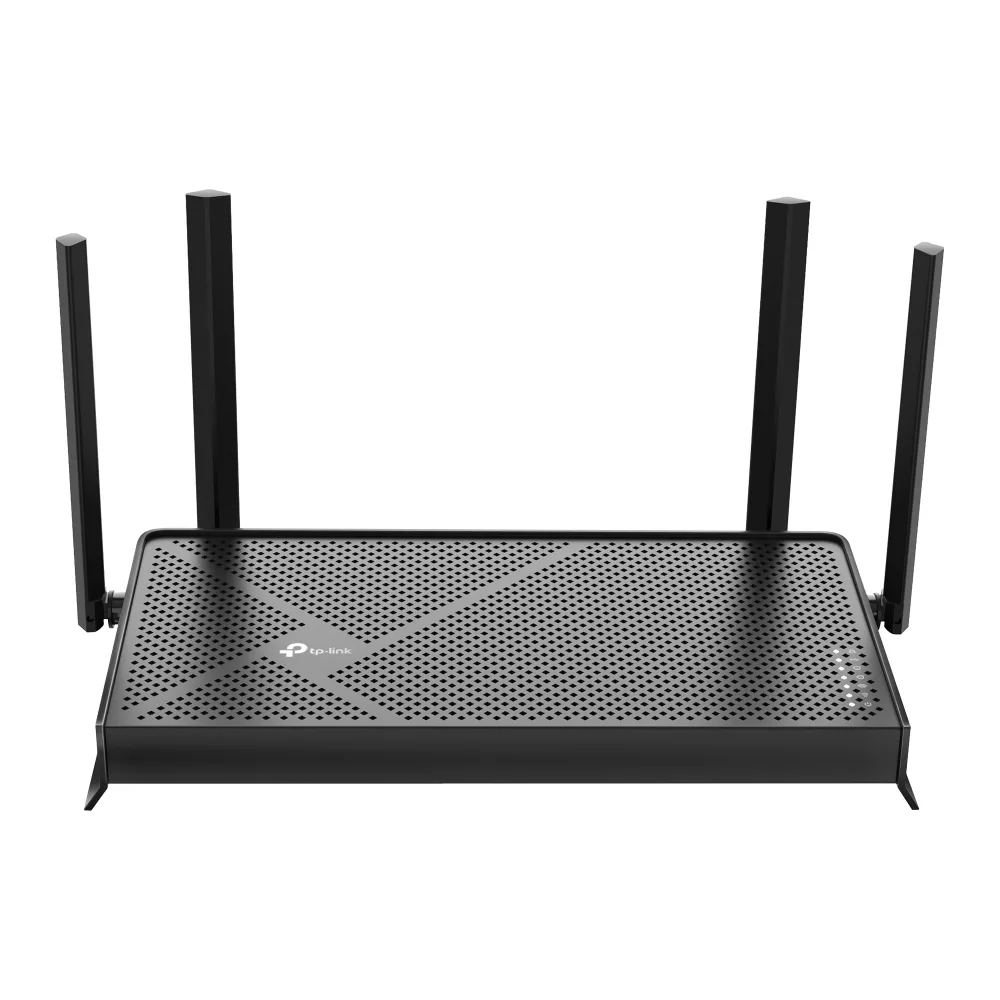
TP-Link Archer BE230 BE3600 Wi-Fi 7 wireless router
- IEEE 802.11be/ax/ac…
- Wi-Fi 7
99,99 $133,99 $−25%
0.00129173BTC
LaosMe võtame vastu krüptoraha — nii saab teie hoitav krüptoraha osta päris riistvara.Makske krüptorahaga, kulutage seda päris riistvarale. Tasuta kindlustatud tarne kogu maailmas, üle 399 $. Lihtsad, kaubamärgita väliskarbid, saadetud Saksamaalt.Tasuta kindlustatud tarne üle 399 $. Teie kurss lukustatakse 30 minutiks kohe, kui kassa avaneb.Kurss lukustatud 30 minutiks. Iga toode on pitseeritud, selle seerianumber on kontrollitud ja sellel kehtib 24-kuuline garantii.Pitseeritud, 24-kuulise garantiiga.


TP-Link
Tri-band Wi-Fi 7 router delivering up to 9.7 Gbps with a 10 Gbps WAN port and four 2.5 Gbps LAN ports
Model Archer BE550 Pro
The Archer BE550 Pro is a tri-band Wi-Fi 7 router delivering up to 9.7 Gbps aggregate wireless throughput. It targets households and small offices that need high-capacity connectivity for 8K streaming, VR applications and dense device environments. The design supports IEEE 802.11 a/b/g/n/ac/be standards across the 2.4 GHz, 5 GHz and 6 GHz bands.
A single 10 Gbps WAN port connects to multi-gig internet services while four 2.5 Gbps LAN ports serve wired clients such as NAS units, workstations and gaming consoles. Physical controls include dedicated power, Wi-Fi, LED, WPS and reset buttons for direct management. The unit operates between 0 and 40 °C with humidity up to 90 % non-condensing.
Multi-Link Operation transmits across the 2.4 GHz, 5 GHz and 6 GHz bands simultaneously, reducing latency compared with Wi-Fi 6 and 6E routers. EasyMesh compatibility allows the router to join an existing EasyMesh system for whole-home coverage. Buyers who require more than four wired 2.5 Gbps connections or a second 10 Gbps port should consider models with additional multi-gig interfaces.
| Brand | TP-Link |
|---|---|
| Model | Archer BE550 Pro |
| Standards | IEEE 802.11 a/b/g/n/ac/be |
| WPA | • WPA • WPA2 • WPA3 • WPA/WPA2-Enterprise (802.1x) |
| WAN Ports | 1× 10 Gbps WAN |
| LAN Ports | 4× 2.5 Gbps LAN |
| Buttons | • Power On/Off Button • Wi-Fi On/Off Button • LED Button • WPS Button • Reset Button |
| Temperature | • Operating Temperature: 0?~40? (32? ~104?) |
| Humidity | • Operating Humidity: 10%~90% non-condensing |
| Package Contents | • Wi-Fi 7 Router Archer BE550 Pro • Power Adapter • RJ45 Ethernet Cable • Quick Installation Guide |
| Tarnekaal | 2.09 kg |
| Pakendi mõõtmed | 274 × 240 × 145 mm |
Selle mudeli teised versioonid
Sama seeria, erinev mälumaht, jahutus või taktsagedus — võrrelge enne otsustamist.
The single 10 Gbps WAN port caps incoming internet throughput at ten gigabits per second, so any ISP plan faster than that will be limited by the port.
The rear panel holds four 2.5 Gbps LAN ports spaced for standard RJ45 plugs; allow at least 45 mm depth behind the router for straight cables or use angled connectors in tighter spaces.
Press the dedicated WPS button on the rear panel after enabling WPS in the web interface; a common mistake is holding the reset button instead, which restores factory defaults.
Veel samast osakonnast
Sama osakond, sama kassa — kaheksa krüptovaluutat ja 30-minutiline kursilukk.
See, millega maksate, ja see, milles vaatate hindu.
Saadetud teie rahakotist kassas
Ainult kuvamiseks — kataloogi hinnad on dollarites
Ükski vääring ei vasta sellele.
Valige keel, milles sait teiega räägib.
Esimest korda siin?
Teil on juba konto?
Automaatset lähtestamist ei ole: see pood ei saada ühtegi e-kirja, seega pole ka ühekordset linki, mida küsida. Jätke aadress kontole alles, seda käsitletakse käsitsi.
Päring registreeritud
Teie postkasti ei jõua midagi — see pood ei saada e-kirju üldse. Keegi tegeleb sellega käsitsi.
Tuli meelde?