Panasonic
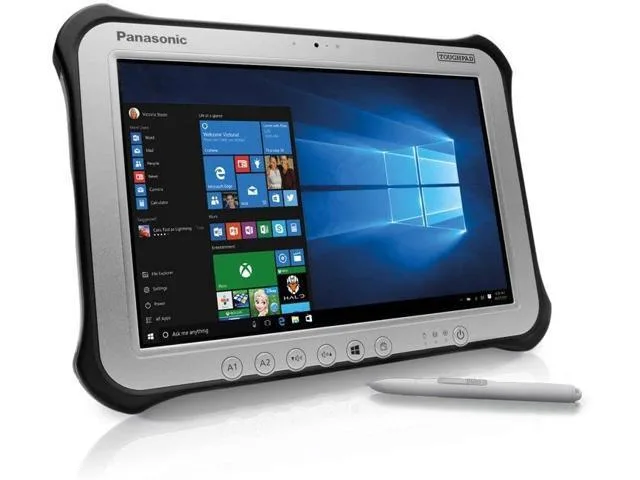
Panasonic Toughpad FZ-G1 10.1" Tablet i5-6300U 8GB 128GB
- Silver
- Windows 10 Pro
221,99 $
0.00285199BTC
VarastossaHyväksymme kryptoa — hallussasi olevat kolikot voivat näin ostaa oikeaa laitteistoa.Maksa kryptolla, käytä se oikeaan laitteistoon. Ilmainen vakuutettu toimitus maailmanlaajuisesti yli 399 $. Neutraalit, tuotemerkittömät ulkopakkaukset, lähetetään Saksasta.Ilmainen vakuutettu toimitus yli 399 $. Kurssisi lukitaan 30 minuutiksi heti, kun kassa avautuu.Kurssi lukittu 30 minuutiksi. Jokainen tuote on sinetöity, sen sarjanumero on tarkistettu, ja sillä on 24 kuukauden takuu.Sinetöity, 24 kuukauden takuu.


Panasonic
A fully rugged 10.1" tablet with a daylight-readable 1920 x 1200 display, Intel Core i5-6300U processor, 8GB DDR3L RAM, 256GB SSD, 4G LTE, Wi-Fi 5, Bluetooth 4.1, and Windows 10 Pro
SSD 256 GB
Option 4G LTE
The Panasonic Toughpad FZ-G1 MK4 is a fully rugged 10.1 inch Windows tablet built for outdoor viewability. It runs Windows 10 Pro on an Intel Core i5-6300U processor with 8GB of DDR3L RAM and a 256GB SSD. The daylight-readable display supports 10-point capacitive touch and digitiser input.
This unit fits field teams who require Windows 10 Pro for specific legacy applications and cannot migrate to Windows 11. It offers 4G LTE multi-carrier connectivity for USA and Canada networks plus Wi-Fi 5 and Bluetooth 4.1. Buyers needing a Windows 11 upgrade path or newer processor architecture should look at something else.
The operating system is explicitly not upgradeable to Windows 11, which defines the device's usable lifespan for organisations with modern OS mandates. The Intel Core i5-6300U runs at 2.40GHz with 3GHz turbo across two cores. The 1920 x 1200 IPS panel reaches 800 nits for direct sunlight readability.
| Brand | Panasonic |
|---|---|
| Series | Toughpad |
| Model | FZ-G1 |
| Part Number | FZ-G1PXXXXXX |
| Color | Silver |
| Style | Standard |
| Type | Work / Business |
| Usage | Business |
| Operating System | Windows 10 Pro |
| CPU Type | Intel Core i5 6th Gen |
| Processor Name | 2.40 GHz |
| Turbo Frequency | 3 GHz |
| Number of Cores | Dual-core Processor |
| Core Name | Skylake |
| Screen Size | 10.1" |
| Touchscreen | Touch Screen |
| Wide Screen Support | Yes |
| Display Type | Wide XGA |
| Panel | TFT IPS |
| Resolution | 1920 x 1200 |
| Display Features | Daylight-viewable WUXGA Active Matrix TFT IPS colour LCD with circular polarizer (up to 800cd/m² brightness), 10 finger capacitive multi-touchscreen + digitiser (pen, finger and glove modes) |
| GPU/VPU | Intel HD Graphics 520 |
| Graphic Type | Integrated Card |
| SSD | 256GB |
| HDD | No |
| Memory | 8GB |
| Optical Drive Type | N/A |
| LAN | N/A |
| WLAN | 802.11ac Wireless LAN |
| Bluetooth | Bluetooth 4.1 |
| HDMI | 1 x HDMI |
| Docking Connector | 1 |
| Audio Ports | 1 x Headphone/Microphone Combo Jack |
| Speaker | Water/Dust resistant mono speaker with internal mic for webcam |
Tämän mallin muut versiot
Sama tuoteperhe, eri muisti, jäähdytin tai kellotaajuus — vertaile ennen päätöstä.
The unit ships with an AC adapter and a stylus pen, providing power and pen input right out of the box.
Yes, the single USB 3.0 port is backward compatible with USB 2.0 devices for data transfer and power.
Open the Windows calibration tool and test touch points across the 1920 x 1200 display; the stylus should register pressure and hover independently of finger input.
Myös tällä osastolla
Sama osasto, sama kassa — kahdeksan kryptovaluuttaa ja 30 minuutin kurssilukko.
Valuutta, jolla maksetaan, sekä valuutta, jossa hinnat näytetään.
Lähetetään lompakostasi kassalla
Vain näyttöä varten — hinnat ovat Yhdysvaltain dollareissa
Valuuttaa ei löytynyt.
Valitse kieli, jolla sivusto puhuu sinulle.
Ei vastaavaa kieltä.
Uusi täällä?
Onko sinulla jo tili?
Automaattista palautusta ei ole: kauppa ei lähetä sähköpostia lainkaan, joten kertakäyttöistä linkkiä ei ole mistä pyytää. Jätä osoite tilille, niin se käsitellään käsin.
Pyyntö kirjattu
Mikään ei ole tulossa sähköpostiisi — tämä kauppa ei lähetä sähköpostia lainkaan. Joku käsittelee nämä pyynnöt käsin.
Muistitko sen?