MSI
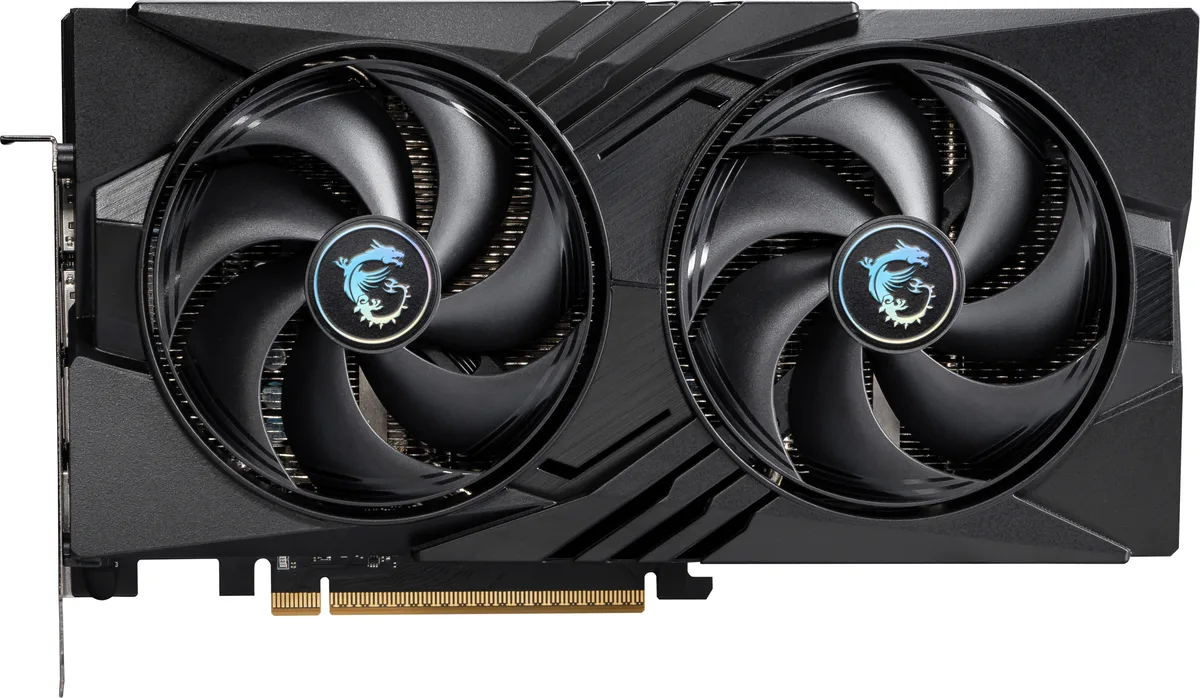
MSI RTX 5060 8G VENTUS 3X OC graphics card
- PCI Express 5.0 x 1…
- NVIDIA
365,99 USD
0.0047252BTC
Yra sandėlyjePriimame kriptovaliutą — taip monetos, kurias turite, gali nupirkti tikrą techniką.Mokėkite kriptovaliuta, išleiskite ją tikrai technikai. Nemokamas apdraustas pristatymas visame pasaulyje virš 399 $. Paprastos, be žymų siuntos dėžės, siunčiamos iš Vokietijos.Nemokamas apdraustas pristatymas virš 399 $. Jūsų kursas fiksuojamas 30 minučių, kai tik prasideda atsiskaitymas.Kursas fiksuojamas 30 minučių. Kiekvienas gaminys užplombuotas, jo serijos numeris patikrintas, ir jam taikoma 24 mėnesių garantija.Užplombuota, 24 mėnesių garantija.


MSI
GeForce RTX 5060 graphics card with 8 GB GDDR7 memory, 3840 CUDA cores and a 2527 MHz boost clock for 1440p gaming
Edition VENTUS 2X OC
Perbrauktos versijos egzistuoja, bet šiame sandėlyje jų nėra.
This card carries 8 GB of GDDR7 memory on a 128-bit bus running at 28 Gbps. The configuration feeds the RTX 5060 GPU with enough bandwidth for 1440p gaming and creative workloads. The 3840 CUDA cores operate at a 2527 MHz boost clock. A PCIe 5.0 x16 interface running at x8 completes the data path.
The memory capacity and bus width suit players targeting high-refresh 1440p and creators starting with GPU-accelerated apps. Builds that need more VRAM for 4K textures, heavy 3D scenes or large language models should consider cards with wider buses and larger buffers. The dual-fan Ventus cooler fits standard mid-tower cases without special clearance planning.
The card plugs into a PCIe 5.0 x16 slot but negotiates an x8 electrical link. On platforms that only wire the primary slot for x8, performance remains unchanged. Systems limited to PCIe 4.0 will see the link drop to 4.0 x8, which may marginally affect bandwidth-heavy titles. Verify your motherboard lane allocation before purchase.
| Brand | MSI |
|---|---|
| Series | Ventus |
| Model | RTX 5060 8G VENTUS 2X OC |
| Part Number | RTX 5060 8G VENTUS 2X OC |
| Interface | PCI Express 5.0 x 16 (use x8) |
| Chipset Manufacturer | NVIDIA |
| GPU Series | NVIDIA GeForce RTX 50 Series |
| GPU | GeForce RTX 5060 |
| Boost Clock | 2527 MHz |
| CUDA Cores | 3840 |
| Effective Memory Clock | 28 Gbps |
| Memory Size | 8GB |
| Memory Interface | 128-Bit |
| Memory Type | GDDR7 |
| DirectX | DirectX 12 Ultimate |
| OpenGL | OpenGL 4.6 |
| Multi-Monitor Support | 4 |
| HDMI | 1 x HDMI 2.1b |
| DisplayPort | 3 x DisplayPort 2.1b |
| Color | Silver |
| Max Resolution | 7680 x 4320 |
| SLI Support | No |
| Cooler | Double Fans |
| Thermal Design Power | 145W |
| Recommended PSU Wattage | 550W |
| Power Connector | 8-Pin |
| HDCP Ready | Yes |
| Max GPU Length | 197 mm |
| Card Dimensions (L x H) | 197 x 120 x 41 mm |
| Siuntos svoris | 0.89 kg |
| Pakuotės dydis | 279 × 203 × 76 mm |
Kiti šio modelio variantai
Ta pati šeima, bet skiriasi atmintis, aušintuvas ar dažnis — palyginkite prieš apsispręsdami.
The card uses a PCI Express 5.0 x16 interface that operates at x8, so it works in any PCIe x16 slot from version 3.0 upwards.
Yes, the single HDMI 2.1b port is backward compatible with HDMI 2.0 displays, and the three DisplayPort 2.1b ports also support older DisplayPort versions.
Open the NVIDIA overlay or a monitoring tool like GPU-Z while a 3D load is running; the reported boost clock should show 2527 MHz.
Taip pat šiame skyriuje
Ta pati lentyna, tas pats atsiskaitymas — aštuonios monetos ir 30 minučių fiksuotas kursas.
Tai, kuo mokate, ir valiuta, kuria matote kainas.
Išsiunčiama iš Jūsų piniginės atsiskaitant
Tik rodoma — katalogo kainos nurodytos doleriais
Tokios valiutos nerasta.
Pasirinkite kalbą, kuria Jums kalbės svetainė.
Pirmą kartą čia?
Jau turite paskyrą?
Automatinio atstatymo nėra: ši parduotuvė nesiunčia jokių el. laiškų, todėl nėra jokios vienkartinės nuorodos, kurios būtų galima paprašyti. Palikite adresą paskyroje, ir juo bus pasirūpinta rankiniu būdu.
Prašymas užfiksuotas
Į Jūsų pašto dėžutę niekas nekeliauja — ši parduotuvė apskritai nesiunčia jokių el. laiškų. Šiuos prašymus kažkas peržiūri rankiniu būdu.
Prisiminėte?