MSI
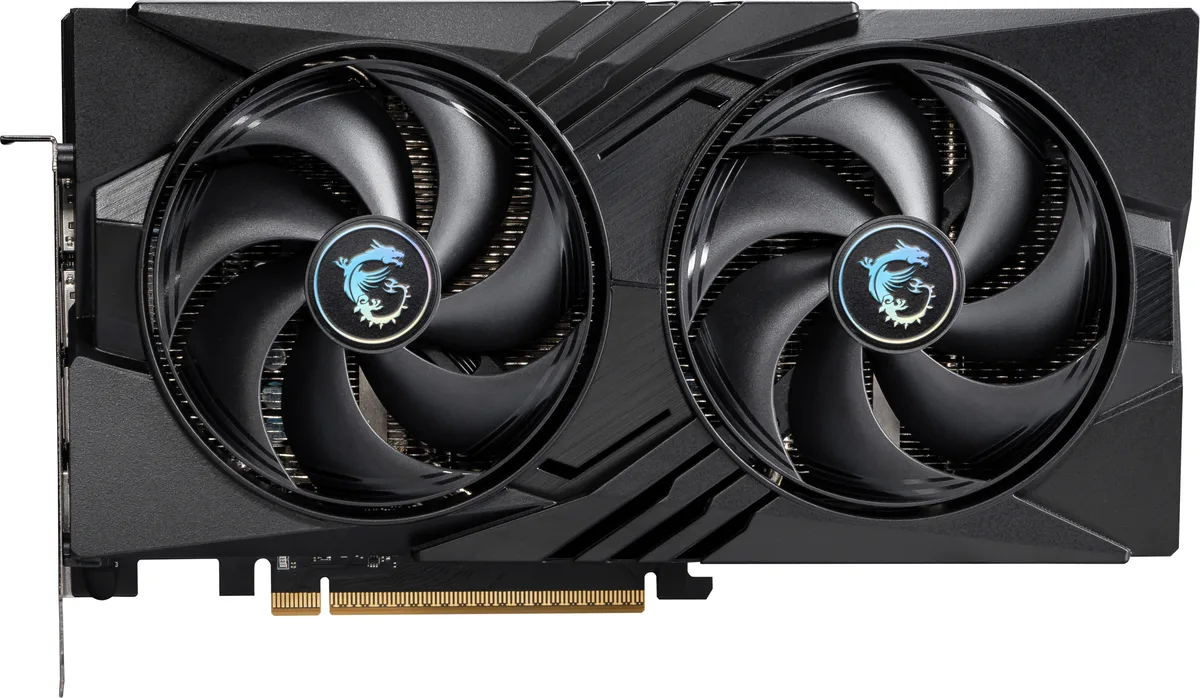
MSI RTX 5060 8G VENTUS 3X OC graphics card
- PCI Express 5.0 x 1…
- NVIDIA
365,99 $
0.00455302BTC
VarastossaHyväksymme kryptoa — hallussasi olevat kolikot voivat näin ostaa oikeaa laitteistoa.Maksa kryptolla, käytä se oikeaan laitteistoon. Ilmainen vakuutettu toimitus maailmanlaajuisesti yli 399 $. Neutraalit, tuotemerkittömät ulkopakkaukset, lähetetään Saksasta.Ilmainen vakuutettu toimitus yli 399 $. Kurssisi lukitaan 30 minuutiksi heti, kun kassa avautuu.Kurssi lukittu 30 minuutiksi. Jokainen tuote on sinetöity, sen sarjanumero on tarkistettu, ja sillä on 24 kuukauden takuu.Sinetöity, 24 kuukauden takuu.


MSI
GeForce RTX 5060 graphics card with 8 GB GDDR7 memory, 3840 CUDA cores and a 2527 MHz boost clock for 1440p gaming
Edition VENTUS 2X OC
Yliviivatut versiot ovat olemassa, mutta niitä ei ole varastossa täällä.
This card carries 8 GB of GDDR7 memory on a 128-bit bus running at 28 Gbps. The configuration feeds the RTX 5060 GPU with enough bandwidth for 1440p gaming and creative workloads. The 3840 CUDA cores operate at a 2527 MHz boost clock. A PCIe 5.0 x16 interface running at x8 completes the data path.
The memory capacity and bus width suit players targeting high-refresh 1440p and creators starting with GPU-accelerated apps. Builds that need more VRAM for 4K textures, heavy 3D scenes or large language models should consider cards with wider buses and larger buffers. The dual-fan Ventus cooler fits standard mid-tower cases without special clearance planning.
The card plugs into a PCIe 5.0 x16 slot but negotiates an x8 electrical link. On platforms that only wire the primary slot for x8, performance remains unchanged. Systems limited to PCIe 4.0 will see the link drop to 4.0 x8, which may marginally affect bandwidth-heavy titles. Verify your motherboard lane allocation before purchase.
| Brand | MSI |
|---|---|
| Series | Ventus |
| Model | RTX 5060 8G VENTUS 2X OC |
| Part Number | RTX 5060 8G VENTUS 2X OC |
| Interface | PCI Express 5.0 x 16 (use x8) |
| Chipset Manufacturer | NVIDIA |
| GPU Series | NVIDIA GeForce RTX 50 Series |
| GPU | GeForce RTX 5060 |
| Boost Clock | 2527 MHz |
| CUDA Cores | 3840 |
| Effective Memory Clock | 28 Gbps |
| Memory Size | 8GB |
| Memory Interface | 128-Bit |
| Memory Type | GDDR7 |
| DirectX | DirectX 12 Ultimate |
| OpenGL | OpenGL 4.6 |
| Multi-Monitor Support | 4 |
| HDMI | 1 x HDMI 2.1b |
| DisplayPort | 3 x DisplayPort 2.1b |
| Color | Silver |
| Max Resolution | 7680 x 4320 |
| SLI Support | No |
| Cooler | Double Fans |
| Thermal Design Power | 145W |
| Recommended PSU Wattage | 550W |
| Power Connector | 8-Pin |
| HDCP Ready | Yes |
| Max GPU Length | 197 mm |
| Card Dimensions (L x H) | 197 x 120 x 41 mm |
| Lähetyspaino | 0.89 kg |
| Pakkauksen mitat | 279 × 203 × 76 mm |
Tämän mallin muut versiot
Sama tuoteperhe, eri muisti, jäähdytin tai kellotaajuus — vertaile ennen päätöstä.
The card uses a PCI Express 5.0 x16 interface that operates at x8, so it works in any PCIe x16 slot from version 3.0 upwards.
Yes, the single HDMI 2.1b port is backward compatible with HDMI 2.0 displays, and the three DisplayPort 2.1b ports also support older DisplayPort versions.
Open the NVIDIA overlay or a monitoring tool like GPU-Z while a 3D load is running; the reported boost clock should show 2527 MHz.
Myös tällä osastolla
Sama osasto, sama kassa — kahdeksan kryptovaluuttaa ja 30 minuutin kurssilukko.
Valuutta, jolla maksetaan, sekä valuutta, jossa hinnat näytetään.
Lähetetään lompakostasi kassalla
Vain näyttöä varten — hinnat ovat Yhdysvaltain dollareissa
Valuuttaa ei löytynyt.
Valitse kieli, jolla sivusto puhuu sinulle.
Uusi täällä?
Onko sinulla jo tili?
Automaattista palautusta ei ole: kauppa ei lähetä sähköpostia lainkaan, joten kertakäyttöistä linkkiä ei ole mistä pyytää. Jätä osoite tilille, niin se käsitellään käsin.
Pyyntö kirjattu
Mikään ei ole tulossa sähköpostiisi — tämä kauppa ei lähetä sähköpostia lainkaan. Joku käsittelee nämä pyynnöt käsin.
Muistitko sen?