MSI
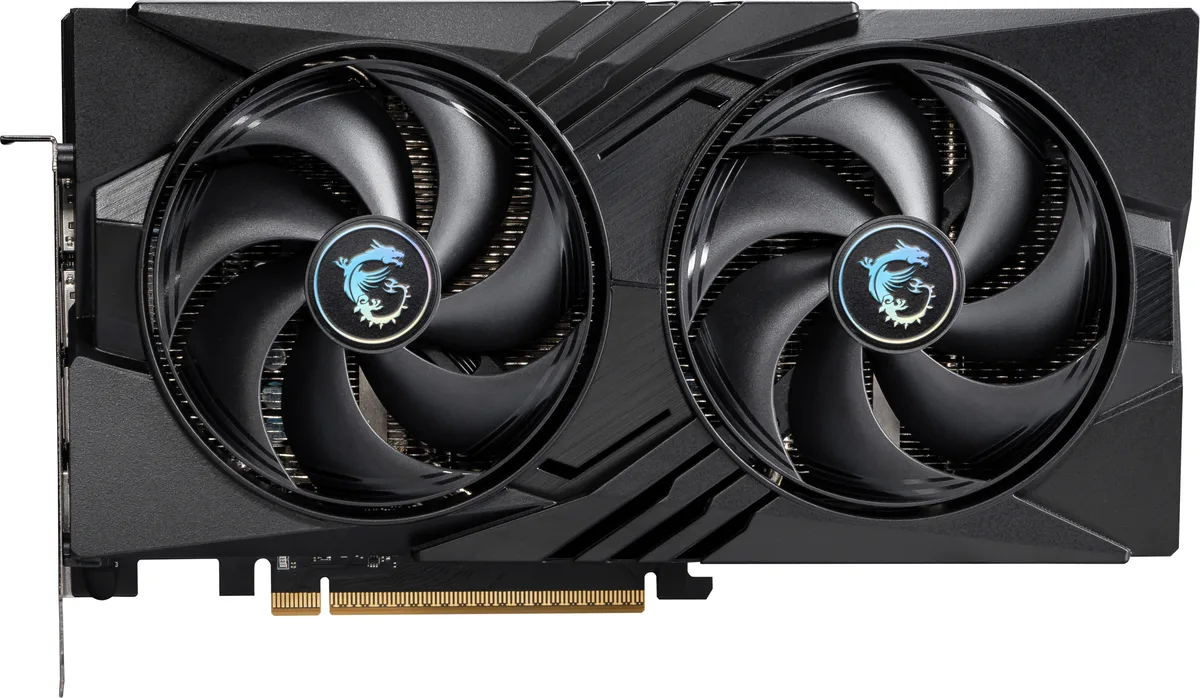
MSI RTX 5060 8G VENTUS 3X OC graphics card
- PCI Express 5.0 x 1…
- NVIDIA
365,99 US$
0.00455393BTC
En stockAceptamos criptomonedas — así, las criptos que usted tiene pueden comprar hardware real.Pague en cripto y gástela en hardware real. Envío asegurado gratis a nivel mundial a partir de $399. Cajas neutras, sin marca, enviadas desde Alemania.Envío asegurado gratis a partir de $399. Su cotización queda bloqueada 30 minutos en cuanto se abre el pago.Cotización bloqueada 30 minutos. Todos los artículos vienen sellados, con el número de serie verificado y cubiertos por una garantía de 24 meses.Sellado, con 24 meses de garantía.


MSI
GeForce RTX 5060 graphics card with 8 GB GDDR7 memory, 3840 CUDA cores and a 2527 MHz boost clock for 1440p gaming
Edition VENTUS 2X OC
Las versiones tachadas existen, pero no están disponibles aquí.
This card carries 8 GB of GDDR7 memory on a 128-bit bus running at 28 Gbps. The configuration feeds the RTX 5060 GPU with enough bandwidth for 1440p gaming and creative workloads. The 3840 CUDA cores operate at a 2527 MHz boost clock. A PCIe 5.0 x16 interface running at x8 completes the data path.
The memory capacity and bus width suit players targeting high-refresh 1440p and creators starting with GPU-accelerated apps. Builds that need more VRAM for 4K textures, heavy 3D scenes or large language models should consider cards with wider buses and larger buffers. The dual-fan Ventus cooler fits standard mid-tower cases without special clearance planning.
The card plugs into a PCIe 5.0 x16 slot but negotiates an x8 electrical link. On platforms that only wire the primary slot for x8, performance remains unchanged. Systems limited to PCIe 4.0 will see the link drop to 4.0 x8, which may marginally affect bandwidth-heavy titles. Verify your motherboard lane allocation before purchase.
| Brand | MSI |
|---|---|
| Series | Ventus |
| Model | RTX 5060 8G VENTUS 2X OC |
| Part Number | RTX 5060 8G VENTUS 2X OC |
| Interface | PCI Express 5.0 x 16 (use x8) |
| Chipset Manufacturer | NVIDIA |
| GPU Series | NVIDIA GeForce RTX 50 Series |
| GPU | GeForce RTX 5060 |
| Boost Clock | 2527 MHz |
| CUDA Cores | 3840 |
| Effective Memory Clock | 28 Gbps |
| Memory Size | 8GB |
| Memory Interface | 128-Bit |
| Memory Type | GDDR7 |
| DirectX | DirectX 12 Ultimate |
| OpenGL | OpenGL 4.6 |
| Multi-Monitor Support | 4 |
| HDMI | 1 x HDMI 2.1b |
| DisplayPort | 3 x DisplayPort 2.1b |
| Color | Silver |
| Max Resolution | 7680 x 4320 |
| SLI Support | No |
| Cooler | Double Fans |
| Thermal Design Power | 145W |
| Recommended PSU Wattage | 550W |
| Power Connector | 8-Pin |
| HDCP Ready | Yes |
| Max GPU Length | 197 mm |
| Card Dimensions (L x H) | 197 x 120 x 41 mm |
| Peso de envío | 0.89 kg |
| Dimensiones del paquete | 279 × 203 × 76 mm |
Otras versiones de este modelo
Misma familia, con memoria, disipador o frecuencia diferentes — compare antes de decidirse.
The card uses a PCI Express 5.0 x16 interface that operates at x8, so it works in any PCIe x16 slot from version 3.0 upwards.
Yes, the single HDMI 2.1b port is backward compatible with HDMI 2.0 displays, and the three DisplayPort 2.1b ports also support older DisplayPort versions.
Open the NVIDIA overlay or a monitoring tool like GPU-Z while a 3D load is running; the reported boost clock should show 2527 MHz.
También en este pasillo
Mismo estante, mismo pago — ocho criptomonedas y un tipo de cambio fijado 30 minutos.
Lo que usted paga, y la moneda en la que lee los precios.
Se envía desde su billetera al finalizar la compra
Solo informativo — el catálogo está en dólares
Ninguna moneda coincide.
Elija el idioma en el que el sitio le habla.
¿Es nuevo aquí?
¿Ya tiene una?
No existe ningún restablecimiento automático: esta tienda no envía correos electrónicos, así que no hay ningún enlace de un solo uso que solicitar. Deje la dirección asociada a la cuenta y se atenderá de forma manual.
Solicitud registrada
No hay nada de camino a su bandeja de entrada: esta tienda no envía correos en absoluto. Alguien se encarga de esto manualmente.
¿La recordó?