
Acer America
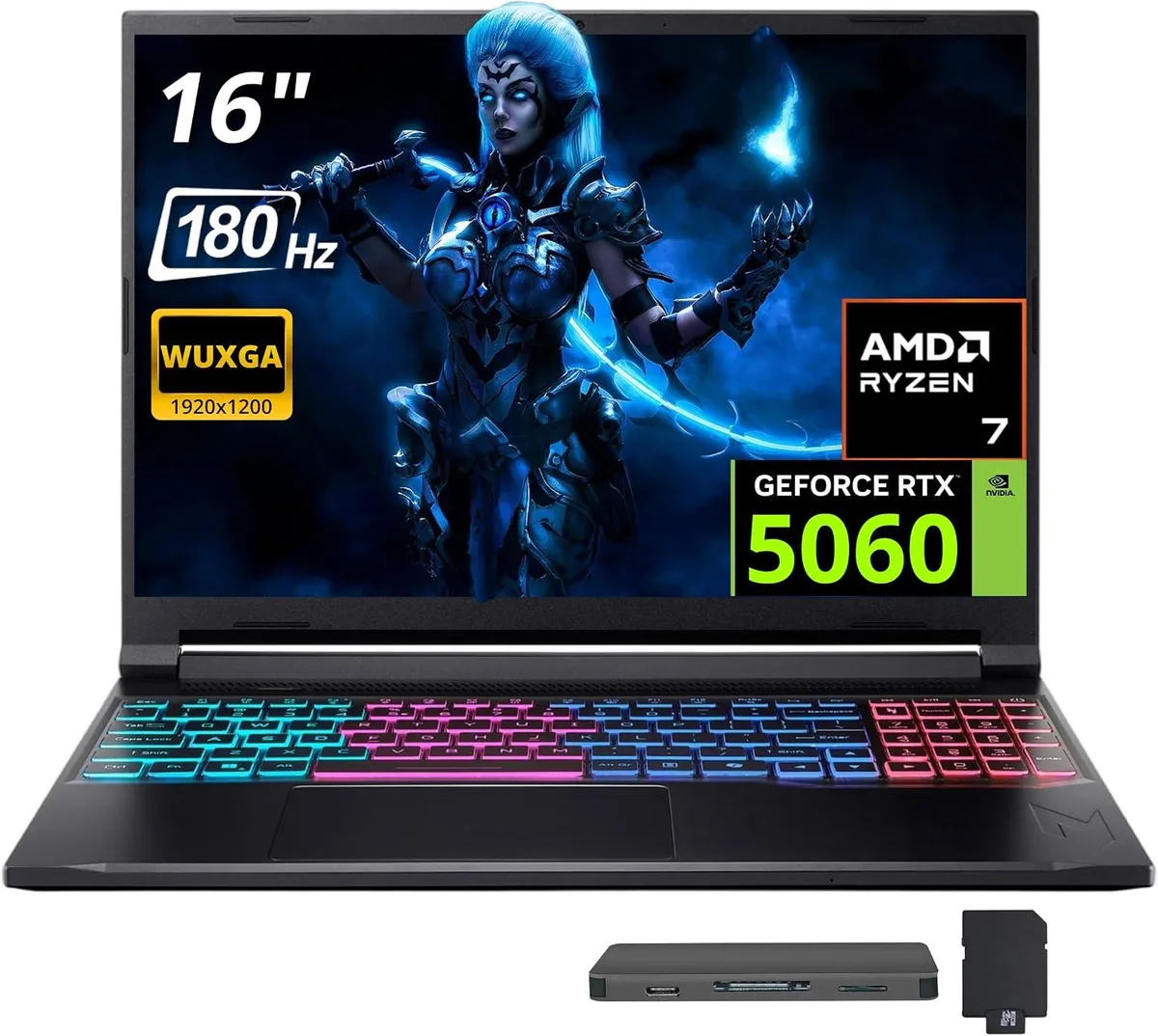
Acer Nitro V 16S AI 16" 180 Hz Gaming Laptop, AMD Ryzen 260, 16GB RAM, 1TB SSD + 1TB Dock Set
- Black
- AMD Ryzen 260
1 118,99 $
0.014478BTC
KrājumāMēs pieņemam kriptovalūtu — lai tā, kas Jums pieder, varētu nopirkt īstu aparatūru.Maksājiet kriptovalūtā, iztērējiet to īstai aparatūrai. Bezmaksas apdrošināta piegāde visā pasaulē virs 399 $. Vienkāršas, nemarķētas kastes, sūtītas no Vācijas.Bezmaksas apdrošināta piegāde virs 399 $. Jūsu kurss tiek fiksēts uz 30 minūtēm, tiklīdz atveras kase.Kurss fiksēts uz 30 minūtēm. Katra prece ir aizzīmogota, tās sērijas numurs ir pārbaudīts, un uz to attiecas 24 mēnešu garantija.Aizzīmogots, 24 mēnešu garantija.


Acer America
16-inch 180 Hz WUXGA gaming laptop with AMD Ryzen 260, 32 GB DDR5, 2 TB SSD plus 1 TB dock, RTX 5060 and Windows 11 Pro
Capacity 32GB DDR5 · 2TB SSD
The Acer Nitro V 16S AI pairs a 16-inch 1920 x 1200 display running at 180 Hz with an AMD Ryzen 260 eight-core processor and an NVIDIA GeForce RTX 5060 GPU. Thirty-two gigabytes of DDR5 5600 system memory and a 2 TB solid-state drive give fast load times and headroom for multitasking. Windows 11 Pro ships pre-installed on the black chassis.
Moving from a standard 60 Hz screen to the 180 Hz panel makes motion visibly smoother in competitive titles, while the jump to 32 GB DDR5 removes the bottleneck that appears when modern games and background apps share limited memory. The RTX 5060 with GDDR7 video memory delivers a clear step up over previous mobile GPUs, so the upgrade pays off when frame rates and texture detail matter most.
A single HDMI 2.1 port drives external high-refresh monitors at native resolution, and the included 7-in-1 docking station adds a 1 TB SSD, a 32 GB microSD card with adapter, a USB-C data cable, a 3-in-1 charging cable and a suede cleaning cloth. Three USB-A ports and one USB-C port on the laptop itself handle peripherals, while 802.11ax Wi-Fi and Bluetooth 5.3 cover wireless needs. The four-zone RGB keyboard rounds out the feature set without demanding extra desk space.
| Color | Black |
|---|---|
| Processor Name | AMD Ryzen 260 |
| Number of Cores | 8-core Processor |
| Screen Size | 16.0" |
| Touchscreen | Non-Touch Screen |
| Display Type | WQXGA |
| Resolution | 1920 x 1200 |
| Refresh Rate | 180 Hz |
| Operating System | Windows 11 Pro |
| GPU/VPU | NVIDIA GeForce RTX 5060 |
| Memory | 32GB |
| Memory Speed | DDR5 5600 |
| Memory Type | GDDR7 |
| WLAN | 802.11ax Wireless LAN |
| Bluetooth | Bluetooth 5.3 |
| USB | 1 x USB-C, 3 x USB-A |
| HDMI | 1 x HDMI 2.1 |
| Backlit Keyboard | Backlit |
| Webcam | Yes |
| Type | Gaming |
| Usage | Gaming |
Citas šī modeļa versijas
Viena saime, taču atšķirīga atmiņa, dzesētājs vai frekvence — salīdziniet, pirms izlemjat.
The laptop is a portable 16.0 inch clamshell with no VESA mounting holes; it is designed for desk or lap use only.
The 32GB DDR5 5600 memory is soldered and not user-replaceable; the 2TB internal SSD is pre-installed, while the 1TB dock SSD connects via the supplied USB-C cable — the step often missed is installing the dock drivers before first use.
Clean the non-touch 180 Hz display with the included suede cloth; keep the RTX 5060 GPU vents clear of dust and update NVIDIA drivers regularly for optimal performance.
Arī šajā sadaļā
Tas pats plaukts, tā pati kase — astoņas kriptovalūtas un kursa fiksēšana uz 30 minūtēm.
Kriptovalūta, kurā maksājat, un valūta, kurā redzat cenas.
Nosūtīts no Jūsu maciņa, noformējot pasūtījumu
Tikai informatīvi — katalogā cenas norādītas ASV dolāros
Neviena valūta neatbilst.
Izvēlieties valodu, kurā vietne sarunājas ar Jums.
Neviena valoda neatbilst.
Pirmo reizi šeit?
Jau ir konts?
Automātiskas atiestatīšanas nav: šis veikals nesūta e-pastus, tāpēc nav arī vienreizējas saites, ko pieprasīt. Atstājiet adresi kontā, un tā tiks apstrādāta manuāli.
Pieprasījums saņemts
Uz Jūsu e-pastu nekas neatnāks — šis veikals vispār nesūta e-pastus. Kāds šos pieprasījumus apstrādā manuāli.
Atcerējāties?





