

HP
HP ProDesk 600 G3 SFF all-in-one PC i7-6700 3.40GHz 32GB DDR4 2TB SSD Windows 10 Pro
- Business Desktops &…
- Slim/Small Form Fac…
655,99 $
0.0084388BTC
KrājumāMēs pieņemam kriptovalūtu — lai tā, kas Jums pieder, varētu nopirkt īstu aparatūru.Maksājiet kriptovalūtā, iztērējiet to īstai aparatūrai. Bezmaksas apdrošināta piegāde visā pasaulē virs 399 $. Vienkāršas, nemarķētas kastes, sūtītas no Vācijas.Bezmaksas apdrošināta piegāde virs 399 $. Jūsu kurss tiek fiksēts uz 30 minūtēm, tiklīdz atveras kase.Kurss fiksēts uz 30 minūtēm. Katra prece ir aizzīmogota, tās sērijas numurs ir pārbaudīts, un uz to attiecas 24 mēnešu garantija.Aizzīmogots, 24 mēnešu garantija.
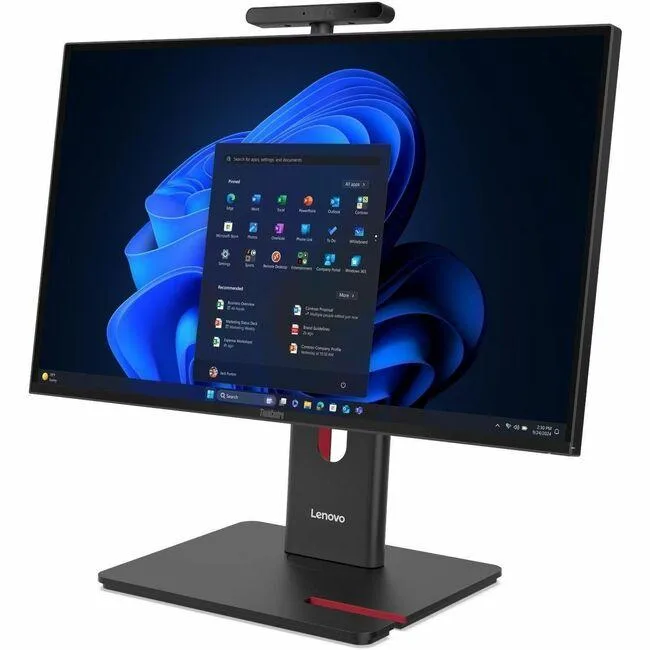


Lenovo
23.8 inch Full HD all-in-one desktop with Intel Core Ultra 5 225, 8 GB DDR5 and 256 GB SSD running Windows 11 Pro
This Lenovo ThinkCentre M90a Gen 6 integrates a 23.8 inch Full HD display with an Intel Core Ultra 5 225 processor, 8 GB of DDR5 memory and a 256 GB SSD. Windows 11 Pro is pre-installed. The system includes a DVD-Writer, wired Ethernet, IEEE 802.11ax wireless LAN and a 180 W power supply. A USB keyboard and mouse complete the package.
The all-in-one form factor saves desk space and simplifies deployment for general business applications. Buyers who need discrete graphics performance, larger internal storage capacity or user-upgradeable memory slots should evaluate alternative configurations. The integrated Intel Graphics handles everyday productivity but not intensive 3D workloads.
Under continuous load the Intel Core Ultra 5 225 and integrated graphics operate within the 180 W supply, so clock speeds remain stable without thermal throttling. The Intel Q870 chipset manages platform power efficiently during long work sessions. Fan noise stays consistent because the cooling solution is sized for the fixed power envelope.
| Brand | Lenovo |
|---|---|
| Series | ThinkCentre M90a |
| Model | ThinkCentre M90a Gen 6 |
| Part Number | 13AT0003US |
| Type | All-in-One PC |
| Color | Black |
| Processor | Intel Core Ultra 5 225 (2nd Gen) |
| Memory | 8 GB DDR5 SDRAM |
| Storage | 256 GB SSD |
| Optical Drive | DVD-Writer |
| Graphics | Intel Graphics |
| Ethernet | Ethernet |
| Wireless Card | IEEE 802.11ax Wireless LAN |
| Power Supply | 180 W |
| Monitor | 23.8" Full HD Display Included |
| Keyboard | English (US) Keyboard |
| Mouse | USB Calliope Mouse |
| Operating System | Windows 11 Pro |
| Chipset | Intel Q870 |
| CPU Type | Core Ultra 5 |
| CPU Name | Core Ultra 5 225 |
| SSD | 256 GB |
| Screen Size | 23.8 Inch |
| Package Contents | ThinkCentre M90a Gen 6 13AT0003US All-in-One Computer USB, Calliope USB Calliope Mouse VESA mount UltraFlex V Stand |
| Sūtījuma svars | 10.80 kg |
| Sūtījuma izmēri | 686 × 533 × 235 mm |
The system uses integrated Intel Graphics; check the rear I/O for HDMI or DisplayPort outputs to attach an additional screen.
Yes — the all-in-one provides standard USB ports, so any USB keyboard and mouse will work alongside the supplied set.
Open Settings > System > Storage; the 256 GB drive should appear as the primary device with Windows installed.
Arī šajā sadaļā
Tas pats plaukts, tā pati kase — astoņas kriptovalūtas un kursa fiksēšana uz 30 minūtēm.
Kriptovalūta, kurā maksājat, un valūta, kurā redzat cenas.
Nosūtīts no Jūsu maciņa, noformējot pasūtījumu
Tikai informatīvi — katalogā cenas norādītas ASV dolāros
Neviena valūta neatbilst.
Izvēlieties valodu, kurā vietne sarunājas ar Jums.
Pirmo reizi šeit?
Jau ir konts?
Automātiskas atiestatīšanas nav: šis veikals nesūta e-pastus, tāpēc nav arī vienreizējas saites, ko pieprasīt. Atstājiet adresi kontā, un tā tiks apstrādāta manuāli.
Pieprasījums saņemts
Uz Jūsu e-pastu nekas neatnāks — šis veikals vispār nesūta e-pastus. Kāds šos pieprasījumus apstrādā manuāli.
Atcerējāties?



