

HP
HP ProDesk 600 G3 SFF all-in-one PC i7-6700 3.40GHz 32GB DDR4 2TB SSD Windows 10 Pro
- Business Desktops &…
- Slim/Small Form Fac…
655,99 USD
0.00816944BTC
DisponibileAccettiamo criptovalute — così le crypto che Lei possiede possono comprare hardware reale.Paghi in crypto, la spenda in hardware reale. Spedizione assicurata gratuita in tutto il mondo oltre i 399 $. Cartoni neutri, senza marchio, spediti dalla Germania.Spedizione assicurata gratuita oltre i 399 $. Il Suo tasso resta bloccato per 30 minuti dall’apertura del checkout.Tasso bloccato 30 minuti. Ogni articolo è sigillato, il numero di serie è verificato, ed è coperto da una garanzia di 24 mesi.Sigillato, garantito 24 mesi.
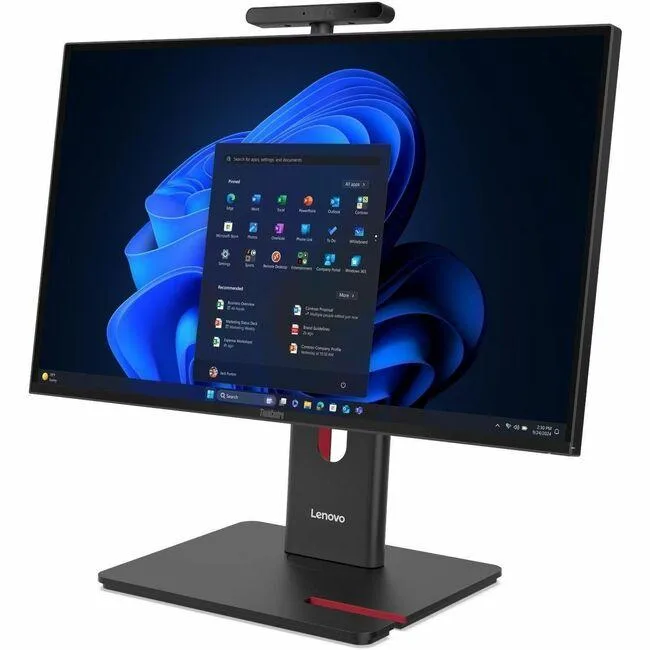


Lenovo
23.8 inch Full HD all-in-one desktop with Intel Core Ultra 5 225, 8 GB DDR5 and 256 GB SSD running Windows 11 Pro
This Lenovo ThinkCentre M90a Gen 6 integrates a 23.8 inch Full HD display with an Intel Core Ultra 5 225 processor, 8 GB of DDR5 memory and a 256 GB SSD. Windows 11 Pro is pre-installed. The system includes a DVD-Writer, wired Ethernet, IEEE 802.11ax wireless LAN and a 180 W power supply. A USB keyboard and mouse complete the package.
The all-in-one form factor saves desk space and simplifies deployment for general business applications. Buyers who need discrete graphics performance, larger internal storage capacity or user-upgradeable memory slots should evaluate alternative configurations. The integrated Intel Graphics handles everyday productivity but not intensive 3D workloads.
Under continuous load the Intel Core Ultra 5 225 and integrated graphics operate within the 180 W supply, so clock speeds remain stable without thermal throttling. The Intel Q870 chipset manages platform power efficiently during long work sessions. Fan noise stays consistent because the cooling solution is sized for the fixed power envelope.
| Brand | Lenovo |
|---|---|
| Series | ThinkCentre M90a |
| Model | ThinkCentre M90a Gen 6 |
| Part Number | 13AT0003US |
| Type | All-in-One PC |
| Color | Black |
| Processor | Intel Core Ultra 5 225 (2nd Gen) |
| Memory | 8 GB DDR5 SDRAM |
| Storage | 256 GB SSD |
| Optical Drive | DVD-Writer |
| Graphics | Intel Graphics |
| Ethernet | Ethernet |
| Wireless Card | IEEE 802.11ax Wireless LAN |
| Power Supply | 180 W |
| Monitor | 23.8" Full HD Display Included |
| Keyboard | English (US) Keyboard |
| Mouse | USB Calliope Mouse |
| Operating System | Windows 11 Pro |
| Chipset | Intel Q870 |
| CPU Type | Core Ultra 5 |
| CPU Name | Core Ultra 5 225 |
| SSD | 256 GB |
| Screen Size | 23.8 Inch |
| Package Contents | ThinkCentre M90a Gen 6 13AT0003US All-in-One Computer USB, Calliope USB Calliope Mouse VESA mount UltraFlex V Stand |
| Peso di spedizione | 10.80 kg |
| Dimensioni del pacco | 686 × 533 × 235 mm |
The system uses integrated Intel Graphics; check the rear I/O for HDMI or DisplayPort outputs to attach an additional screen.
Yes — the all-in-one provides standard USB ports, so any USB keyboard and mouse will work alongside the supplied set.
Open Settings > System > Storage; the 256 GB drive should appear as the primary device with Windows installed.
Anche in questo reparto
Stesso reparto, stessa cassa — otto monete e un cambio bloccato per 30 minuti.
Cosa invia per pagare, e in quale valuta legge i prezzi.
Inviato dal Suo portafoglio alla cassa
Solo a titolo indicativo — il catalogo è espresso in dollari
Nessuna valuta corrisponde.
Scelga la lingua in cui il sito Le parla.
Prima visita?
Ne ha già uno?
Non esiste un ripristino automatico: questo negozio non invia e-mail, quindi non esiste alcun link monouso da richiedere. Lasci l’indirizzo sull’account: verrà gestito manualmente.
Richiesta registrata
Non arriverà nulla nella Sua casella di posta — questo negozio non invia e-mail. Qualcuno se ne occupa manualmente.
L’ha ritrovata?



