

HP
HP ProDesk 600 G3 SFF all-in-one PC i7-6700 3.40GHz 32GB DDR4 2TB SSD Windows 10 Pro
- Business Desktops &…
- Slim/Small Form Fac…
655,99 US$
0.00816944BTC
En stockAceptamos criptomonedas — así, las criptos que usted tiene pueden comprar hardware real.Pague en cripto y gástela en hardware real. Envío asegurado gratis a nivel mundial a partir de $399. Cajas neutras, sin marca, enviadas desde Alemania.Envío asegurado gratis a partir de $399. Su cotización queda bloqueada 30 minutos en cuanto se abre el pago.Cotización bloqueada 30 minutos. Todos los artículos vienen sellados, con el número de serie verificado y cubiertos por una garantía de 24 meses.Sellado, con 24 meses de garantía.


Lenovo
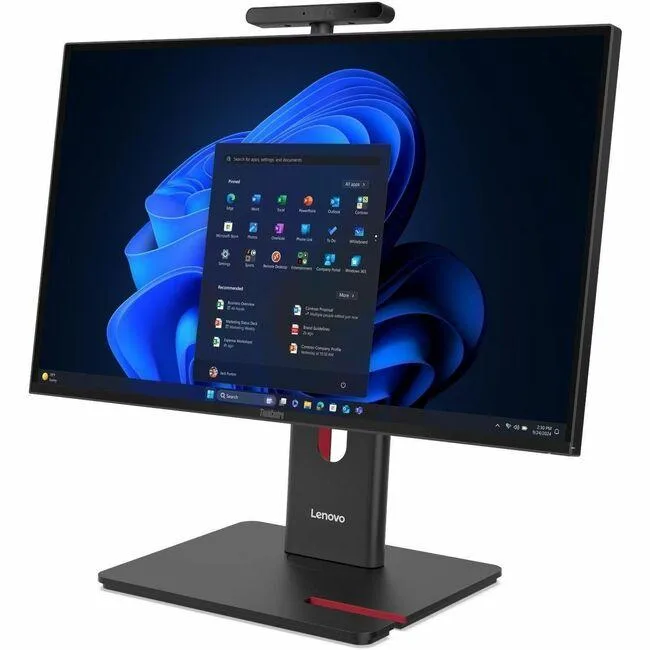
23.8 inch Full HD all-in-one desktop with Intel Core Ultra 5 225, 8 GB DDR5 and 256 GB SSD running Windows 11 Pro
This Lenovo ThinkCentre M90a Gen 6 integrates a 23.8 inch Full HD display with an Intel Core Ultra 5 225 processor, 8 GB of DDR5 memory and a 256 GB SSD. Windows 11 Pro is pre-installed. The system includes a DVD-Writer, wired Ethernet, IEEE 802.11ax wireless LAN and a 180 W power supply. A USB keyboard and mouse complete the package.
The all-in-one form factor saves desk space and simplifies deployment for general business applications. Buyers who need discrete graphics performance, larger internal storage capacity or user-upgradeable memory slots should evaluate alternative configurations. The integrated Intel Graphics handles everyday productivity but not intensive 3D workloads.
Under continuous load the Intel Core Ultra 5 225 and integrated graphics operate within the 180 W supply, so clock speeds remain stable without thermal throttling. The Intel Q870 chipset manages platform power efficiently during long work sessions. Fan noise stays consistent because the cooling solution is sized for the fixed power envelope.
| Brand | Lenovo |
|---|---|
| Series | ThinkCentre M90a |
| Model | ThinkCentre M90a Gen 6 |
| Part Number | 13AT0003US |
| Type | All-in-One PC |
| Color | Black |
| Processor | Intel Core Ultra 5 225 (2nd Gen) |
| Memory | 8 GB DDR5 SDRAM |
| Storage | 256 GB SSD |
| Optical Drive | DVD-Writer |
| Graphics | Intel Graphics |
| Ethernet | Ethernet |
| Wireless Card | IEEE 802.11ax Wireless LAN |
| Power Supply | 180 W |
| Monitor | 23.8" Full HD Display Included |
| Keyboard | English (US) Keyboard |
| Mouse | USB Calliope Mouse |
| Operating System | Windows 11 Pro |
| Chipset | Intel Q870 |
| CPU Type | Core Ultra 5 |
| CPU Name | Core Ultra 5 225 |
| SSD | 256 GB |
| Screen Size | 23.8 Inch |
| Package Contents | ThinkCentre M90a Gen 6 13AT0003US All-in-One Computer USB, Calliope USB Calliope Mouse VESA mount UltraFlex V Stand |
| Peso de envío | 10.80 kg |
| Dimensiones del paquete | 686 × 533 × 235 mm |
The system uses integrated Intel Graphics; check the rear I/O for HDMI or DisplayPort outputs to attach an additional screen.
Yes — the all-in-one provides standard USB ports, so any USB keyboard and mouse will work alongside the supplied set.
Open Settings > System > Storage; the 256 GB drive should appear as the primary device with Windows installed.
También en este pasillo
Mismo estante, mismo pago — ocho criptomonedas y un tipo de cambio fijado 30 minutos.
Lo que usted paga, y la moneda en la que lee los precios.
Se envía desde su billetera al finalizar la compra
Solo informativo — el catálogo está en dólares
Ninguna moneda coincide.
Elija el idioma en el que el sitio le habla.
¿Es nuevo aquí?
¿Ya tiene una?
No existe ningún restablecimiento automático: esta tienda no envía correos electrónicos, así que no hay ningún enlace de un solo uso que solicitar. Deje la dirección asociada a la cuenta y se atenderá de forma manual.
Solicitud registrada
No hay nada de camino a su bandeja de entrada: esta tienda no envía correos en absoluto. Alguien se encarga de esto manualmente.
¿La recordó?



