

HP
HP ProDesk 600 G3 SFF all-in-one PC i7-6700 3.40GHz 32GB DDR4 2TB SSD Windows 10 Pro
- Business Desktops &…
- Slim/Small Form Fac…
US$ 655,99
0.00817851BTC
Op voorraadWij accepteren cryptovaluta — zo kunnen de munten die u bezit echte hardware kopen.Betaal in crypto, besteed het aan echte hardware. Gratis verzekerde verzending wereldwijd vanaf $399. Neutrale dozen zonder merk, verzonden vanuit Duitsland.Gratis verzekerde verzending vanaf $399. Uw koers wordt 30 minuten vastgezet zodra het afrekenen begint.Koers 30 minuten vastgezet. Elk artikel is verzegeld, het serienummer wordt gecontroleerd, en het valt onder 24 maanden garantie.Verzegeld, 24 maanden garantie.


Lenovo
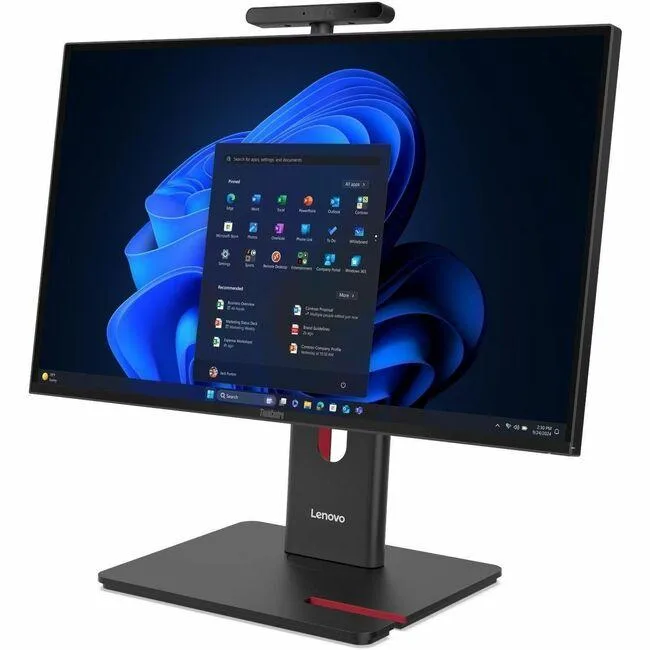
23.8 inch Full HD all-in-one desktop with Intel Core Ultra 5 225, 8 GB DDR5 and 256 GB SSD running Windows 11 Pro
This Lenovo ThinkCentre M90a Gen 6 integrates a 23.8 inch Full HD display with an Intel Core Ultra 5 225 processor, 8 GB of DDR5 memory and a 256 GB SSD. Windows 11 Pro is pre-installed. The system includes a DVD-Writer, wired Ethernet, IEEE 802.11ax wireless LAN and a 180 W power supply. A USB keyboard and mouse complete the package.
The all-in-one form factor saves desk space and simplifies deployment for general business applications. Buyers who need discrete graphics performance, larger internal storage capacity or user-upgradeable memory slots should evaluate alternative configurations. The integrated Intel Graphics handles everyday productivity but not intensive 3D workloads.
Under continuous load the Intel Core Ultra 5 225 and integrated graphics operate within the 180 W supply, so clock speeds remain stable without thermal throttling. The Intel Q870 chipset manages platform power efficiently during long work sessions. Fan noise stays consistent because the cooling solution is sized for the fixed power envelope.
| Brand | Lenovo |
|---|---|
| Series | ThinkCentre M90a |
| Model | ThinkCentre M90a Gen 6 |
| Part Number | 13AT0003US |
| Type | All-in-One PC |
| Color | Black |
| Processor | Intel Core Ultra 5 225 (2nd Gen) |
| Memory | 8 GB DDR5 SDRAM |
| Storage | 256 GB SSD |
| Optical Drive | DVD-Writer |
| Graphics | Intel Graphics |
| Ethernet | Ethernet |
| Wireless Card | IEEE 802.11ax Wireless LAN |
| Power Supply | 180 W |
| Monitor | 23.8" Full HD Display Included |
| Keyboard | English (US) Keyboard |
| Mouse | USB Calliope Mouse |
| Operating System | Windows 11 Pro |
| Chipset | Intel Q870 |
| CPU Type | Core Ultra 5 |
| CPU Name | Core Ultra 5 225 |
| SSD | 256 GB |
| Screen Size | 23.8 Inch |
| Package Contents | ThinkCentre M90a Gen 6 13AT0003US All-in-One Computer USB, Calliope USB Calliope Mouse VESA mount UltraFlex V Stand |
| Verzendgewicht | 10.80 kg |
| Pakketafmetingen | 686 × 533 × 235 mm |
The system uses integrated Intel Graphics; check the rear I/O for HDMI or DisplayPort outputs to attach an additional screen.
Yes — the all-in-one provides standard USB ports, so any USB keyboard and mouse will work alongside the supplied set.
Open Settings > System > Storage; the 256 GB drive should appear as the primary device with Windows installed.
Ook in deze afdeling
Dezelfde afdeling, dezelfde kassa — acht munten en een koers die 30 minuten vaststaat.
Waarmee u betaalt, en waarin u de prijzen leest.
Verzonden vanuit uw wallet bij het afrekenen
Alleen ter weergave — de catalogus is geprijsd in USD
Geen valuta gevonden.
Kies de taal waarin de site met u spreekt.
Nieuw hier?
Al een account?
Er is geen automatisch herstel: deze winkel verstuurt geen e-mail, dus er is geen eenmalige link om aan te vragen. Laat het adres op het account achter en het wordt handmatig opgepakt.
Verzoek genoteerd
Er is niets onderweg naar uw inbox — deze winkel verstuurt helemaal geen e-mail. Iemand pakt dit handmatig op.
Weet u het weer?



