Lenovo
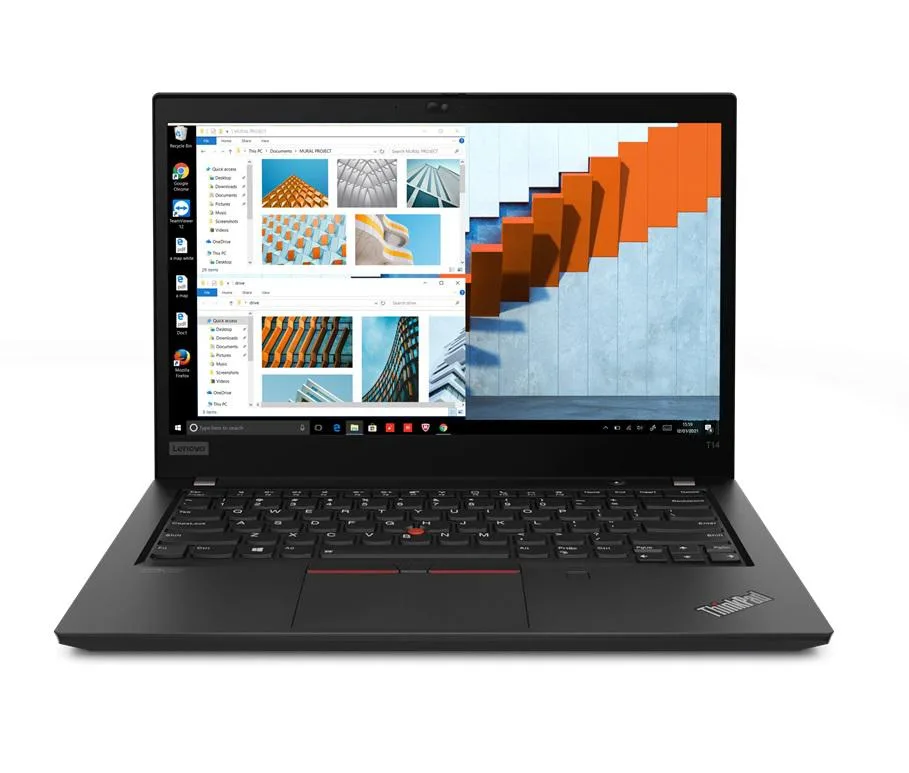
Lenovo Thinkpad T14 Gen 2 laptop i5-1135G7 32GB 256GB 14.0" FHD Ubuntu
- 32GB
- DDR4
881,99 USD
0.01148096BTC
På lagerVi tar imot kryptovaluta — slik kan kryptovalutaene du eier, kjøpe ekte maskinvare.Betal med krypto, bruk den på ekte maskinvare. Gratis, forsikret levering verden over for bestillinger over 399 $. Nøytrale kartonger uten merking, sendt fra Tyskland.Gratis, forsikret levering over 399 $. Kursen din er låst i 30 minutter når kassen åpnes.Kurs låst i 30 minutter. Alle varer er forseglet, serienummerkontrollert og dekket av 24 måneders garanti.Forseglet, 24 måneders garanti.


Lenovo
14.0" Full HD business laptop with 11th Gen Intel Core i5, 8GB DDR4 memory, 2TB PCIe SSD and Windows 11 Pro
Options 8GB/2TB
The Lenovo Thinkpad T14 Gen 2 is a 14.0 inch Full HD business laptop built for professionals who need reliable performance on the move. It runs Windows 11 Pro on an 11th Gen Intel Core i5-1135G7 processor with 4 cores and a maximum turbo frequency of 4.2 GHz. Integrated Intel Iris Xe graphics handle everyday visual tasks. The 1920 x 1080 IPS display provides clear viewing angles for documents and video calls.
The black chassis weighs 3.23 lb and measures 12.9 IN by 8.9 IN by 0.70 IN, fitting easily into a briefcase. Two Thunderbolt 4 USB-C ports support power delivery, high-speed data and external displays. Two USB-A 3.2 Gen 1 ports include one always-on port for charging peripherals. A full-size HDMI port, RJ-45 Ethernet jack, microSD reader and combo audio jack cover legacy and modern accessories. Wi-Fi 6 and Bluetooth 5.2 provide current wireless standards.
The 2 TB PCIe SSD replaces the smaller drives common in earlier thin-and-light models, removing the need for external storage during travel. 8 GB of DDR4 memory is soldered and not expandable, so buyers who need more RAM for virtual machines or large datasets should consider a different configuration. The 50 WHr battery and 65 W power supply support typical office workloads between charges.
| Memory | 8GB |
|---|---|
| Memory Speed | DDR4 |
| Type | Work / Business |
| Resolution | 1920 x 1080 |
| Screen Size | 14.0" |
| Display Type | Full HD |
| Touchscreen | No |
| SSD | 2 TB |
| HDD | No |
| Storage Spec | 2TB PCIe SSD |
| Brand | Lenovo |
| Series | Thinkpad T14 Gen 2 |
| Part Number | T14 |
| Model | Thinkpad |
| Color | Black |
| GPU/VPU | Intel Iris Xe Graphics |
| Operating System | Windows 11 Pro |
| WiFi Generation | Wi-Fi 6 |
| LAN | 10/100/1000Mbps |
| WLAN | Wi-Fi 6 |
| Bluetooth | Bluetooth 5.2 |
| CPU Type | Intel Core i5 11th Gen |
| Optical Drive Type | No |
| Webcam | Yes |
| Touchpad | ThinkPad UltraNav |
| Keyboard | Standard |
| Card Reader | Micro SD |
| Battery | Lithium Polymer |
| USB | 2 x USB 3.2 Gen 1 |
| Thunderbolt | 2 x Thunderbolt 4 |
| Video Port | 1 x HDMI |
| Ethernet | 1 x RJ-45 |
| Audio Ports | 1 x Headphone/Microphone Combo Jack |
| Audio | Integrated Sound card |
| Speaker | Integrated Stereo Speakers |
Andre versjoner av denne modellen
Samme familie, annet minne, annen kjøler eller klokkefrekvens — sammenlign før du bestemmer deg.
The Thunderbolt 4 Type-C ports support up to 40 Gbps bandwidth for data, video and charging through a single cable.
The chassis measures 12.9 in x 8.9 in x 0.70 in and weighs 3.23 lb, so verify sleeve or dock internal clearance against those figures.
Boot from USB, choose Custom install, then enter BIOS and disable Secure Boot before saving — skipping that step blocks the installer on this model.
Også i denne avdelingen
Samme hylle, samme kasse — åtte mynter og 30 minutters kurslås.
Det du betaler med, og det du ser prisene i.
Sendes fra lommeboken din i kassen
Kun visning — katalogen er prissatt i USD
Fant ingen valuta.
Velg språket nettstedet snakker til deg på.
Ingen språk samsvarer.
Ny her?
Har du allerede en konto?
Det finnes ingen automatisk tilbakestilling: butikken sender ikke e-post, så det finnes ingen engangslenke å be om. La adressen stå på kontoen, så blir den behandlet manuelt.
Forespørsel registrert
Ingenting er på vei til innboksen din — butikken sender ingen e-post i det hele tatt. Noen behandler dette manuelt.
Husket du det likevel?